Brief Overview
This article covers the desktop menu's foreground and background updates; auto-update, content publish, update detection, and web-app update.
Tasks that involve networking are core functionality in the desktop menu. The desktop menu uses networking with a sense of care and prioritizes stability over user experience to avoid overloading focal points, such as proxy servers.
WalkMe Content
The desktop menu displays content that was created in WalkMe's CMS by the organization's content builders.
This content is shipped and distributed over a static JSON file that is deployed on WalkMe's CDN (cdn.walkme.com). The delivery method for the desktop menu is similar to WalkMe Web products.
However, as a desktop application, it has no loading-related observation, such as the "load" web event.
Therefore, content publishes checks are tied to the user usage; the desktop menu will check for content updates as a result of three actions performed by the user:
- Starting/Refreshing the desktop menu - when the process starts, the desktop menu engine re-downloads the content file (aka JSON file) and displays it to the user.
- Foreground state changed - known as "in focus" state change; each time the end-user "leaves" the desktop menu for another application, which is not in a time frame of 30 seconds since the last visit, the engine will check if there was an update ("checking if there was an update" no necessarily proceeds with a download).
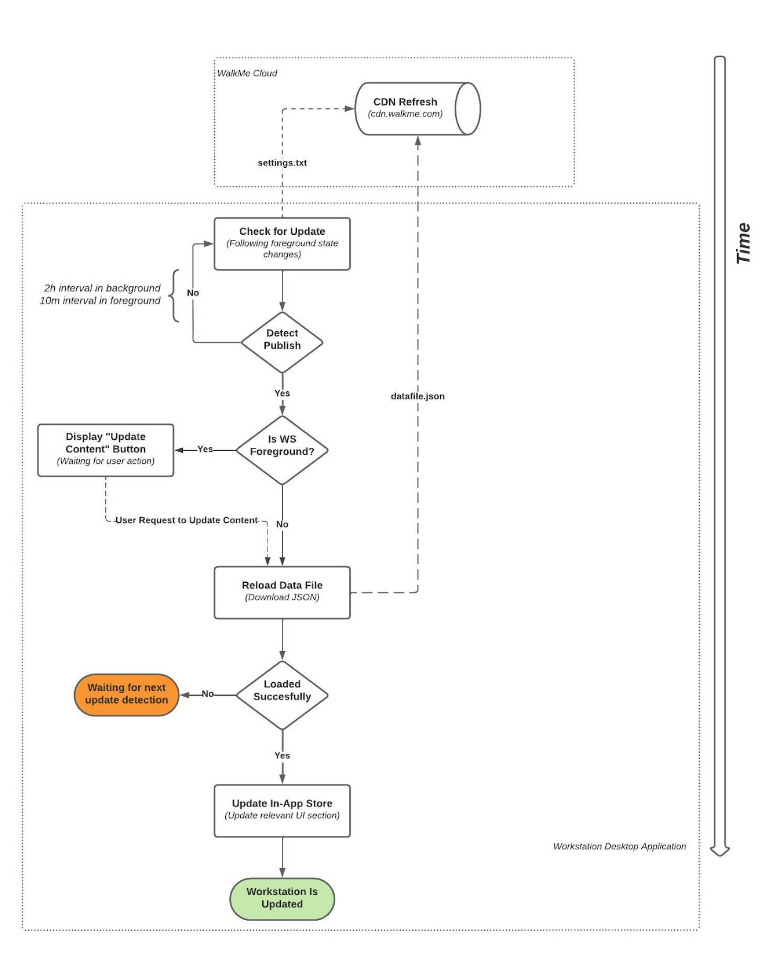
Content Update Loading Flow
Not every "check for an update" ended with an actual update. Re-download of the content file will happen only when new content or configuration was published by the content builders.
Below figure describes how the desktop menu pulls the updates and decides if it needs to re-download the content file.
- The desktop menu downloads the settings.txt file (1.3 KB) following the above events.
- The desktop menu parses the file and compares the 'PublishDate' with its local copy of the file.
- If there's a later update than its current copy, the desktop menu will proceed to the next step.
- Based on the foreground state, the desktop menu will choose the download strategy;
- Prompting an "update content" button for the user
- Automatically download the content file in the background
- The desktop menu downloads the content file (size usually is a few hundreds of kilobytes, but might be a few megabytes for non-maintained files).
- Once the content file is downloaded, the desktop menu will rebuild the local data store and content will be available for the user.
Content Segmentation
WalkMe content can be segmented per department, attributes, and user actions. Each condition is a hashed string, which in the case of user-related information, is evaluated with a remote server.
Evaluation is as consolidated as possible and sent in batch requests to https://papi.walkme.com/conditions/evaluatedConditions
The desktop menu interface is a web-based solution, based on the React framework. The application comprises of static files (HTML, CSS, JS) that are served from the desktop menu CDN - workstation.walkme.com.
The size of the application is 1.3MB, and it all served compressed as gzip.
The desktop menu loads the web application every boot and manual refresh by the end-user.
The location of the web application is determined by the settings.txt file that was downloaded earlier in the bootstrap process.
WalkMe Analytics
The desktop menu collects various events to provide usage reporting on Insights and Menu Dashboard.
Each event is an HTTPS request, in a size of a few kilobytes, and is sent to ec.walkme.com.
Starting version >1.00 of the Electron-based the desktop menu, an auto-update engine is taking a place to update the binaries, aka the Desktop Menu Container.
The desktop menu container is an Electron-based wrapper that performs low-level tasks such as proxy and network certification compatibility, push notifications registration, windows management, and etc.
The Container maintains the life cycle of the web application, and manages the WalkMe Content update mechanism.
The desktop menu uses Squirrel as an auto-update facilitator, following the industry-standard recommendation by Electron.
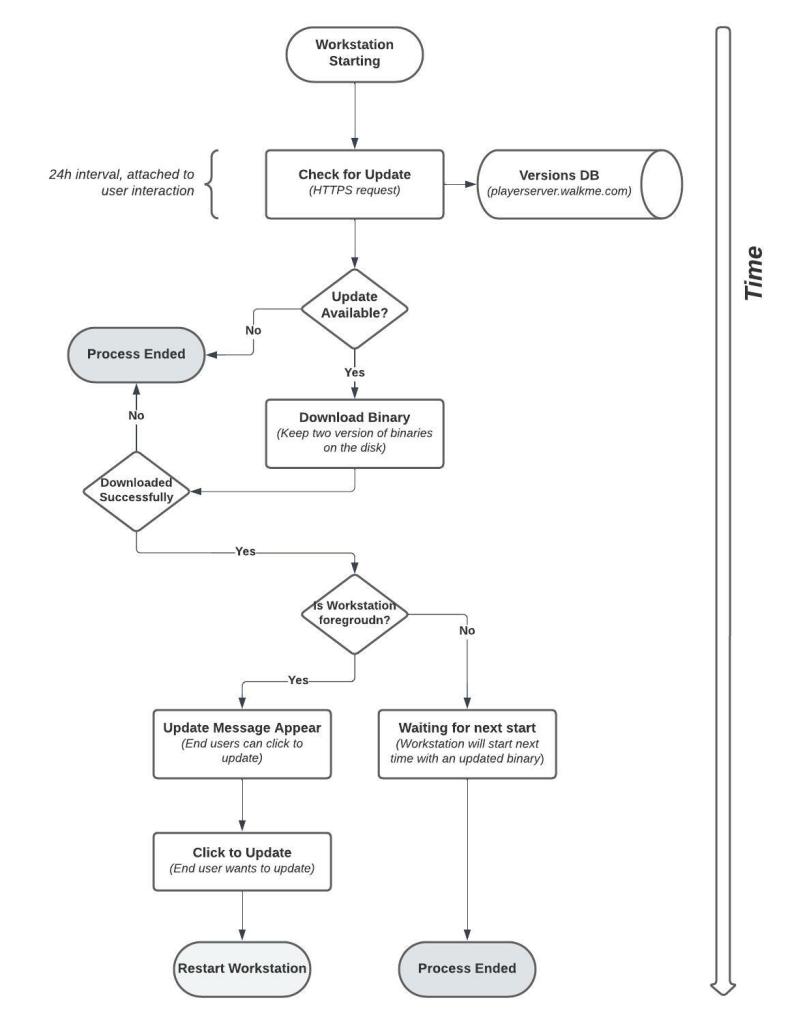
- The desktop menu always starts with the latest available binary version (see Versions Maintenance and Download Failure Overcome section below)
- On every startup, the desktop menu sends an HTTPS request to check if there's a more up-to-date version than the current.
- When the desktop menu starts or is refreshed, it will check if there are any new versions instantly. If there are no new versions on start, it will check again one more time when the user engages with the desktop menu in the next 12 hours. This means that a check is done once every 12 hours if the user opens the app window, if they do not, it will only update when the app is re-launched or refreshed.
- The desktop menu will start downloading the binaries and store it in the desktop menu installation folder.
- Once the download is finished successfully, the desktop menu will implement one of the below strategies:
- The desktop menu is foreground/background - user will be notified about the update and will be asked to relaunch the desktop menu - "Click to Update"
- The desktop menu is off - next startup will be using the newer binary.
Versions Maintenance and Download Failure Overcome
The auto-update mechanism keeps two binary versions at a single time to overcome download failures.
Before switching to the newer version, the auto-update engine will hold two completed versions; the current + previous and the new uncompleted version.
Following the completed download, the auto-update version will erase the previous version and will hold two versions; current + next.
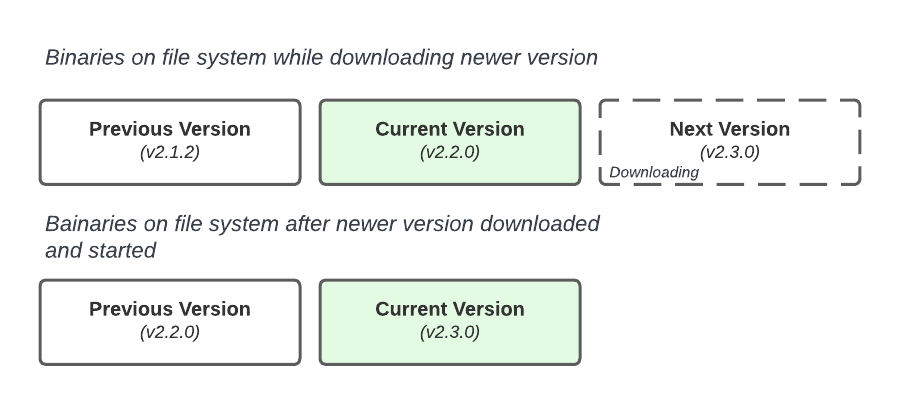
Note that v2.1.2 was removed from the file system when v.2.3.0 turned current.
Automatic Software Updates and macOS Administrative Privileges
When a new update becomes available, it will be automatically deployed and ready to update your software.
For Mac users without administrative privileges, a notification may appear. This notification is generated by the operating system and is beyond our control. However, in most cases, you do have administrative privileges.
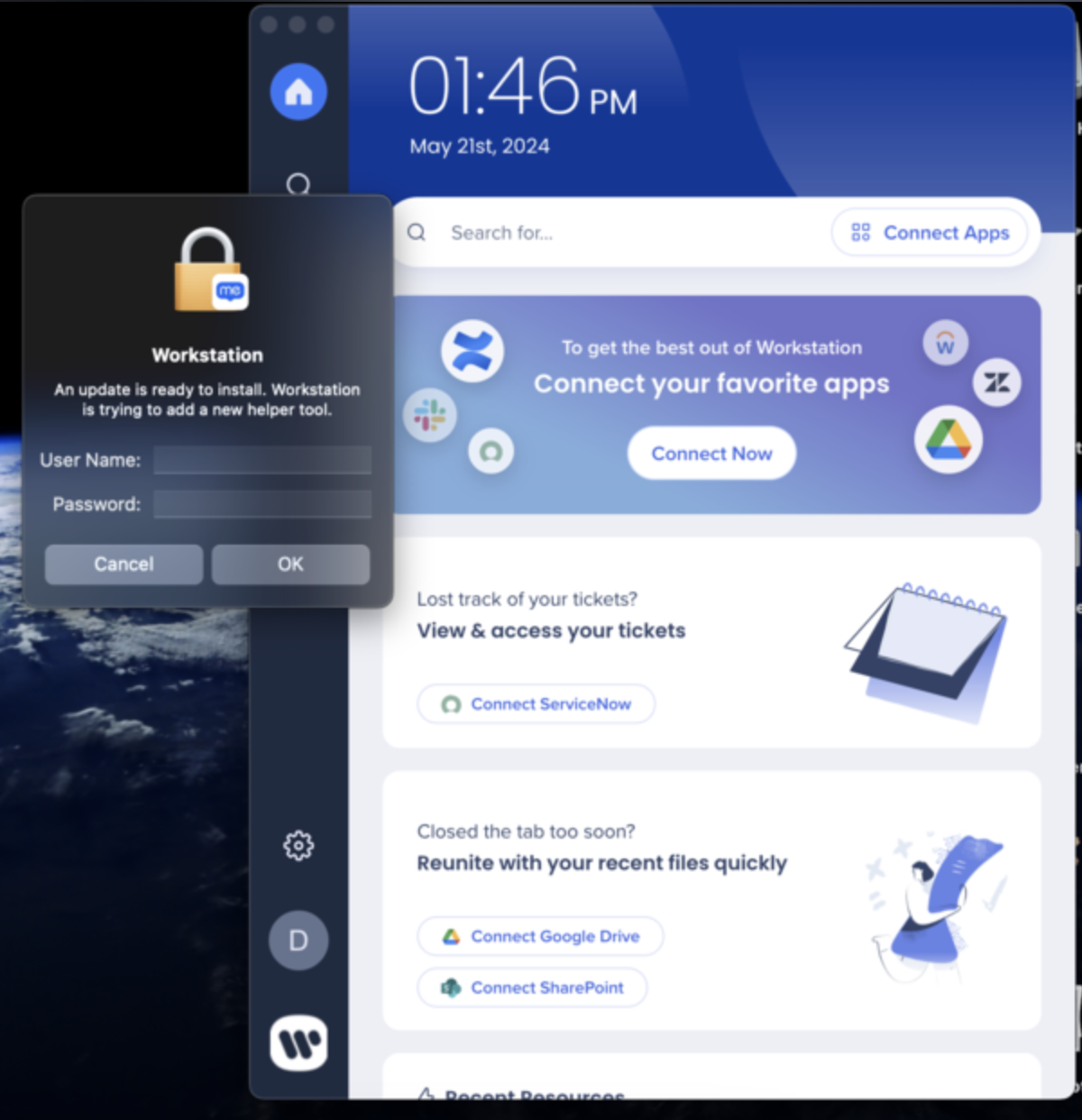
The desktop menu invites users to engage with it by connecting third-party applications, such as SharePoint, Confluence, Jira, and many others.
Any connection is using the network, whether the application is self-hosted or a SaaS.
Connecting third-party applications initiates OAuth2.0, SMAL, or OAuth1.1 authentication flows that are using the network.

Once the connection is established, the desktop menu will query its server to provide the interface with content sourced in the third-party application. Each third-party application generates at least one HTTPS request each time the user brings the desktop menu to the foreground.
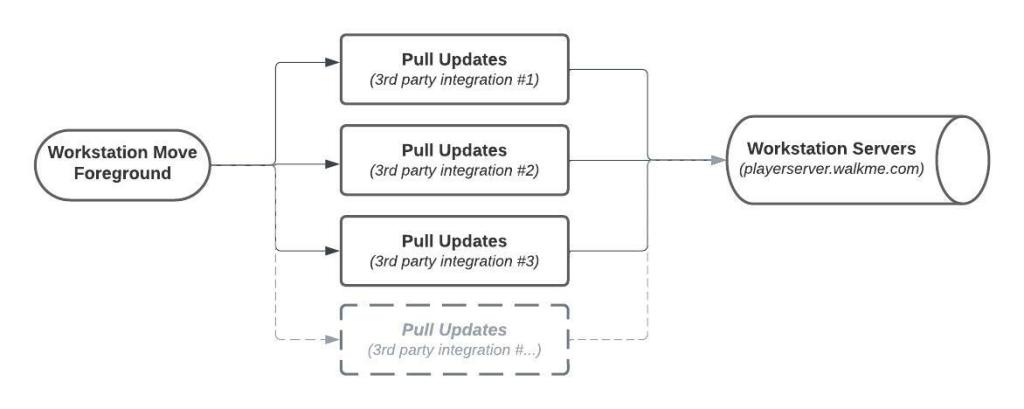
Enterprise Search Activity
Besides the above automatic updates, users can initiate searches in their third-party applications. Each search triggers an HTTPS request that collects the results from the remote servers.


