Get started: Download templates now
The DAP Professional: Industry trends
What's an average salary range? What is the primary role they take? What is the typical team size?
The 2024 DAP Professionals Report analyzes survey data from nearly 500 global DAP professionals, examining the trends across geography, professional experience, salary, AI adoption, and more.
Take me to the report.
Brief Overview
Capacity planning is a business process that determines the resources needed to meet anticipated demand. This includes analyzing delivery capabilities, forecasting demand, and creating a resource plan.
Capacity planning for your DAP team maximizes resources efficiency and identifies skill growth opportunities for your DAP professionals. The risks of not operationalizing this include inability to meet demand, poor service quality, delayed delivery times and inability to scale.
When to Use This
After you are live with 1-2 digital adoption implementations and have a goal of scaling your team to tackle additional business problems.
Step 1: Analyze Delivery Capabilities
Analyzing delivery capabilities includes reviewing who you have delivering as well as what they are delivering (at what velocity).
Who (Your People)
Review DAP Roles & Responsibilities for descriptions of core responsibilities on your DAP team. For your core capacity planning, focus on the Program Manager, Project Lead, and Builder. Remember that early in your program's maturity, it's common for each person to have a combination of responsibilities, with roles specializing over time.
What (Project Velocity)
 Understanding your historical rate of delivery is an important input to future project planning. WalkMe benchmarks for delivery rates are as follows:
1 Workflow = Averages 10 User Steps
1 Project = Averages 5 Workflows
Important: Rate of delivery is not just "new projects." It also should include maintenance and optimization of already-live content.
See Download Templates & Tools below for a resource planning/velocity calculation model based on these benchmarks, that includes both creation of new content and maintenance/optimization of current content.
The more precise your discovery, the higher your project velocity
Project velocity is a metric used in Agile project management and Scrum that represents the amount of work a team can tackle during a single Sprint cycle. It's typically calculated by summing the estimates of the work (often in story points or hours) that was completed in the last Sprint.
For a digital adoption project, remember that volume of content does not necessarily equate to value. Building 2 SmartTip sets can have as much or more impact than building 10 Smart Walk-Thrus, if your thorough discovery indicated 2 SmartTip sets would be a more precise solution of solving the real problem.
Step 2: Forecast Demand
Forecasting demand involves two parts: Demand for new content, and demand of optimizing current content.
 Demand for New Content
Use the Capacity Planning Tool in the Download Templates & Tools section below for a model to start with. It shows sample output based on WalkMe benchmarks.
Then, compare this projected output to your current WalkMe queue and outbound marketing plans in the next 2-4 quarters. What projects do you already have in the queue? What new transformation projects are you targeting? How much demand did you get last quarter? Does the projected output in the model seem higher or lower than what you're planning for?
This is a great time to revisit your Business Value Alignment and Intake/Prioritization Process to ensure any new incoming projects clearly map to strategic priorities.
 Demand of Optimizing Current Content
The Capacity Planning Tool in the Download Templates & Tools section below includes planning for both new and optimizing content.
Download the Effort Estimation Calculator in the Content Maintenance Strategy article to obtain a conservative estimate of maintenance time. If your team had to revisit and rework 20% of this content on a quarterly basis, do you have enough resources?
Remember - this number is meant to be conservative. It's meant to prompt a deeper look at your content engagement to ensure the content you have has good engagement, and is still aligned to business objectives. If your maintenance efforts look high - are you sure all the content is still relevant? Can it be simplified, or even archived?
Step 3: Create a Resource Plan
With these inputs, you're ready to forecast the resource(s) you need to achieve your goals. For support expanding your team, check out the following resources:
- Creating a Business Case: Use the 4 Pillars Framework to tell impactful value stories and gain senior leadership support for additional resources.
- Hiring or Reallocating Resources: Visit Download Templates and Tools below for job descriptions for your three core roles: Program Manager, Project Lead, and Builder
- Creating an Onboarding Plan: Program Manager, Project Lead, and Builder certifications are now free in WalkMe's Digital Adoption Institute! Click here for Learning Paths by DAP Role, inclusive of these certification courses.
How to Tackle Resource Constraints
A common hurdle in early stages of a DAP team's maturity is difficulty getting enough resources to meet the forecasted demand. If this is a challenge for you, try the following approaches:
Updated Business Case
You're likely live with at least 1 WalkMe implementation. Do you have a value story that maps to strategic objectives? Does it tell a story of downstream impact beyond just time savings or ticket deflection?
Partner with your WalkMe Success Team to create a business case that combines impact to-date and projected future impact from your demand forecasting.
Start with the downloadable Strategy & Value Framework (4 Pillars) available here.
Citizen Builder Model
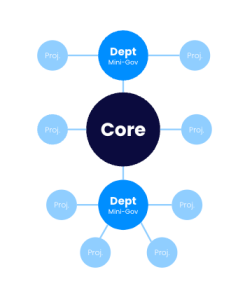
This is the recommended model for enterprise-level digital adoption implementations.
A Citizen Builder model allows department-level subject matter experts to do their own WalkMe building, rather than relying solely on a centralized shared services model.
This model is important as it democratizes technology creation, accelerates digital transformation, and allows for more customized and agile solutions to business problems.
Interns or Contract-to-Hire
For a lower-cost option to internal resourcing, consider hiring a DAP intern or contract-to-hire Builder. See Learning Paths by DAP Role for a comprehensive onboarding plan, including the now free of charge Digital Adoption Institute Certification courses.
Outsourcing
Visit WalkMe's Partner Finder for a comprehensive view of WalkMe's entire partner network. Filter by Partner Type, Partner Tier, Region, Language, and Capability
Capacity Planning Tool
Based on WalkMe benchmarks, displays a model of core team resources and their delivery outputs over a period of time.
Download here.
Roles, Responsibilities & Team Structure Slides
Includes the information above, as well as a slide on responsibility combinations and an appendix with one-pagers for each discipline.
Download here.


