January 21, 2018 release, WalkMe delivers updates to improve your experience.
How to Use the Product Updates
The release notes give you brief, high-level descriptions of new and updated WalkMe features.
How will the New Update Become Available?
Our new updates will be available on January 21, 2018. New features in the WalkMe Editor will only be available in our new Editor (not our former Firefox plugin).
Your current implementation will not be affected by the update until you publish it again. For customers that run WalkMe on their local servers, contact your Customer Success Manager, or success@walkme.com, to learn how you can gain access to these new features.
Feature Updates
AI Predictive Analytics
Prevent Churn Before it Even Happens
https://walkme.wistia.com/medias/m2ko17w4sx
Traditional analytics may show you how many users recently churned, but treating a problem after it happens is not good enough. We wanted to leverage AI to help you predict user intentions and proactively drive users towards business goals across mobile and web.
- Prevent churn before it even happens
- Track all user interactions on your website/application
- Use AI to automatically create a target audience of users who are likely to churn
- Drive to action users who fall into your newly-created target audience
- Read more about AI Predictive Analytics
Contact your CSM to learn about AI Predictive Analytics
WalkMe for Mobile Native Apps
Capture Walk-Thrus Directly From Your Mobile Device
https://walkme.wistia.com/medias/b0ns35foxm
Mobile has become the preferred way for your customers and employees to interact with the world, but most users still struggle with app navigation and task completion. Our support for mobile apps lets you build seamless Android and iOS mobile experiences right from your mobile device, to promote adoption, self-service, and loyalty.
- Build experiences by capturing elements right from your mobile device
- Modify the design and targeting preferences using our advanced web Editor console
- Collect hundreds of data touchpoints on users' state, physical surroundings, and device status
- Analyze user data with AI Predictive Analytics and target individual users at their “Happy Moments”, when they are most likely to engage with your campaign
- Use the data you collected to engage users, offer help, and provide a streamlined mobile experience that keeps users engaged and loyal.
- Read more about WalkMe on Native Mobile Apps
Contact your CSM to learn about WalkMe Mobile
WalkMe Desktop
Now WalkMe is Everywhere You Work
https://walkme.wistia.com/medias/ei5c53md3q
WalkMe is now everywhere work happens, providing support for web, mobile, and now native desktop applications.
Contact your CSM about WalkMe Desktop
Version History for Efficient Content Management
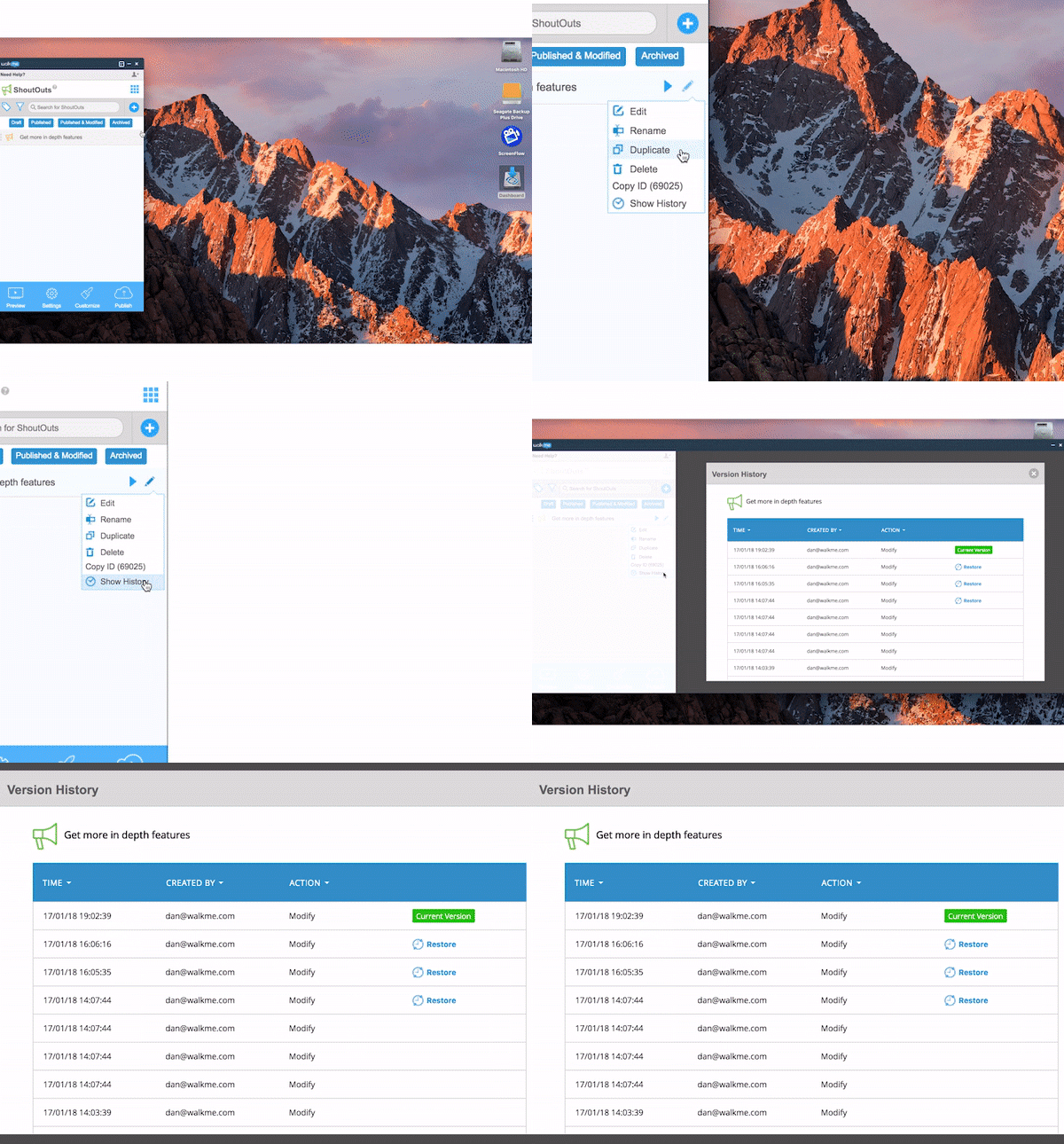
Everyone makes mistakes, which is why Control Z, or 'undo' is a function every software needs. Sometimes, you will edit a Walk-Thru or a ShoutOut by accident and want to go back to a previously-saved version. WalkMe's new Version History lets you easily go back to a previous version.
- Use Activity Log to easily see all recent updates to the Editor
- Restore previous versions with a single click
- Make the editing process far more efficient and streamlined
- Read more about Version History
Contact your CSM to learn about Version History
XLIFF file format, which is used by translation agencies is difficult to work with. It requires a special software, and when you open the file it is hard to read and edit the content manually. That is why we added Excel file format support for Multi-language.
-
- Improved experience for human translators
- Use Excel import and export upload different language translations
- Collaborate with other translators by uploading your file to Google Drive
- Read and review all the textual content in one simple document
- Read more about Multi-Language
Contact your CSM to learn about Multi-Language
Enterprise-Class Readiness:
Manage the Translation Process at Scale
Managing multi-language translations in one file can get messy - It's hard to keep track of versions. To make the translation process easier to manage, you can now manage your translations in a better fashion - each WalkMe deployable can have its own multi-language file.
Contact your CSM
Make it Easy to Mass Deploy WalkMe on IE
Large organizations used to manually update WalkMe on each of their machines that run IE. This process was time-consuming and bothersome. With the new WalkMe Master Extension, you can automatically update WalkMe on all of the IE machines in your network.
Contact your CSM
Access WalkMe Through SSO
Most organizations use an SSO solution to let employees access any software with a single password. Our SSO support now lets your users access the WalkMe Editor quickly and securely through your SSO provider, keeping employees focused and productive.
Contact your CSM
Many of our customers use WalkMe to improve Salesforce adoption. To guarantee WalkMe's performance and reliability, we introduce improvements to our Find Element algorithm in Salesforce Classic, Salesforce Lightning, and Salesforce Console Classic.
Contact your CSM
Improved Data Transport for WalkMe Insights
Do you have questions or just want to share what you're most excited about? Discuss all the latest features in our brand new customer community!
community.walkme.com
You should have received an email invitation last week from walkmecommunity@walkme.com titled "Join the WalkMe Community Now!" to set up your access. If you didn't receive this email, please contact your CSM.


