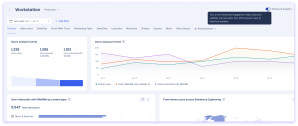
Con Análisis mejorado, puedes ver cómo tus empleados interactúan con WalkMe en la GUI de SAP y otras aplicaciones de escritorio directamente en la consola. Obtienes los mismos paneles de control, pestañas y Reportes disponibles para las implementaciones web, lo que facilita la comprensión de la adopción y la mejora del Contenido de WalkMe en todas las plataformas.
Cómo funciona
Paneles de Insights
El interruptor de Analisis mejorado te permite cambiar a una experiencia de análisis actualizada con datos de interacción mejorados, una mejor visibilidad de cómo los Usuarios interactúan con tu Contenido y acceso a nuevas pestañas que anteriormente no estaban disponibles.
Si ves el interruptor depende de cuándo te convertiste en cliente.
Nuevos clientes: Análisis mejorado es el único modo disponible. No se muestra ningún interruptor y no hay datos heredados.
Clientes existentes: un interruptor de Analisis mejorado aparece en la esquina superior derecha del Tablero de Insights.
Activa (Análisis mejorado): muestra paneles actualizados con métricas mejoradas y nuevas pestañas. Los nuevos informes están disponibles en la página de la Galería de informes.
Desactivar (Legacy): vuelve a la vista del Tablero anterior. Utiliza esto para acceder a hasta un año de datos históricos durante el período de transición.
Pestañas añadidas con Analisis mejorado
Estas pestañas están disponibles con analisis mejorado y anteriormente no estaban disponibles para los sistemas del menú de escritorio:
Descripción general
Usuarios activos / Sesiones
Menú (anteriormente parte de la pestaña combinada "Menú y búsqueda")
Búsqueda de menú (anteriormente parte de la pestaña combinada "Menú y búsqueda")
Paneles de control de IA
AI Answers
AI Smart Highlights
Próximo fin de vida útil (EOL)
El envío de eventos heredados está planificado para el final de su vida útil en el segundo trimestre de 2027, después de lo cual se retirarán los análisis y los informes heredados.
Flow Analytics
With Enhanced Analytics, you can also use Desktop Menu systems in Flow Analytics. Build flows with Desktop Menu steps, on their own or alongside Web steps. Steps are based on WalkMe content. Page steps aren't available, and event steps aren't supported yet.
Web-only filters and properties
In Flow Analytics, URL, Domain, Path, Query, Hash, Browser, and Platform are hidden for Desktop Menu steps in filters, conditions, Show data as, Expand by, and Split by
Enhanced analytics reports
Five new reports are available in the Reports Gallery. Existing customers also retain access to five legacy equivalents for historical data continuity, plus four legacy-only reports with no new equivalent. Legacy reports are marked with a label.
New reports
Report name
Description
Desktop Menu Activity by Date
A daily breakdown of user actions in Desktop Menu.
Desktop Menu User Search Log
A detailed log of search activity, including search terms, event time, and results clicked.
Desktop Menu User Search Terms
An analysis of search behavior in Desktop Menu, including search terms and user counts.
Desktop Menu Walk-Thru Step Activity Log
A step-by-step log of Smart Walk-Thru interactions across your users.
Desktop Menu Items Activity
A report of user interactions with Desktop Menu items, including item type, name, and ID.
Legacy reports (use alongside new reports for historical data)
Report name
Description
Desktop Menu Activity by Date (Legacy)
Use alongside the Enhanced Analytics report to review up to 1 year of historical data.
Desktop Menu User Search Log (Legacy)
Use alongside the Enhanced Analytics report to review up to 1 year of historical data.
Desktop Menu User Search Terms (Legacy)
Use alongside the Enhanced Analytics report to review up to 1 year of historical data.
Desktop Menu Walk-Thru Step Activity Log (Legacy)
Use alongside the Enhanced Analytics report to review up to 1 year of historical data.
Desktop Menu Items Activity (Legacy)
Use alongside the Enhanced Analytics report to review up to 1 year of historical data.
Legacy-only reports (no new equivalent)
Report name
Description
Desktop Menu Apps Activity
An overview of user interaction for each app connected to Desktop Menu.
Desktop Menu Apps Log
A detailed action-level log of user interactions with Desktop Menu connected apps.
Desktop Menu Devices List
A list of all devices with their status, container version, operating system, and number of updates performed.
Desktop Menu Users List
A list of all users who signed into Desktop Menu, regardless of whether they opened it.
Custom reports
You can create custom reports for Desktop Menu systems in the Report Builder.
For Desktop Menu data, use General Event Template for Web with Desktop Menu. It includes every General Event Template field, plus the Desktop Menu Info & Metrics fields
You can also use these templates: Launcher Analysis, Menu Searches, Resource Analysis, ShoutOut Analysis, Shuttle Analysis, SmartTip Analysis, Task Analysis, Users Analysis, Walk-Thru Analysis, and WalkMe Item List
Custom reports include only data collected with Enhanced Analytics. For historical data, use the legacy reports
Desktop Menu previously used a separate event schema from WalkMe's web platform, which meant data was collected and structured differently. This limited which dashboards, tabs, and reports were available for desktop systems in the console.
Enhanced Analytics migrates Desktop Menu to WalkMe's unified event schema, the same schema used by web deployments. This means:
Desktop menu events now map to the same data structure as web events, enabling shared dashboards and consistent metric definitions across platforms
Tabs that were previously web-only are now available for desktop menu because the underlying data is shaped the same way
Legacy event sending will be retired in Q2 2027. Until then, existing customers can toggle between Enhanced and legacy analytics, and legacy reports remain available for up to 1 year of historical data continuity
Technical Notes
Only WalkMe Menu version 4.3.0+ is supported for enhanced analytics
Enhanced Analytics reports and dashboard analytics do not include historical data
Legacy reports remain available alongside new reports so you can continue to access up to 1 year of historical data during the transition period
Desktop Menu custom reports include data from Q2 2026 onward, for devices running WalkMe Menu version 4.20 or later