Brief Overview
User Permissions Management refers to a standardized process for granting new Editor access, adjusting level of access based on growing skillset, and administration/oversight of user permissions.
See Roles and Permissions for the user management architecture in the Admin Center.
WalkMe Learning Arc has its own Role-Based Access Control model worth folding into this same process (see the WalkMe Learning Arc – UX and Delivery Framework). WalkMe Haiku is the exception to this entire article: it's designed so department SMEs can publish tips without any Editor access or permissions request at all – see the note under Elements of User Permissions Management below.
How This Impacts Your Program
Benefits of operationalizing
- Reduced Program Manager and/or Project Lead administration time (Enables visibility & risk controls)
- Foundation for Builder enablement & upleveling process
- Efficient response to increasing requests for Editor and/or Insights as your program grows
Risks of not operationalizing
- Suboptimal end-user experience
- Negative business stakeholder sentiment/NPS scores
- Possible risk of non-certified users publishing to a live environment and causing a negative end-user experience
Elements of User Permissions Management
Granting New Access
A formal process to intake, review, and provide access to new team members based on established standards.
Where to start:
- Create a Request Form: An email/intake form template users are required to fill out to request access
- Create a Request Form Response template: If the new addition is a Project Lead or Builder, include links to the relevant DAI courses per-role
Upgrading Level of Access
The process of upleveling access to certain users when they fulfill set criteria.
For example, a Builder journey starts with limited publishing access - as the Builder skill increases, they earn publishing permissions.
Where to start:
- Document the Builder “levels”: What does a Builder need to be able to do to earn publishing rights? (e.g. Take X# of DAI courses; Complete X# of projects; Complete X# of shadowing hours with a certified Builder)
The same leveling concept applies to Learning Arc: restrict edit/publish rights appropriately (SMEs = Contributors; CoE or L&D = Admins – see the WalkMe Learning Arc – UX and Delivery Framework for the full model).
Note on Haiku: Haiku intentionally sits outside this Editor-permissions model. Department SMEs publish Haiku tips directly, without requesting Editor access or going through the leveling process above. The tradeoff is that Haiku needs a lighter-weight governance check elsewhere (see the Enablement Translator role in Knowledge Base Design – Best Practices) rather than access-based control.
Audits and Administration
A method of auditing and oversight to ensure user permissions are kept updated and breadth of access is kept in check.
Where to start:
- Schedule a bi-annual user review using the Admin Center: Led and enforced by the Program Manager in collaboration with Project Leads
- Create a document noting all roles (including custom roles) and descriptions: Host this somewhere central (ideally a knowledge base page) that all of your Digital Adoption Team has access to
Example Standard Operating Procedure: New User Access
Flowcharts can serve a dual purpose: Ensuring your Digital Adoption Team adheres to process, and setting service-level expectations with stakeholders throughout the business.
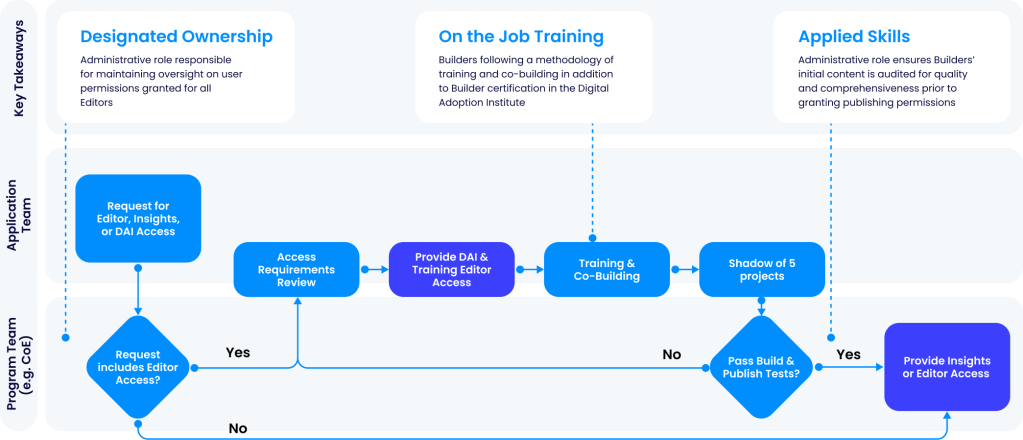
The following are primary tools within the WalkMe product that help you manage User Permissions at scale.
Admin Center
The Admin Center allows you to do the following:
- View installation requirements
- Add/edit users' access or create/edit roles' permissions
- Create a new system or Add an environment to an existing system
- Edit system URL's, Adding a new environment to an existing system
Learn more about the Admin Center with these resources:
Activity Board
The Activity Board allows you to do the following:
- Get a quick overview of account status (number of systems, number of items in production, number of team members)
- Identify broken content at scale
- Understand what content is unused and should be revisited
Learn more about the Activity Board here.
Get Started: Checklist to Standardize
When you create a Standard Operating Procedure (SOP) around User Permissions, use this checklist to make sure you've covered the fundamentals!
Granting New Access/Updating Access
☐ How does a person request access to the Editor?
☐ What is the process for onboarding a new Builder?
☐ What are the resources they need?
☐ What do they need to do before getting into the Editor?
☐ What does my high-level Builder Onboarding & Upleveling journey look like?
☐ What are the skills a person must have/activities they must complete to be granted higher permissions?
☐ Who is responsible for auditing and updating access?
Deciding on Level of Access
☐ How do I decide what systems a person can access?
☐ How do I decide who is permitted to build/edit/publish/archive Funnels/Tracked Events in Insights?
☐ How do I decide who is permitted to build/edit/publish/archive content in Test/Production environments through the WalkMe Editor?
☐ What are the needs and/or risks that might drive creation of custom roles?
☐ What are the custom roles our team uses?
☐ If there are multiple Admins, what is my hierarchy/division of responsibility?
☐ Have I documented Learning Arc's Contributor/Admin access levels alongside Editor access levels, so both are reviewed on the same audit cadence?
Additional Resources & Peer Connections


