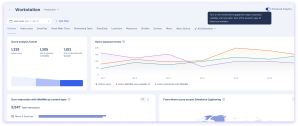
With Enhanced Analytics, you can see how your employees interact with WalkMe on SAP GUI and other desktop applications directly in the console. You get the same dashboards, tabs, and reports available for web deployments, making it easier to understand adoption and improve your WalkMe content across platforms.
How It Works
Insights dashboards
The Enhanced Analytics toggle lets you switch to an upgraded analytics experience with improved engagement data, better visibility into how users interact with your content, and access to new tabs that were not previously available.
Whether you see the toggle depends on when you became a customer.
New customers: Enhanced Analytics is the only mode available. No toggle is displayed and there is no legacy data.
Existing customers: An Enhanced Analytics toggle appears in the top-right corner of your Insights dashboard.
Toggle on (Enhanced Analytics): shows upgraded dashboards with enhanced metrics and new tabs. New reports are available under the Reports Gallery page.
Toggle off (Legacy): returns to the previous dashboard view. Use this to access up to 1 year of historical data during the transition period.
Tabs added with Enhanced Analytics
These tabs are available with Enhanced Analytics and were not previously available for Desktop Menu systems:
Overview
Active Users / Sessions
Menu (previously part of the combined “Menu & Search” tab)
Menu Search (previously part of the combined “Menu & Search” tab)
AI Dashboards
AI Answers
AI Smart Highlights
Upcoming End of Life (EOL)
Legacy event sending is planned for end-of-life in Q2 2027, after which legacy analytics and reports will be retired.
Enhanced analytics reports
Five new reports are available in the Reports Gallery. Existing customers also retain access to five legacy equivalents for historical data continuity, plus four legacy-only reports with no new equivalent. Legacy reports are marked with a label.
New reports
Report name
Description
Desktop Menu Activity by Date
A daily breakdown of user actions in Desktop Menu.
Desktop Menu User Search Log
A detailed log of search activity, including search terms, event time, and results clicked.
Desktop Menu User Search Terms
An analysis of search behavior in Desktop Menu, including search terms and user counts.
Desktop Menu Walk-Thru Step Activity Log
A step-by-step log of Smart Walk-Thru interactions across your users.
Desktop Menu Items Activity
A report of user interactions with Desktop Menu items, including item type, name, and ID.
Legacy reports (use alongside new reports for historical data)
Report name
Description
Desktop Menu Activity by Date (Legacy)
Use alongside the Enhanced Analytics report to review up to 1 year of historical data.
Desktop Menu User Search Log (Legacy)
Use alongside the Enhanced Analytics report to review up to 1 year of historical data.
Desktop Menu User Search Terms (Legacy)
Use alongside the Enhanced Analytics report to review up to 1 year of historical data.
Desktop Menu Walk-Thru Step Activity Log (Legacy)
Use alongside the Enhanced Analytics report to review up to 1 year of historical data.
Desktop Menu Items Activity (Legacy)
Use alongside the Enhanced Analytics report to review up to 1 year of historical data.
Legacy-only reports (no new equivalent)
Report name
Description
Desktop Menu Apps Activity
An overview of user interaction for each app connected to Desktop Menu.
Desktop Menu Apps Log
A detailed action-level log of user interactions with Desktop Menu connected apps.
Desktop Menu Devices List
A list of all devices with their status, container version, operating system, and number of updates performed.
Desktop Menu Users List
A list of all users who signed into Desktop Menu, regardless of whether they opened it.
Technical Overview
Desktop Menu previously used a separate event schema from WalkMe's web platform, which meant data was collected and structured differently. This limited which dashboards, tabs, and reports were available for desktop systems in the console.
Enhanced Analytics migrates Desktop Menu to WalkMe's unified event schema, the same schema used by web deployments. This means:
Desktop menu events now map to the same data structure as web events, enabling shared dashboards and consistent metric definitions across platforms
Tabs that were previously web-only are now available for desktop menu because the underlying data is shaped the same way
Legacy event sending will be retired in Q2 2027. Until then, existing customers can toggle between Enhanced and legacy analytics, and legacy reports remain available for up to 1 year of historical data continuity
Technical Notes
Only WalkMe Menu version 4.3.0+ is supported for enhanced analytics
Enhanced Analytics reports and dashboard analytics do not include historical data
Legacy reports remain available alongside new reports so you can continue to access up to 1 year of historical data during the transition period