Brief Overview
The Translation Activities page provides a log of all translation-related actions in your account. From this page, you can review translation jobs, track their status, and download files or reports for auditing and troubleshooting.
Available actions:
- View activity summaries: See recent translation jobs, file names, and timestamps
- Open detailed reports: Review the file type, action status, and import or export results
- Download reports: Access original translated files or job reports for auditing or troubleshooting
Access
You can access the Activities page from the Multi-Language app in the WalkMe Console.
Multi-Language
How It Works
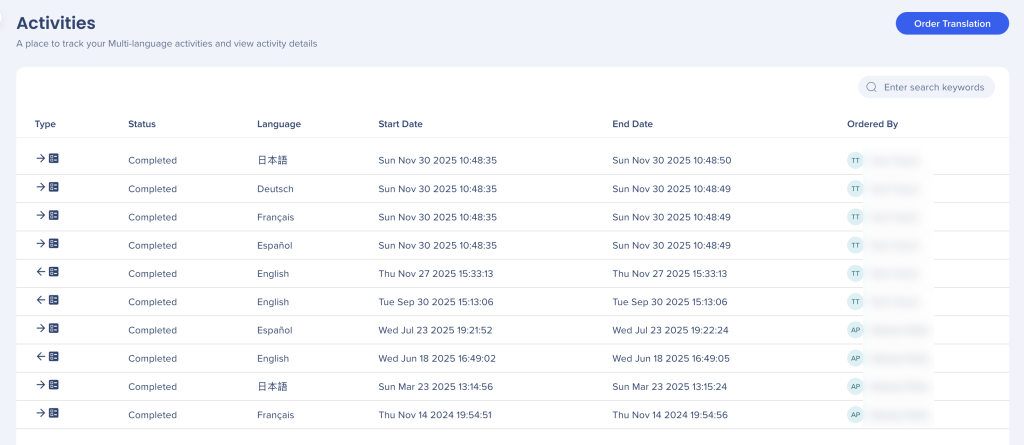
The Translation Activities page lists all translation actions performed in your account.
Each row includes the following columns:
- Type: The type of translation activity, such as an import, export, or translation service request
- Status: The current state of the activity, for example Completed, In progress, or Failed
- Language: The language associated with the translation activity
- Start Date: The date and time when the translation activity started
- End Date: The date and time when the translation activity completed
- Ordered By: The translation provider or service that handled the request (for example, Lilt)
Select a row to open the detailed activity report and review additional job information.
Activity Report
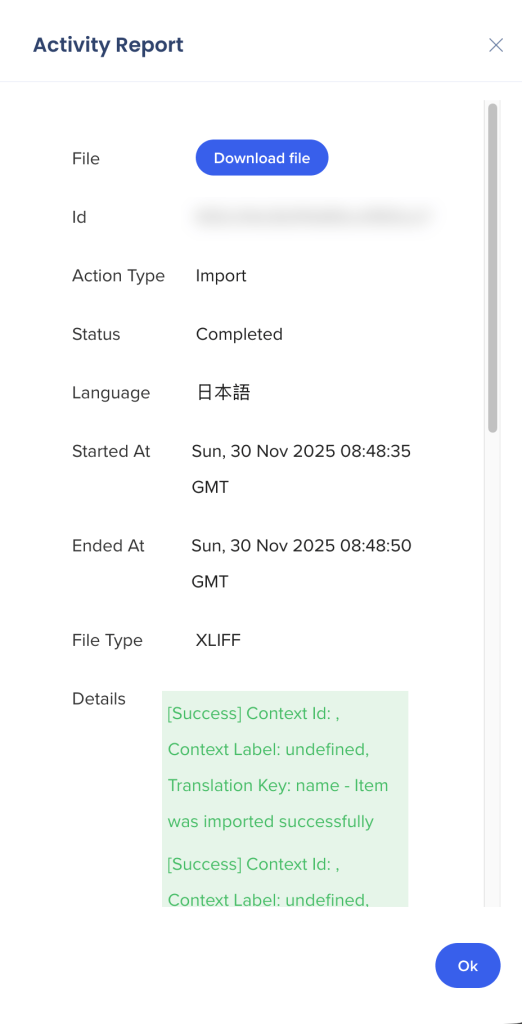
Selecting a row in the Activities table opens the Activity Report, which displays the same information shown in the Activities table along with additional details for the selected translation activity.
Status indicators
Translation results are color-coded to help you quickly understand the outcome:
- Green: Files were imported successfully
- Yellow: Files were partially imported
- Red: Files failed to import
Available actions
From the Activity Report, you can:
- Download file: Download the original translated file, when available
- Download report: Download the job report for review or troubleshooting
Select OK to close the Activity Report and return to the Activities list.


