Brief Overview
A Content Security Policy (CSP) lets website owners specify which domains can load specific types of content. CSP works by allowlisting approved sources for your website, blocking any content from outside the defined policy. This is different from a general allowlist that controls access within an organization.
With CSP, the restriction applies regardless of who you are or what computer you use — if you're in Chrome, Firefox, or Safari, the policy applies. WalkMe is affected when a site's CSP doesn't include WalkMe domains, which prevents WalkMe scripts from loading.
Learn more about CSP.
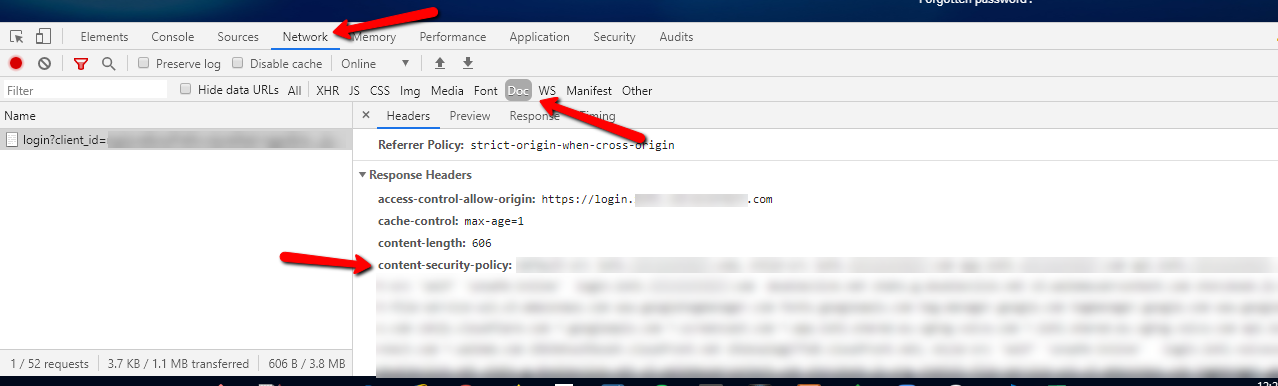
To find out what a site's CSP is:
- Open the Network tab in Developer Tools
- Select the main page request (usually the first one)
- Find "content-security-policy" under the Headers tab
Technical Deep Dive
A CSP defines which sources are allowed for each type of content. Common content types and their directives:
- Javascript → script-src
- CSS → style-src
- Images → img-src
- Default (used when no type-specific rule is set) → default-src
If a source isn't defined in the CSP and there's no default, all sources are allowed for that type.
For WalkMe to load - SaaS
If WalkMe is blocked by your CSP, its files won't load and your content won't appear. To fix this, add WalkMe's domains to the right directives in your policy.
- script-src —
*.walkme.com Used for loading and rendering dynamic WalkMe content. Examples: ShoutOuts, WalkMe Menu
- style-src —
'unsafe-inline' *.walkme.com Used for inline style attributes. Examples: Smart Walk-Thru steps
- frame-src —
'self' *.walkme.com Used for loading frames. Examples: Switch to Steps, iFrames inside a step
- frame-ancestor —
*.walkme.com Used to frame resources from WalkMe domains. Example: Resources in a lightbox
- font-src —
'self' data: *.walkme.com Used to download WalkMe fonts from WalkMe servers. Example: WalkMe Menu and widget font
- img-src —
'self' data: *.walkme.com s3.walkmeusercontent.com eu-s3.walkmeusercontent.com Used by the WalkMe Events collector to insert an image pixel that catches element "seen" events. Examples: Images and resources
- connect-src —
'self' *.walkme.com Used to send XMLHttpRequests for WalkMe end-user events. Examples: Insights, Goals, Tasks, TeachMe, Onboarding, ActionBot
- worker-src —
blob: *.walkme.com Used to send events using a worker. Example: Session Playback (only required if Session Playback is included in your contract)
- object-src —
*.walkme.com Example: Session Playback (only required if Session Playback is included in your contract)
Full CSP string
script-src 'self' *.walkme.com 'unsafe-inline'; style-src 'self' *.walkme.com 'unsafe-inline'; img-src 'self' *.walkme.com s3.walkmeusercontent.com d3sbxpiag177w8.cloudfront.net data:; font-src 'self' *.walkme.com data:; connect-src 'self' *.walkme.com; frame-src 'self' *.walkme.com blob:; worker-src 'self' blob: *.walkme.com;
For accounts using the WalkMe US Data Center:
- https://playerserver.walkme.com
- https://ec.walkme.com
- https://cdn.walkme.com
- https://papi.walkme.com
- https://ec-playback.walkme.com
- https://workstation.walkme.com
For accounts using the WalkMe EU Data Center:
- https://eu-playerserver.walkme.com
- https://eu-ec.walkme.com
- https://eu-cdn.walkme.com
- https://eu-papi.walkme.com
- https://eu-workstation.walkme.com
For WalkMe to load - Self-Hosted
If you're using a self-hosted setup, narrow down your CSP directives based on your existing configuration. Scripts, styles, fonts, images, and frames load from the origin rather than from WalkMe, so not all directives listed above will apply.
Confirming CSP Issues
If WalkMe isn't loading in any browser except Edge, your CSP may be blocking it. To check:
- Open Developer Tools and go to the Console tab
- Reload the page
- Look for a "Content Security Policy" error message
If you see one, contact your IT team and ask them to add WalkMe's domains to the relevant directives.
If your CSP meta tag is in your site's HTML <head> tag, this can also block WalkMe from loading. Share the "Content Security Policy" error message from the Console tab with your IT team so they can resolve it.