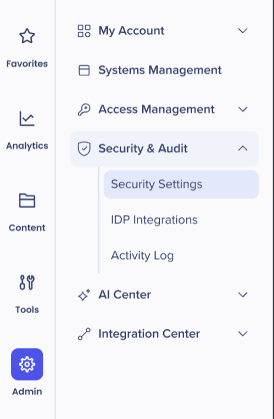
Admin Security & Audit

Last Updated May 20, 2026

Brief Overview

Security & Audit is where authentication settings and access policies for your data and systems are managed and enforced. This ensures your WalkMe environment remains secure and compliant while providing a seamless login experience for your users.

Access

To access Security & Audit in the console:

  1. Open the WalkMe Console:
  2. Go to the Admin category
  3. Select Security & Audit

How It Works

Security & Audit integrates security settings, IDP integrations and the Activity log to give you extended control over all your configurations.

Security settings

Security Settings

IDP Integration

IDP Integration

Activity Log

Activity Log

Was this article helpful?

Thanks for your feedback!

Be part of something bigger.

Engage with peers, ask questions, share ideas

Ask the Community
×