Brief Overview
Starting from WalkMe Mobile SDK version 1.5.0, the WalkMe Mobile SDK supports displaying WalkMe content while the end-user device has no internet connectivity. Offline events caching is supported starting from WalkMe Mobile SDK version 1.6.0.
Use Cases
Offline support use cases include the following:
- Implement WalkMe on apps designed to work in environments with unstable connectivity, such as hospitals, event arenas, or airplanes;
- Implement WalkMe on apps mainly used in countries where data consumption is very expensive;
- Implement WalkMe on any other app that supports working with no internet connectivity.
Enabling / Disabling Offline Mode
Contact your Account Manager (AM) to enable or disable Offline Mode. Be prepared to specify how many days you want content to be stored offline before it is erased.
How Offline Mode Works
Usually, the WalkMe Mobile SDK fetches content from the WalkMe servers whenever the app process starts (whether the app was open in the background or not does not matter, as the operating system usually kills the app process after a few minutes of inactivity).
If Offline Mode is enabled, the SDK will store the content fetched (campaigns and Goals) on the device and use the stored version whenever the app is started.
In a similar manner, the SDK also stores all of the events on user activity that are usually streamed to the WalkMe Mobile server, until there is a connection, when they are sent in a bulk. The SDK can store events for up to 5 days of offline activity. If used offline for longer than 5 days - the oldest days will be deleted.
So, for example, if an app is configured to support Offline Mode for up to five days, the offline feature requires that the app be started while the device is connected to the internet at least once in every five days, so that events can be synced back to the server, but the offline campaigns will not expire after 5 days. If events are not synced, the analytics data for them will not be available in the dashboards and reports.
Campaign storage statistics and limitations
- Android: approximately 3 kilobytes for a ShoutOut, and approximately 34 kilobytes for a 20-step Walk-Thru;
- iOS: approximately 8 kilobytes per ShoutOut, and approximately 55 kilobytes for a 20-step Walk-Thru.
Any image included in a campaign will be downloaded as well and its size will be as uploaded.
The event-storage is limited to storing events up to the configured number of days or up to 10 megabytes (configurable if needed).
An average WalkMe Mobile session usually requires approximately 10 kilobytes of event-storage.
Building Content for Use Offline
The WalkMe Mobile SDK's offline support is limited to functionality that the SDK itself provides. Therefore, features that use an external resource, such as web-view objects within a campaign, or links from a campaign to an external URL, will not work offline.
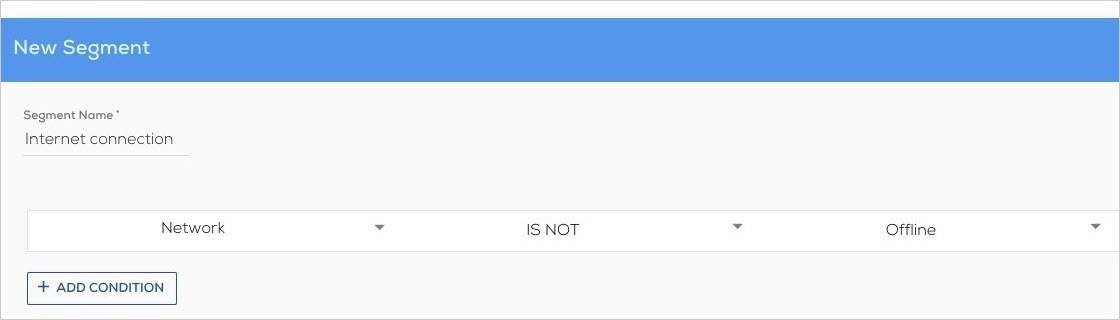
To avoid a negative user experience for campaigns that include content that will not work offline, it is recommended to segment these campaigns so that they only appear for online users, using the Network is not Offline Segment:
Images included in campaigns will appear normally, as they are stored on the device as part of the campaign.
To avoid a campaign appearing inappropriately while the end-user is offline, you can use the Network is/is not Offline Segment.
Offline Mode Pro-Tips
- Changes to connectivity from offline to online throughout a session will not result a re-fetch of content;
- Campaigns are stored on the device for apps that have offline enabled regardless of the current connectivity. This means that sometimes, if a campaign takes a long time to download from the servers, e.g., because of a very heavy image or a slow connection, the WalkMe Mobile SDK will display the cached campaigns until the new content is done downloading;
- To avoid content unnecessarily being stored on the device, the WalkMe Mobile SDK doesn't store content that is segmented by attributes that are false at the time of fetch, and are unlikely to change throughout a session or without the end-user being connected again.
- For example, suppose the SDK didn't store a campaign segmented for a user using x app version 2.0, because the user was using x app version 1.0. If this user upgrades the app version while offline, she will need to be connected to the internet while using the new app version in order to receive said campaign.


