Brief Overview
The Translation Integrations page lets you manage connections to supported translation vendors. From this page, you can connect translation providers, manage authentication, and define which vendor is used by default for new translation requests.
WalkMe supports integrations with third-party translation platforms such as Lilt and XTM.
Available actions:
- View integrations: See which translation vendors are connected to your account
- Manage connections: Set up or reconnect translation vendors
- Add new vendors: Enter your credentials to enable access to additional vendors
- Set default vendor: Define which vendor handles all new translation requests
Access
You can access the Integrations page from the Multi-Language app in the WalkMe Console.
Multi-Language
How It Works
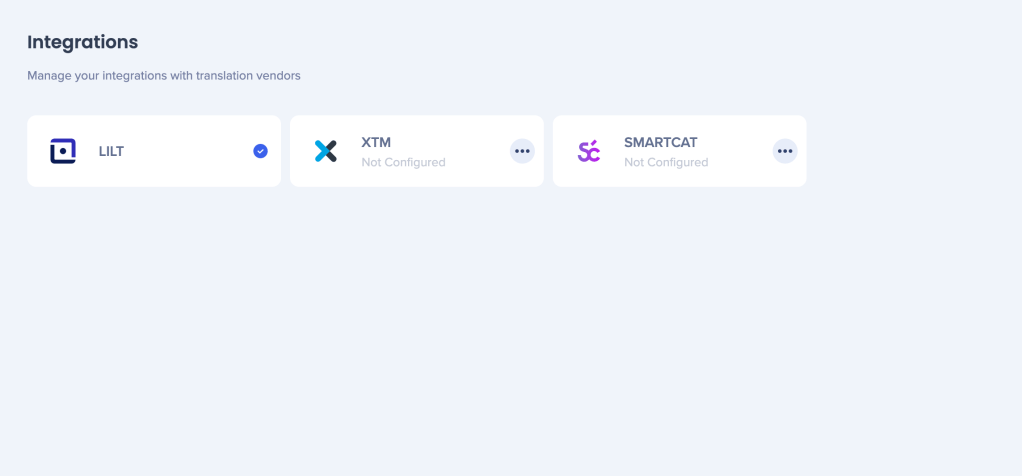
Translation vendors appear as cards on the Integrations page.
To manage an integration:
- Open the Options menu on a vendor card
- Enter or update your account credentials if prompted
- Select Make Default to assign the vendor as the default provider
The default vendor is used automatically when you submit new translation requests from the Translation Services page.
Default vendor behavior
- Lilt is the default translation integration for all customers
- You can change the default vendor at any time after setting up additional integrations
Supported translation vendors
To set up and manage vendor-specific integrations, refer to the following articles:
Each article provides detailed setup instructions and vendor-specific requirements.


