Start Points

Last Updated January 7, 2026

Brief Overview

Start points allow Smart Walk-Thrus to begin from the most relevant step based on where a user is in the process. They help ensure users receive the right guidance even when they do not start from the beginning of a journey.

🎓 Digital Adoption Institute

Use Cases

Use start points when:

  • Users may enter a process from different pages
  • A Smart Walk-Thru spans multiple pages
  • Users may restart a process midway
  • You want the Walk-Thru to resume from the correct step automatically

How It Works

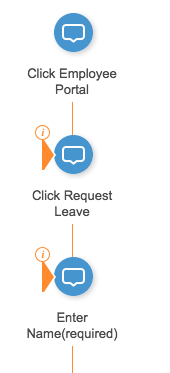
Any step in a Smart Walk-Thru can be configured as a start point.

Start points are evaluated from the bottom up, meaning WalkMe checks the rule for the last start point first. The first rule that evaluates as true determines where the Walk-Thru begins.

  1. Hover over the step you want to use as a start point
  2. Select Add Start Point
  3. Create a rule that defines when the Smart Walk-Thru should begin from this step

Start point rules define when the Smart Walk-Thru should begin from a specific step. When the rule evaluates as true, the Smart Walk-Thru starts from that step instead of the beginning.

When you add a start point, WalkMe pre-populates two rules:

  1. URL rule: Identifies the page where the Walk-Thru should start
  2. Element visibility rule: Checks whether the selected element for that step is currently visible

Best Practices

  • Combine a URL rule with an element visibility rule for better accuracy and performance
  • Use start points on the first step of each new page, not the first step of the Walk-Thru
  • Order start points carefully, since evaluation happens from the bottom up

Tip Tuesday Video

Creating Start Points using WalkMe Data Logic

Technical Notes

  • Start points require an auto-play URL initiator
  • Start points are evaluated from the bottom up
  • Only the first start point with a true rule is used
  • Additional rules can be added using the rule engine

Was this article helpful?

Thanks for your feedback!

Be part of something bigger.

Engage with peers, ask questions, share ideas

Ask the Community
×