Brief Overview
Enhance your user interactions with WalkMe's AI Conditions, seamlessly integrated into the Condition Builder. The AI operator allows you to leverage text analysis to create flexible and responsive conditions without needing exact wording. AI Conditions make it easy to set up dynamic responses that adapt to your users' input, ensuring a more intuitive and effective user experience.
How It Works
AI Conditions are powered by an AI operator available in the Condition Builder. The operator is displayed with an AI icon and appears at the top of the operator list:
This operator works for text conditions, allowing users to describe what the text should represent without needing exact phrasing. The AI processes the text to determine whether it meets the condition, returning a True or False result.
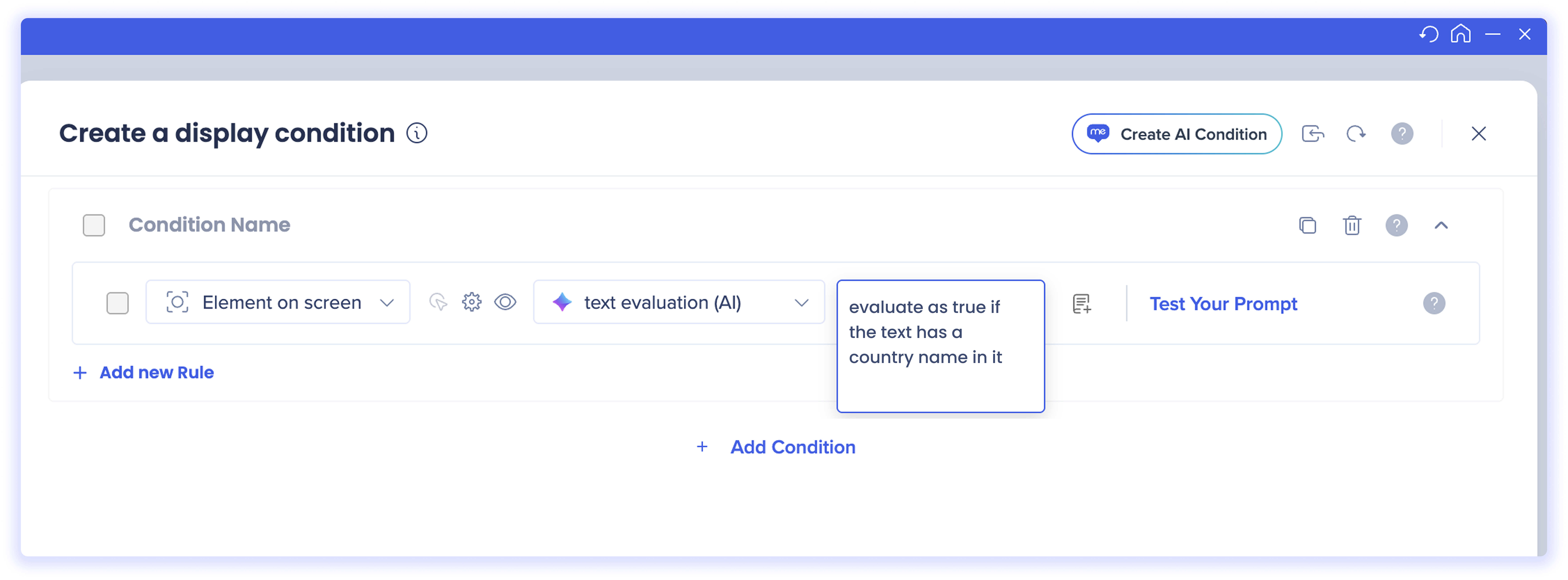
For example, using the text evaluation (AI) operator, you could enter the prompt "evaluate as true if the text has a country name in it." WalkMe identifies the relevant element using DeepUI, sends the text to WalkMe's AI engine along with the prompt, and evaluates whether the condition is met — triggering the appropriate response if it does
Use Cases
Security incident detection in IT ticket descriptions
On the ticket description field, use text evaluation (AI) → "sounds like a security or data breach incident." If matched, surface a Launcher that redirects the user to the dedicated security incident form, bypassing the standard ticket queue. This is more reliable than keyword matching, since users describe incidents in widely different ways.
Competitor mention in a CRM note
When a sales rep logs an activity note in your CRM, use text evaluation (AI) → "mentions a competitor" to trigger a SmartTip offering a link to the competitive battlecard for that deal — right in context, without the rep having to search for it.
Legal or compliance topic in a customer service tool
In a customer-facing messaging or case management tool, use text evaluation (AI) → "relates to a legal, privacy, or liability matter" to show agents a reminder to follow the escalation protocol before responding. More accurate than keyword lists, since customers phrase these concerns in many different ways.
Frustrated or urgent tone in a help desk ticket
When a user fills out an IT or HR help desk ticket, use text evaluation (AI) → "the tone sounds frustrated or urgent" to surface a Launcher or SmartTip reassuring them of expected response times.


