Issue
WalkMe content isn't loading within an iFrame.
Solution
The fix depends on whether the iFrame is same-domain or cross-domain. Start by identifying the iFrame's URL, then follow the relevant steps below.
Finding the iFrame URL
The iFrame's URL isn't always visible in the site's HTML. Use the browser console to find it — this is also helpful when setting up Switch to Frame steps to confirm your URL rules won't apply to other iFrames.
In Chrome:
- Right-click an element inside the iFrame and select Inspect
- Go to the Console tab — you'll automatically be placed in the iFrame console of the element you inspected
- Type document.URL and press Enter
- The URL returned is the source URL for that iFrame
In Firefox:
- Right-click an element inside the iFrame and select Inspect
- In the Element tab, locate the iFrame and note its name, ID, class, or any other unique attribute
- Go to the Console tab
- Open the dropdown and select the iFrame that matches what you saw in the Element tab
- Type document.URL and press Enter
- The URL returned is the source URL for that iFrame
Same-domain iFrame
If the iFrame is same-domain, you don't need to add the WalkMe snippet again as long as it's already present in the top frame.
If you want to anchor to an element within the same-domain iFrame using jQuery instead of an on-screen element, you'll need to configure iFrame jQuery.
Cross-domain iFrame
If the iFrame is cross-domain, the WalkMe snippet needs to be present inside the iFrame itself.
If you're using an extension, reach out to your Customer Success Manager or WalkMe contact to make sure the iFrame's domain is added to the correct package's self-regex.
Checking if the WalkMe snippet is present in the iFrame
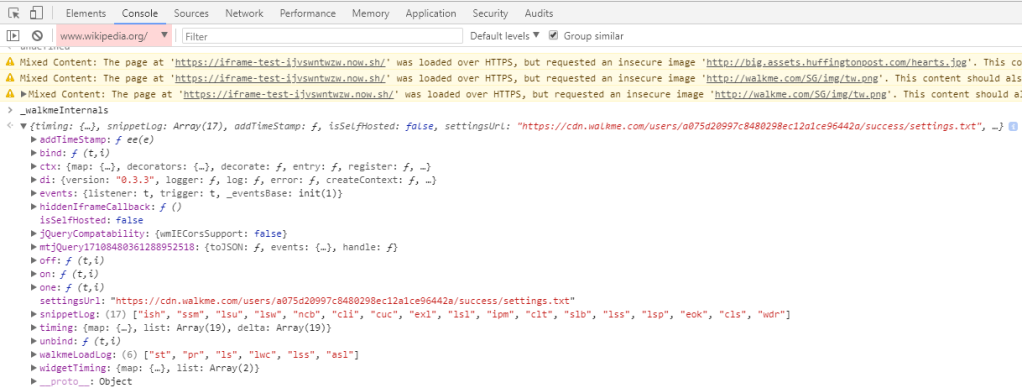
- In the iFrame console, type _walkmeInternals and press Enter
- If the result is undefined, the snippet isn't present and needs to be added
- If the result returns an object, WalkMe is loading correctly inside the iFrame