Brief Overview
DocuSign is an American company that allows organizations to manage electronic agreements, by connecting and automating the entire agreement process. DocuSign offers eSignatures, a way to electronically sign documents.
Learn more about DocuSign.
Security Overview
Read more about the menu's integration security and Enterprise Search.
Use Cases
This menu integration comes with the enterprise search capabilities and a homepage widget. In both we will display “envelopes”. An envelope is a DocuSign transaction.
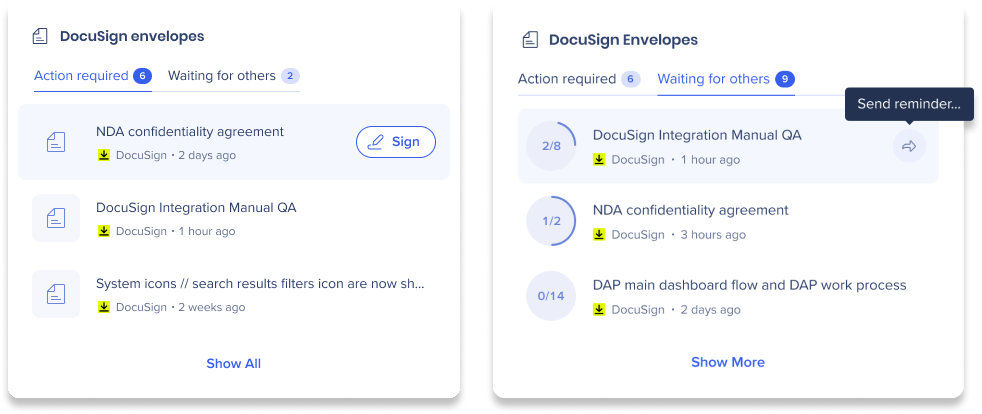
The widget provides the following:
View envelopes in two states
- Action required - envelopes waiting for my signature
- Waiting for others - envelopes waiting for others to sign
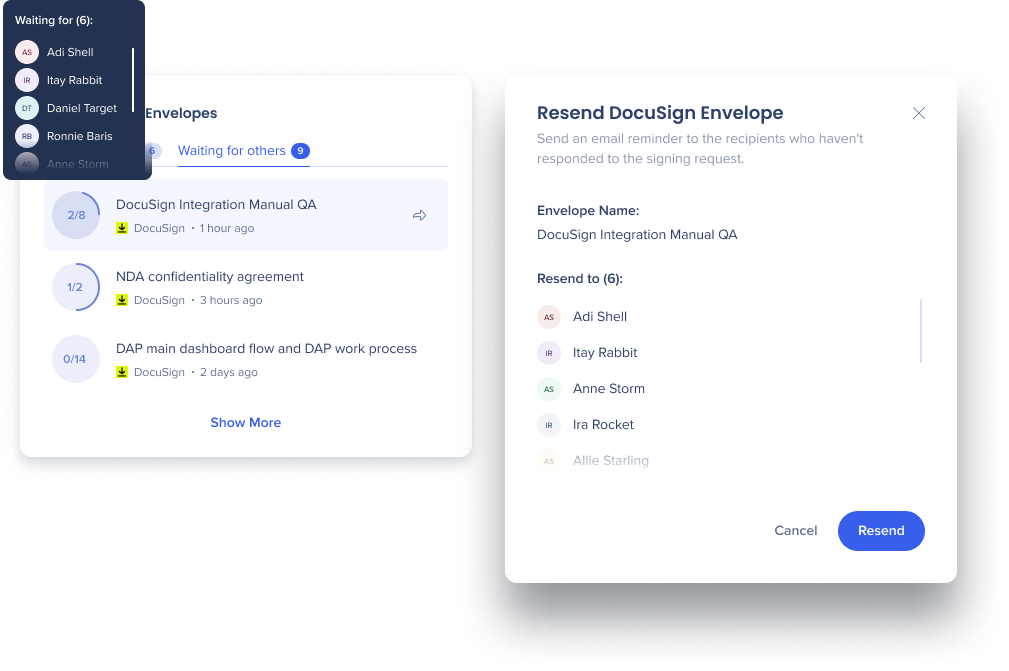
View a list of people who haven't sign yet and send a reminder
Enable Docusign
- Navigate to the Menu Integrations page in the console
- Search for Docusign
- Click Enable
- Navigate to the Settings page in the desktop menu. Docusign will appear in the Integrations tab
- Click Connect


