How to Find Error ID for Support

Last Updated May 20, 2026

Brief Overview

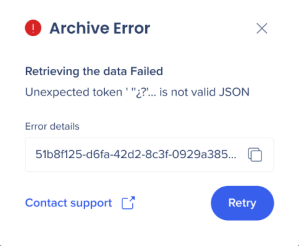
When you encounter an error in the editor, an error ID is displayed alongside the message. Sharing this ID with WalkMe Support helps the team identify and resolve the issue faster.

How It Works

If you encounter an error message while using the editor you will also find an error ID.

  1. When an error message appears in the editor, select the Copy icon next to the error ID
  2. Send the error ID to WalkMe Support

Was this article helpful?

Thanks for your feedback!

Be part of something bigger.

Engage with peers, ask questions, share ideas

Ask the Community
×