概要
インサイトのコンテンツタブでは、WalkMeアイテムの詳細な分析を表示でき、特定のシステム概要内の各コンテンツタイプのダッシュボードを使用できます。
ユーザーが日常的にWalkMeをどのように利用しているか、また、既存のソリューションをどのように改善すればより良い結果を得られるかを理解するのに役立つ重要な情報をご覧いただけます。
コンテンツダッシュボードの多くは類似していますが、Smart Walk-Thrus、シャウトアウト、サーベイなど、特定の主題をさらに深く掘り下げる機能など、注意すべき違いがいくつかあります。
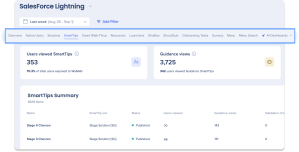
アクセス
-
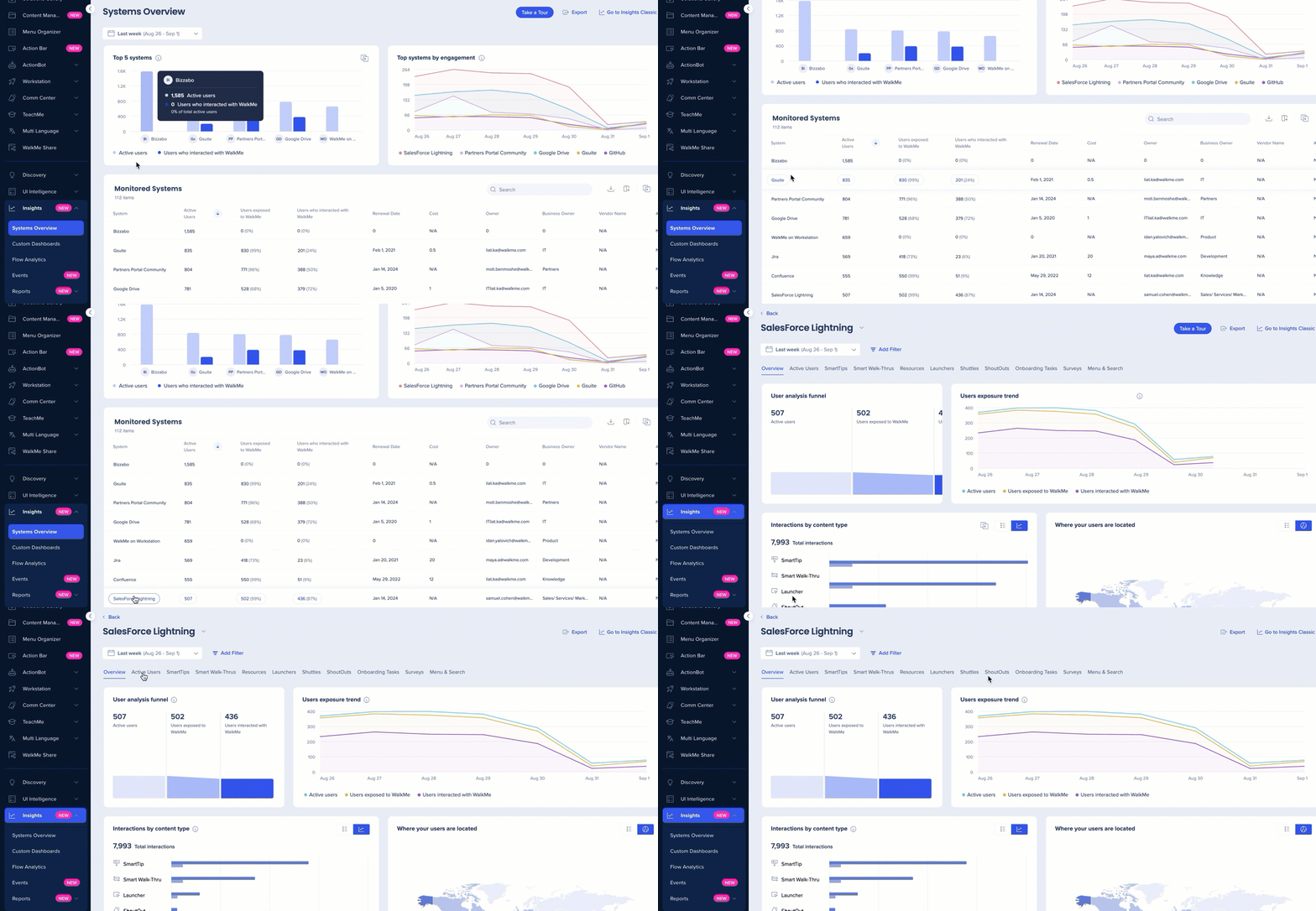
コンソールでシステム概要ページに移動します
-
[Monitored Systems(監視システム)]ウィジェットからシステムを選択します。
-
コンテンツタブを選択します
使用方法
アクティブユーザー
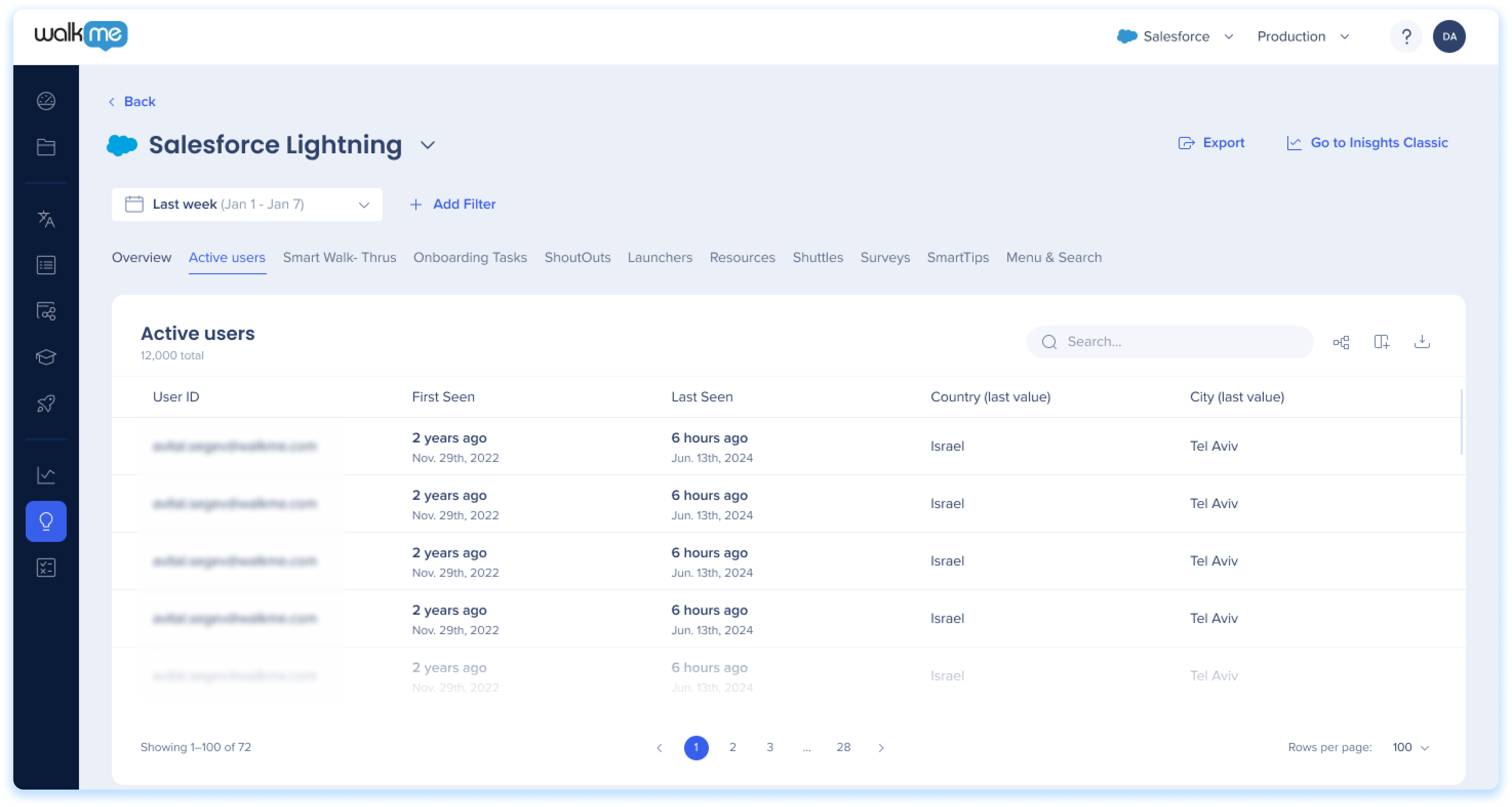
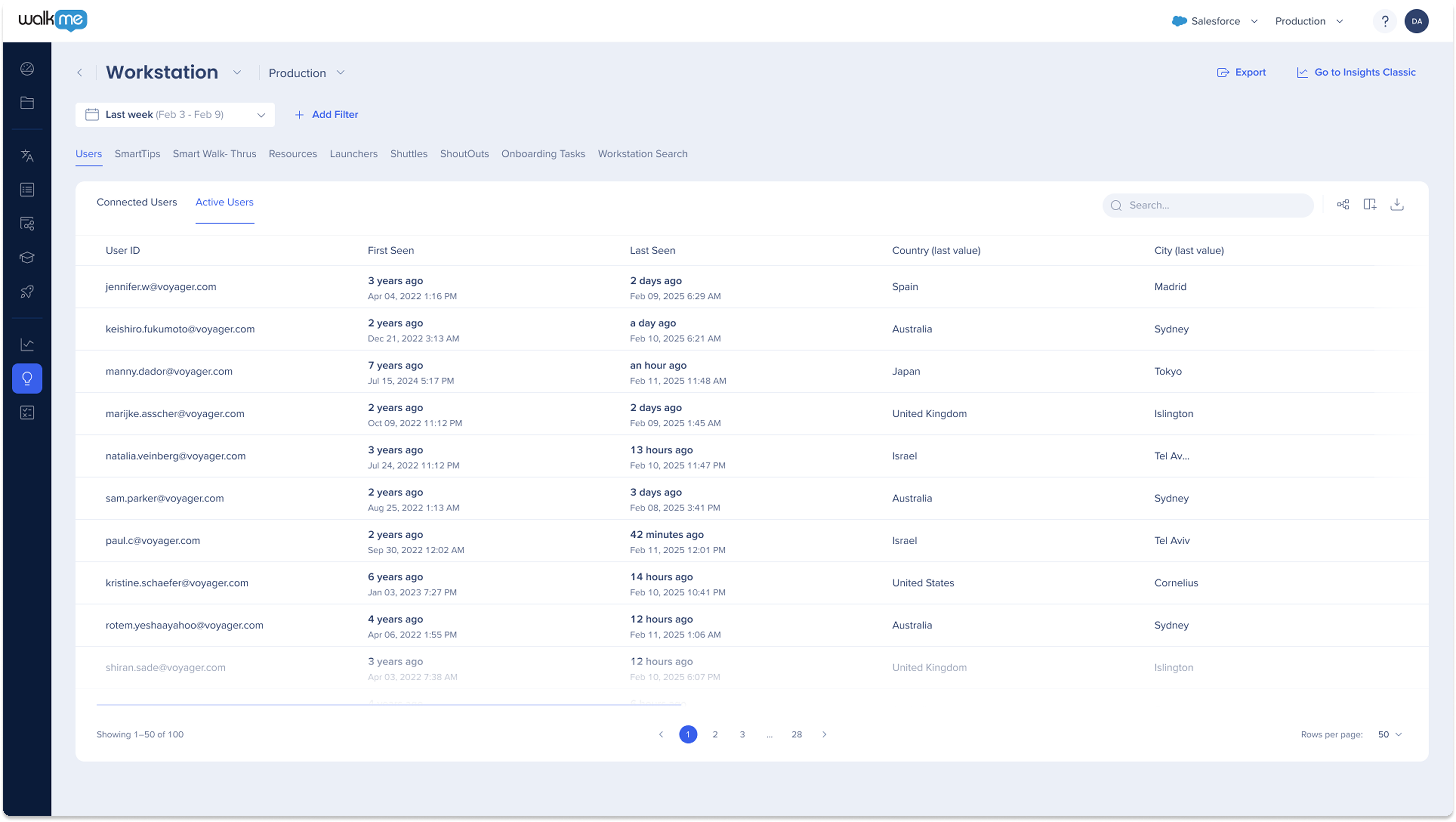
アクティブユーザータブは、ウェブサイト上のユーザーアクティビティに関する貴重なインサイトを提供します。 WalkMeアイテムを操作したかどうかに関係なく、WalkMeがアクティブだった間にサイトを訪問したユーザーの包括的なリストを提供します。
インサイトユーザータブ
注
アクティブユーザータブには、最大30,000ユーザーを表示して、最適なパフォーマンスを確保します。
スマートチップ
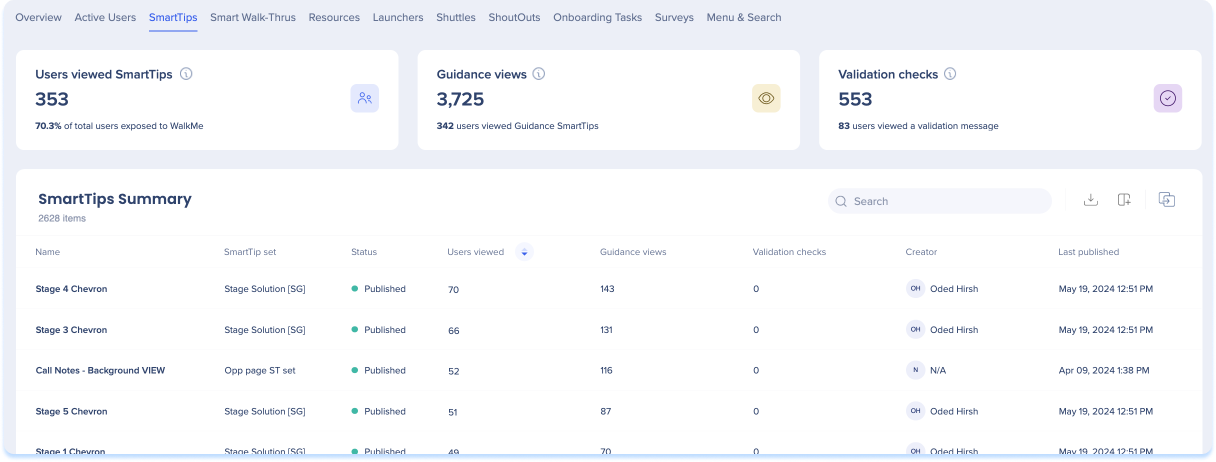
スマートチップの全般的なメトリクス
-
スマートチップの表示ユーザー:スマートチップメッセージが表示されたユニークユーザーの総数と、WalkMeを利用することのできたユーザーの割合
-
ガイダンスの表示:スマートチップのガイダンスメッセージの合計表示回数(同じユーザーによる複数の表示を含む)
-
バリデーションチェック:スマートチップバリデーションルールがチェックされた合計回数と、バリデーションメッセージが表示されたユーザーの合計数
SmartTipの概要
-
名前:コンテンツクリエイターが作成した各スマートチップに付けた名前
-
スマートチップセット:コンテンツ作成者が各スマートチップセットに付けた名前
-
ステータス:アイコンの色は公開ステータスを示します。
-
グリーン - パブリッシュ済み
-
グレー - アーカイブ済み
-
レッド - 削除済み
-
オレンジ - ドラフト
-
表示ユーザー:特定のスマートチップを表示したユーザーの総数
-
ガイダンスの表示:特定のスマートチップのガイダンスメッセージの合計表示回数(同じユーザーによる複数回の表示を含む)。
-
検証チェック:スマートチップ検証ルール評価の結果として、検証メッセージが表示された回数の合計(同じユーザーによる複数の表示を含む)
-
作成者:スマートチップを作成したユーザー
-
最終公開:特定のスマートチップが公開された最終日付
スマートウォークスルー
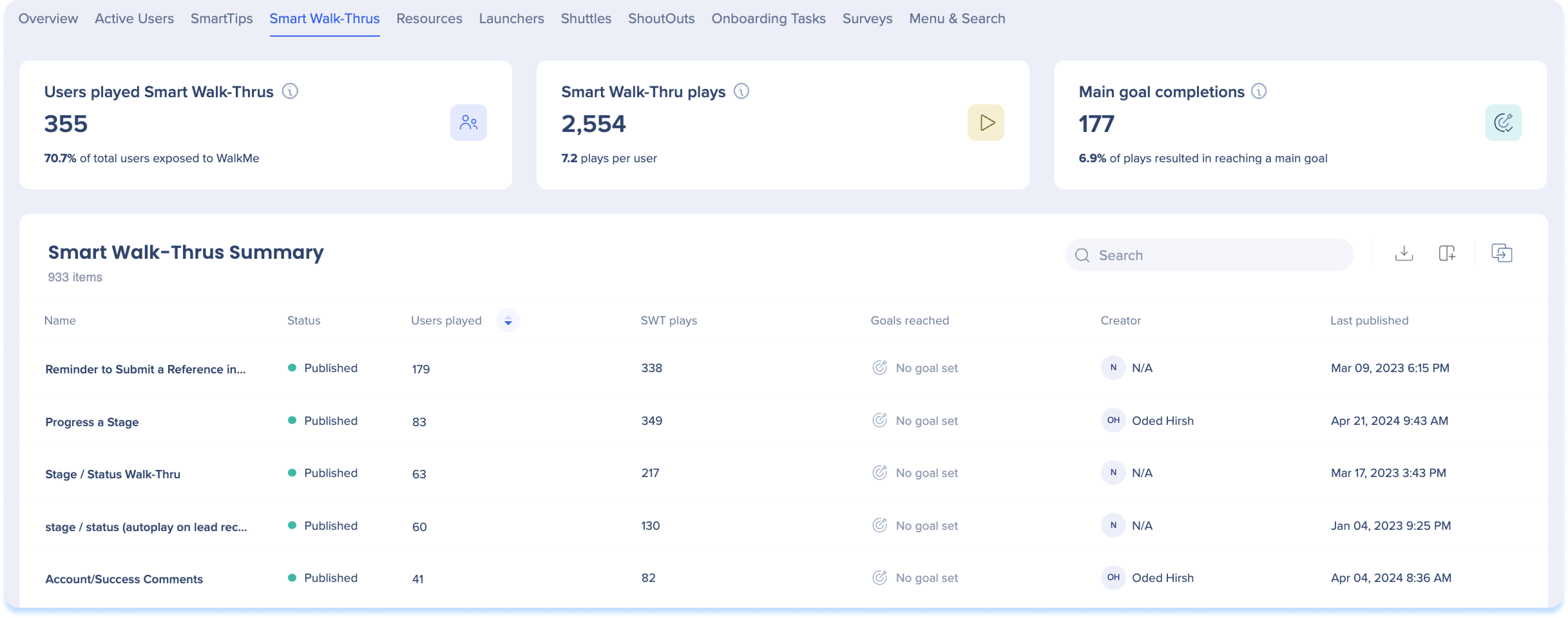
Smart Walk-Thruの全般的なメトリクス
-
スマートウォークスルーを再生したユーザー:スマートウォークスルーを再生したユニークユーザーの総数と、WalkMeを利用できたユーザーの割合
-
スマートウォークスルー再生:スマートウォークスルーが再生された合計回数(同じユーザーによる複数の再生を含む)と、ユーザーごとの平均再生数
-
到達したゴール:すべてのスマートウォークスルー再生を通じて到達したメインゴールの総数と、ユーザーによるゴール到達につながった再生の割合
Smart Walk-Thruの概要
-
名前:コンテンツ作成者が各スマートウォークスルーに付けた名前
-
ステータス:アイコンの色は公開ステータスを示します。
-
グリーン - パブリッシュ済み
-
グレー - アーカイブ済み
-
レッド - 削除済み
-
オレンジ - ドラフト
-
再生したユーザー:特定のスマートウォークスルーを再生したユーザーの総数
-
SWTの再生:特定のスマートウォークスルーの再生回数(同じユーザーによる複数回の再生を含む)
-
到達したゴール(スマートウォークスルーの再生で):ユーザーが特定のスマートウォークスルーを再生時に到達したメインゴールの総数
-
作成者:SWTを作成したユーザー
-
最終公開
注
「スマートウォークスルーの全体的なメトリクス」セクションとは異なり、このセクションでは、複数のスマートウォークスルー(分岐やスマートウォークスルーに接続など)を含む再生は、単一の再生としてカウントされません。 代わりに、発生した各Smart Walk-Thruは、これが大きなフローの一部であっても、ユニークな再生としてカウントされます。
リソース
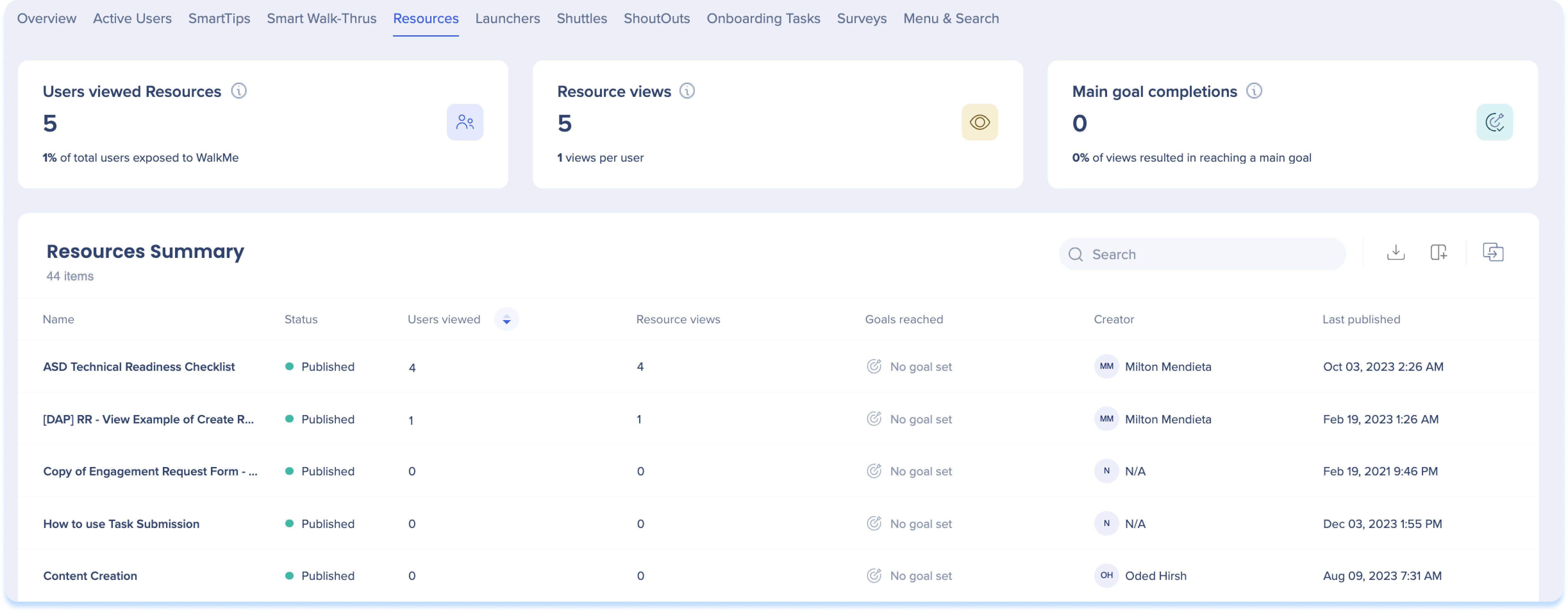
Resourceの全般的なメトリクス
-
リソースの表示ユーザー:任意のリソースが表示されたユニークユーザーの総数と、WalkMeを利用することのできたユーザーの割合
-
リソースの表示回数:リソースの合計表示回数(同じユーザーによる複数の表示を含む)と、ユーザーあたりの平均リソース表示回数
-
メインゴールの完了:すべてのリソースビューを通じて到達したメインゴールの総数と、ユーザーによるゴール到達につながった表示の割合
Resourceの概要
-
名前:コンテンツ作成者が各リソースに付けた名前
-
ステータス:アイコンの色は公開ステータスを示します。
-
グリーン - パブリッシュ済み
-
グレー - アーカイブ済み
-
レッド - 削除済み
-
オレンジ - ドラフト
-
表示ユーザー:特定のリソースを表示したユーザーの総数
-
リソースの表示:特定のリソースが表示された合計回数(同じユーザーによる複数の表示を含む)
-
到達したゴール(リソースビュー):ユーザーが特定のリソースを表示したときに到達したWalkMeゴールの合計数
-
作成者:リソースを作成したユーザー
-
最終公開:特定のリソースが公開された最後の日付
ランチャー
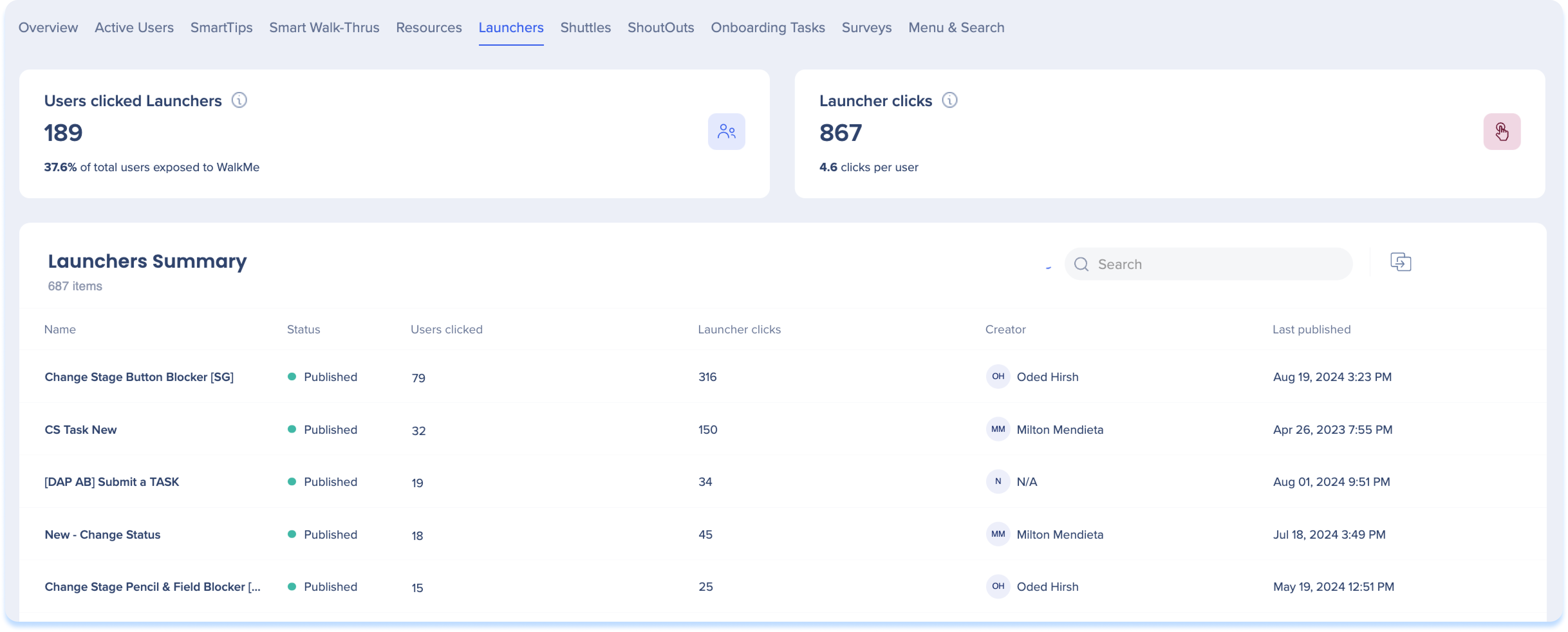
ランチャーの全般的なメトリクス
Launcherの概要
-
名前:コンテンツクリエイターが各ランチャーに付けた名前
-
ステータス:アイコンの色はそのパブリッシュステータスを示します。
-
グリーン - パブリッシュ済み
-
グレー - アーカイブ済み
-
レッド - 削除済み
-
オレンジ - ドラフト
-
クリックしたユーザー:特定のランチャーをクリックしたユーザーの総数
-
ランチャーのクリック回数:特定のランチャーがクリックされた総回数
-
クリエイター:ランチャーを作成したユーザー
-
最終公開日:特定のランチャーが公開された最終日付
シャトル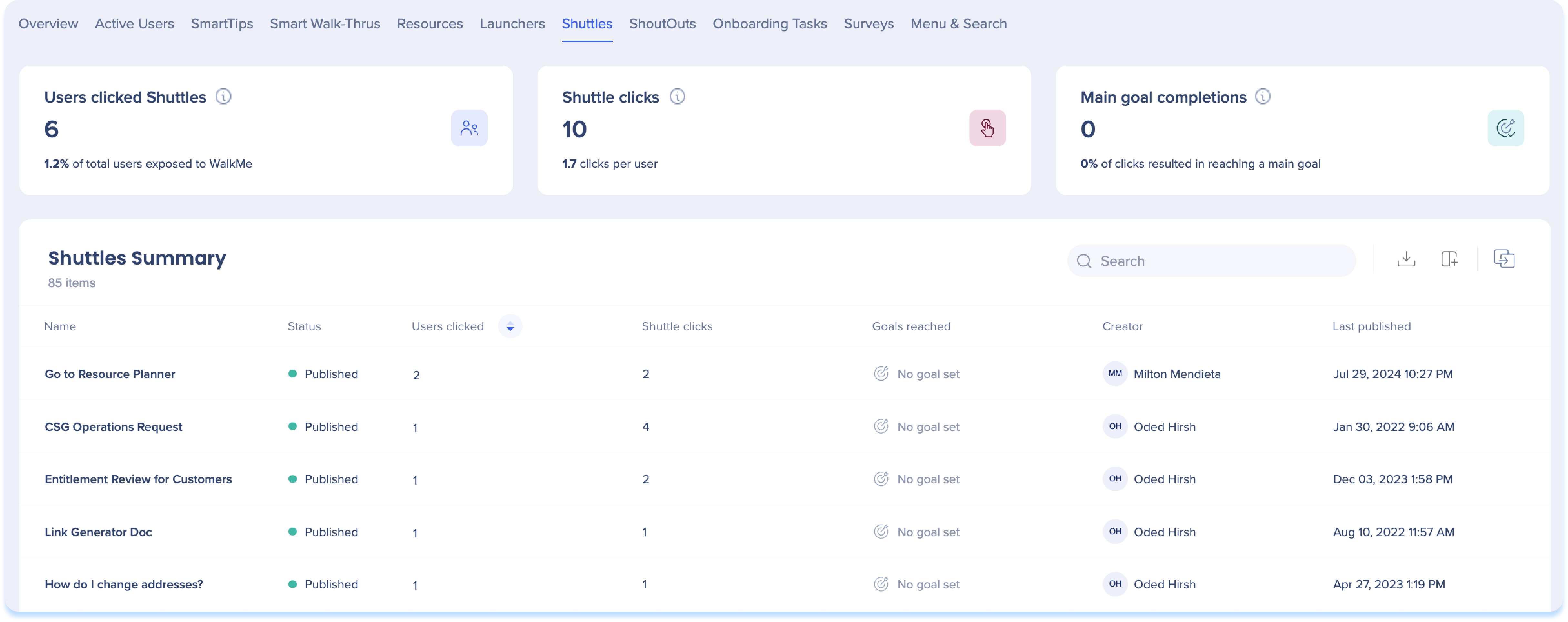
Shuttleの全般的なメトリクス
-
シャトルをクリックしたユーザー:シャトルをクリックしたユニークユーザーの総数と、WalkMeを利用することのできたユーザーの割合
-
シャトルのクリック回数:シャトルがクリックされた合計回数(同じユーザーによる複数のクリックを含む)
-
到達したメインゴール:すべてのシャトルのクリックを通じて到達したWalkMeゴールの総数と、ユーザーがゴールに到達したシャトルのクリックの割合
シャトルの概要
-
名前:コンテンツ作成者が作成した各シャトルに付けた名前
-
ステータス:アイコンの色はそのパブリッシュステータスを示します。
-
グリーン - パブリッシュ済み
-
グレー - アーカイブ済み
-
レッド - 削除済み
-
オレンジ - ドラフト
-
クリックしたユーザー:特定のシャトルをクリックしたユーザーの総数
-
シャトルのクリック:特定のシャトルがクリックされた合計回数
-
到達したゴール(シャトル再生):ユーザーが特定のシャトルを再生したときに到達したメインゴールの合計数
-
作成者:シャトルを作成したユーザー
-
最終公開:特定のシャトルが公開された最終日付
シャウトアウト
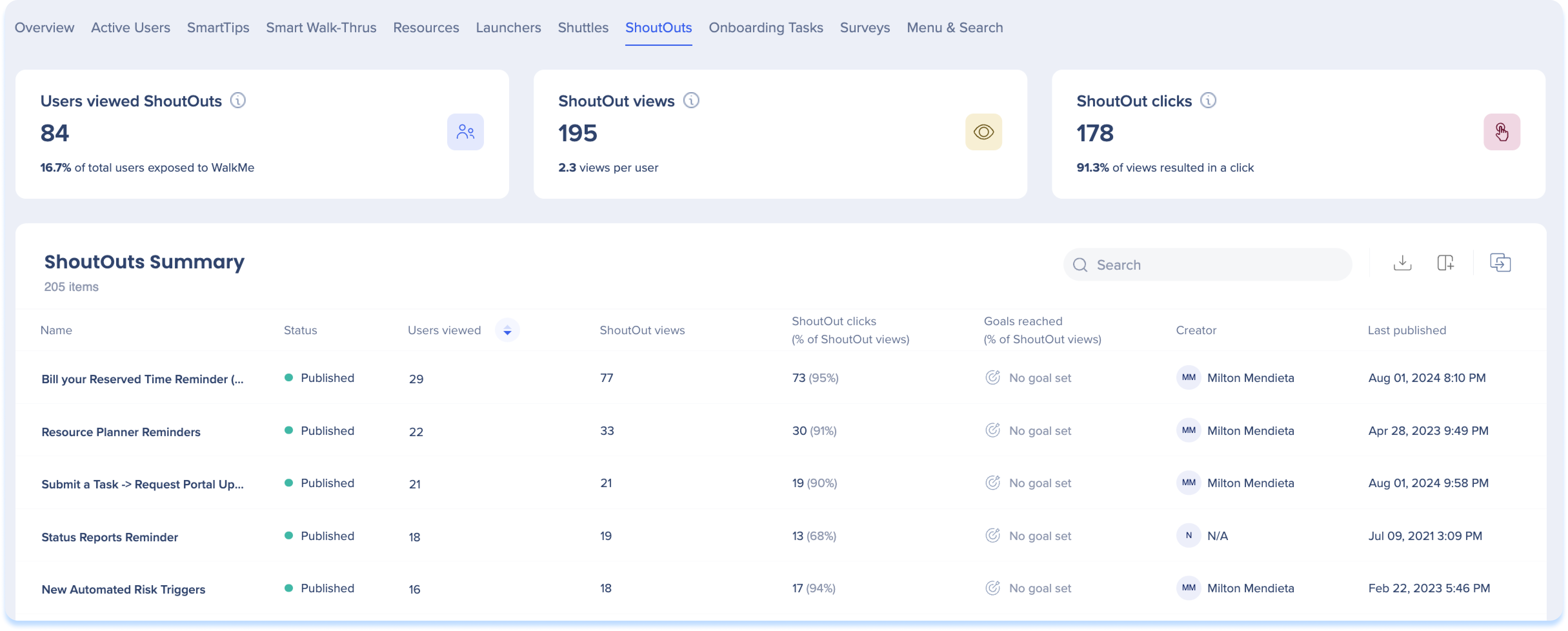
ShoutOutの全般的なメトリクス
-
シャウトアウトを閲覧したユーザー:シャウトアウトを閲覧したユニークユーザーの総数と、WalkMeを利用できたユーザーの割合
-
シャウトアウトの表示回数:シャウトアウトが閲覧された合計回数(同じユーザーによる複数の閲覧を含む)、および1ユーザーあたりの平均閲覧回数
-
シャウトアウトのクリック:すべてのシャウトアウト表示を通じてユーザーがクリックしたアクションボタンの総数と、アクションボタンのクリックにつながったシャウトアウト表示の割合
シャウトアウトの概要
-
名前:コンテンツ作成者が各シャウトアウトに付けた名前
-
ステータス:アイコンの色はその公開ステータスを示します。
-
グリーン - パブリッシュ済み
-
グレー - アーカイブ済み
-
レッド - 削除済み
-
オレンジ - ドラフト
-
表示ユーザー:特定のシャウトアウトを表示したユーザーの総数
-
シャウトアウトの表示:特定のシャウトアウトが表示された合計回数(同じユーザーによる複数回の表示を含む)
-
シャウトアウトのクリック数(シャウトアウトの表示回数):特定のシャウトアウトアクションボタンがクリックされた合計回数と、合計表示回数におけるクリック率
-
作成者:シャウトアウトを作成したユーザー
-
最終公開:特定のシャウトアウトが公開された最終日付
オンボーディングタスク
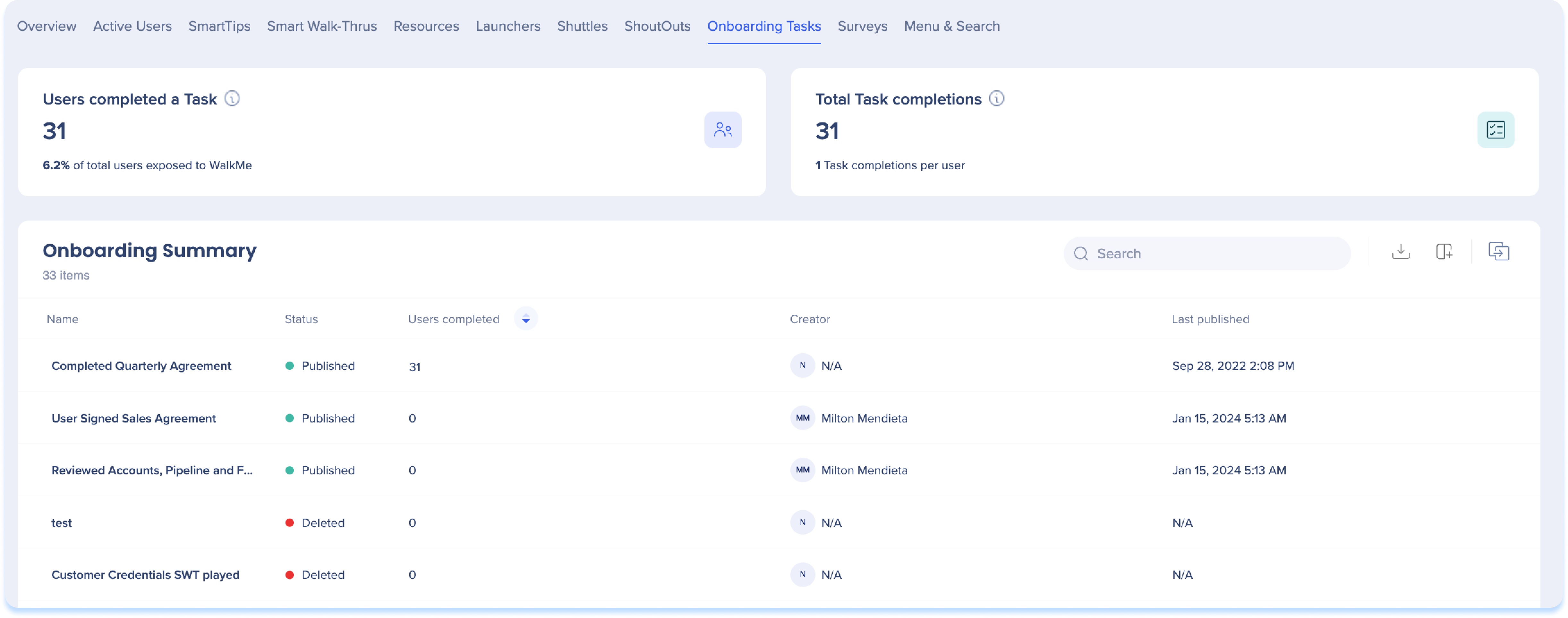
オンボーディングの全般的なメトリクス
オンボーディングのタスク概要
サーベイ
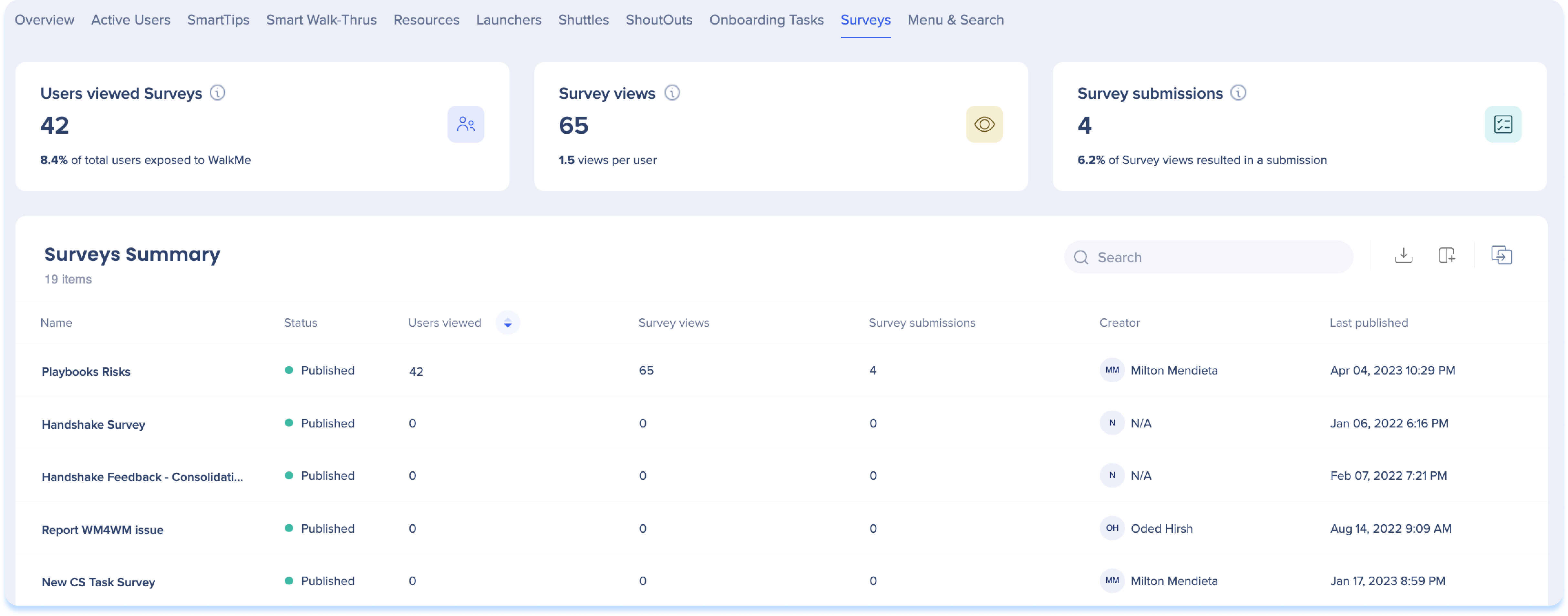
Surveyの全般的なメトリクス
-
サーベイの閲覧ユーザー:サーベイが表示されたユニークユーザーの総数と、WalkMeを利用することのできたユーザーの割合
-
サーベイの表示:サーベイが表示された合計回数(同じユーザーによる複数の表示を含む)と、ユーザーあたりの平均サーベイ表示回数
-
サーベイの送信:サーベイの送信総数、およびユーザーがサーベイを送信したビューの割合
メモ
- 必須ではない質問がカウントに影響:サーベイの送信番号には、不要な質問に回答せずに提出されたサーベイが含まれます。 つまり、送信が記録されていてもレポートのエクスポートは空になる可能性があります
- 削除された質問への影響:サーベイが送信された後に質問が削除された場合、それらの質問への回答はインサイトには含まれません。 送信総件数の数はそのまま残りますが、実際の応答を表示するには、レポートに頼る必要があります
Surveyの概要
-
名前:コンテンツ作成者が作成した各サーベイに付けた名前
-
ステータス:アイコンの色はその公開ステータスを示します。
-
グリーン - パブリッシュ済み
-
グレー - アーカイブ済み
-
レッド - 削除済み
-
オレンジ - ドラフト
-
表示ユーザー:特定のサーベイを表示したユーザーの総数
-
サーベイの表示:特定のサーベイの合計表示回数(同じユーザーによる複数の表示を含む)
-
クリエイター:サーベイを作成したユーザー
-
サーベイ送信:特定のサーベイを閲覧したユーザーの総数のうち、当該サーベイが送信された回数の合計
メニュー
メニューの全般的なメトリクス
- メニューを開いたユーザー:選択した期間およびフィルターにおいて、メニューを少なくとも1回開いたユニークユーザー数
- メニューを開いた総数:同じユーザーによる複数回の操作を含め、メニューが開かれた合計回数
- 総インタラクション数(新規):メニュー内のコンテンツアイテムに対するクリックと再生の総数(同じユーザーによる複数のインタラクションを含む)
- メニューインタラクションファネル(新規): ユーザーがメニューを開いてからコンテンツをクリックするまでの進捗状況を表示します。 これを使用して、エンゲージメントが低下する箇所を特定します
- トップコンテンツソース(新規):最もクリックされたコンテンツアイテムを含むメニューカテゴリまたはタブを表示します
-
- カテゴリ別またはタブ別の表示を切り替えます
- クリック数に基づいて上位5つのカテゴリ/タブを降順で表示します(5つ未満の場合はその数が表示されます)
- クリック数とユニークユーザー数をそれぞれ表示します。カーソルを合わせると、正確な数を確認できます
- 「コンテンツアイテムを表示」を選択すると、そのカテゴリからトリガーされたすべてのコンテンツをコンテンツ名、ユニークユーザー、クリック数とともにリストするサイドパネルを開きます。 パネルは検索とエクスポートが可能です。
メニューの概要
- トップコンテンツタブ: コンテンツ名、タイプ(例:SWT、シャウトアウト)、ユニークユーザー、インタラクション、クリエイター、最終公開済み。 コンテンツをクリックすると、コンテンツタイプ(スマートウォークスルー、シャウトアウト、サーベイ)に基づいたデータを含むサイドパネルが開きます。
- メニューレイアウトタブ: コンテンツ名、コンテンツアイテム(タブ/カテゴリ内のアイテム番号)、ユニークユーザー、クリック。 タブまたはカテゴリを選択すると、その内のアイテムが開きます。ユニークユーザーは、そのカテゴリまたはタブ内のすべてのコンテンツで計算されます。
- エントリポイントタブ:ソース、メニューを開いたユーザー、メニューが開いた合計、アクションを実行したユーザー、メニューアクション。 URLが収集されない場合、ページタイトルが表示されます。どちらも収集されない場合(PII設定)、メッセージが表示され、このアカウントではURLとページタイトルが収集されないことを示します。 クエリとハッシュURLパーツは保存されません
メニュー検索
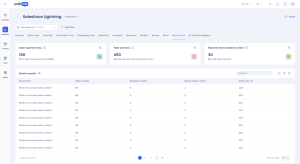
メニューと検索の全般的なメトリクス
- メニューを開いたユーザー:選択した期間およびフィルターにおいて、メニューを少なくとも1回開いたユニークユーザー数
- 総検索数:選択した期間にメニューに入力された検索クエリの総数
- アクションが発生した検索:ユーザーが結果をクリックした検索の数
メニュー検索の概要:検索語、総検索、アクションあり、アクションなし、アクション率(検索結果をクリックしたユーザーの割合)。
カスタム検索インテグレーション
メニュー検索は、GoogleおよびZendeskの検索インテグレーションをサポートしています。 その他はカスタム統合であり、デフォルトではサポートされていません。WalkMeはこれらの内容をケースバイケースで審査します。
カスタム統合が承認された場合、アカウントにはアウトバウンド接続用にIDプロバイダー(IDP)が用意されている必要があります。 IDPは、ユーザーとアプリケーションを認証し、接続に余分なセキュリティレイヤーを追加します。
IDプロバイダーを追加および管理する方法について説明します。
AIダッシュボード
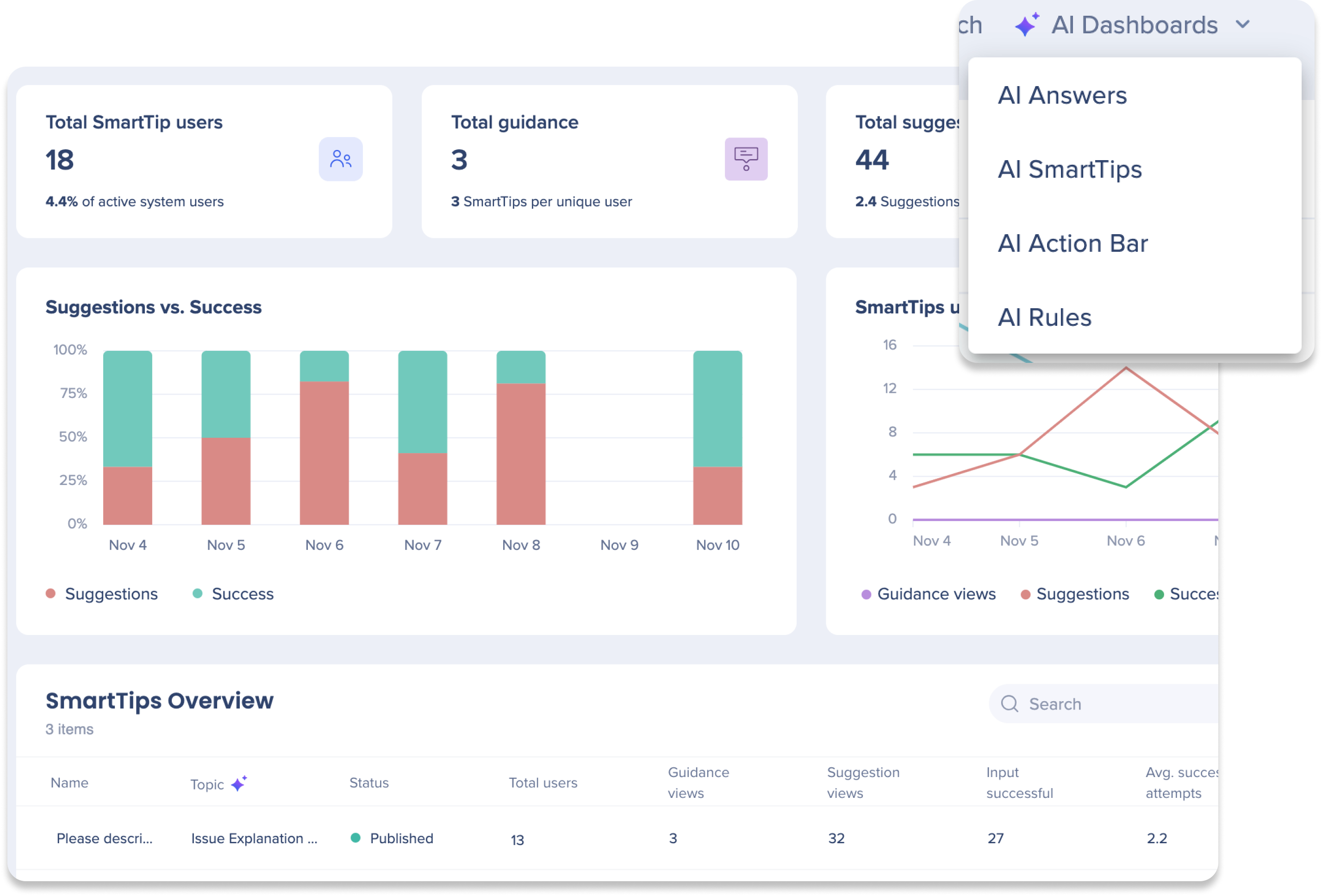
インサイトコンソールのAIダッシュボードは、ワークフロー内のAI製品の使用状況と導入状況を包括的に可視化します。 これらのダッシュボードには最大4つのタブがあり、それぞれが特定のWalkMe AI製品(AIアンサー、AIアクションバー、AIスマートチップ、AI条件)専用です。 受け取るタブは、AIパッケージによって異なります。
AI Dashboards
デスクトップ/モバイル分析
コンテンツタブのデスクトップ/モバイルシステム分析により、ビルダーやDAPプロフェッショナルは、デスクトップ/モバイルの使用状況データをより高度に制御し、より深いインサイトを得ることができます。 このセクションでは、インサイトのデスクトップ/モバイルシステムの違いを概説します。
概要
サーベイ
AIダッシュボード
スマートウォークスルー
-
メインゴールの完了ウィジェットは、一般的なウィジェットではサポートされていません。
-
到達したゴールは、スマートウォークスルーの概要テーブルではサポートされていません。
-
メインゴールの完了数は、ディープダイブサイドパネルではサポートされていません。
メニューとメニュー検索
アクティブユーザー
-
アクティブユーザータブの名前がユーザーに変更されました
-
ユーザーテーブルは、「接続ユーザー」と「アクティブユーザー」の2つのタブに分かれています。
-
接続されたユーザー=1つ以上のデバイスでデスクトップ/モバイル向けWalkMeメニューにサインインしたが、選択した日付範囲内のデバイスで開いたことがないユーザー
-
アクティブユーザー=あらゆるデバイスでデスクトップ/モバイル向けWalkMeメニューを少なくとも1回開き、entSearchClick、Widgetitemclick、WidgetActionClick、WMContentClickのいずれかのイベントタイプが発生したユーザー
-
各ユーザーテーブルには、ユーザーに関する以下の情報が含まれています:ユーザーID、初回表示、最終表示、統合属性(IDP)
シャトル
シャウトアウト
-
シャウトアウトのクリックウィジェットは、一般的なウィジェットではサポートされていません。
-
シャウトアウトのクリック(シャウトアウトの表示に対する割合)やゴール到達(シャウトアウトの表示に対する割合)は、シャトルの概要テーブルではサポートされていません。
-
シャウトアウトのクリック総数とゴール完了に関する情報は、詳細分析パネルではサポートされていません。
リソース
スマートチップ
- すべての一般的なメトリックは、公開されたコンテンツに対してのみプルされたデータを示す
- 「WalkMeを利用できたユーザー」の比率は、WalkMeを利用できたユーザー数を全ユーザー数で割って計算されます。
- 全ユーザー数は、同じ日付範囲で終了されたセッションのユーザー数です。
- まれなケースでは、まだ終了していないライブのセッションに大勢のユーザーがいる場合にこの比率が100%を超える可能性があります。
- 大半の場合、これが発生するのは日付範囲が今日の日付を含む場合です。
-
メニュータブでは、概要テーブルのエントリポイントタブには、クエリパラメータが保存されていないため、クエリやハッシュなどのURL部分が表示されません
- エディタの制限により、大量のルールを持つフィルタが。
-
メニュー検索タブには、URLの結果が100件までしか表示されません
- アクティブユーザータブには、最大30,000ユーザーを表示して、最適なパフォーマンスを確保します。
-
既存のフィルターは、指定された例外を除いてデスクトップ/モバイルシステムにも適用されます:
-
インサイトは、エディタから取得された最新の定義のみを確認します。 削除されたサブアイテムはインサイトに表示されません
-
すべてのメニューとメニュー検索データは、2026年8月30日以降利用可能です。 WalkMeメニュー for デスクトップを使用している場合は、バージョン4.3.0以降も必要です。 データは、ユーザーがインタラクションを開始した後にのみ表示されます


