Brief Overview
If you're having trouble accessing or connecting the WalkMe Editor, local network configurations or browser settings are usually the cause. Work through the relevant section below to identify and fix the issue.
Editor Is Blank When Launching
If the editor opens but displays no content, your network or proxy may be blocking necessary requests.
Check your allowlist
Ask your IT team to confirm that all WalkMe Editor and WalkMe Insights domains are allowlisted at both the network and proxy levels. Refer to the Access Requirements for WalkMe article for the full list. This only applies if your company uses a proxy to authenticate network requests — check with your IT team if you're not sure.
Access Requirements for WalkMe
Reinstall the editor
If the domains are already allowlisted, uninstall and reinstall the editor from walkme.com/download.
Restart your computer and try launching the editor again.
Editor Loads but Login Page Has an Issue
Verify browser settings
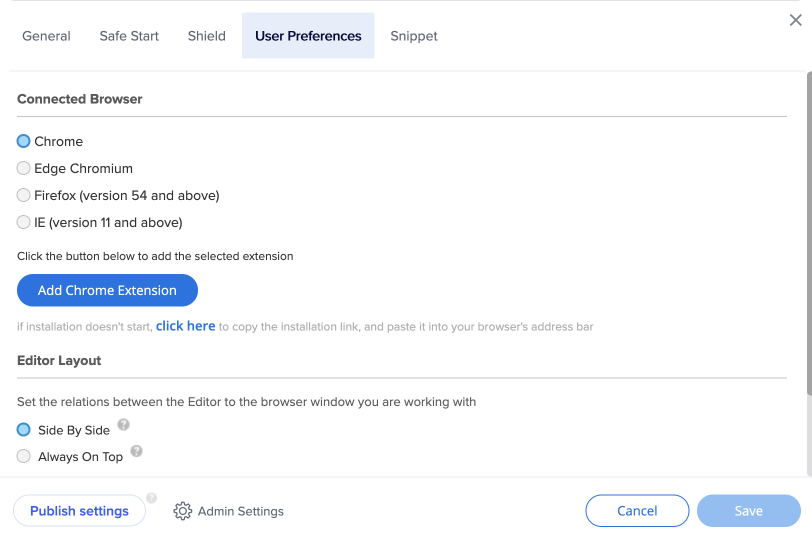
Confirm your computer's default browser matches the Connected Browser selected in the User Preferences tab in the editor's System Settings. If you can't change it manually, ask your IT help desk to reset your default browser.
Check local security software
Endpoint Detection and Response (EDR) software may block internal communication between the editor and the extension. Ask your IT team to open the following ports on localhost (127.0.0.1) in your EDR:
- Port 22414 (HTTP)
- Port 22515 (HTTPS)
White Screen or Continuous Loading After Login
Refresh or use incognito
Refresh the page, or copy the URL and open it in a new tab or an incognito window.
Sync your clock
An inaccurate system clock can cause authentication loops. Make sure your computer clock is set to the correct time zone and is accurate to the minute.
Editor Is Open but Not Connecting to the Page
Check build mode
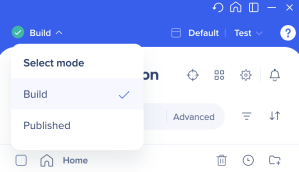
Make sure you're in Build mode and not Published mode in the editor.
Verify the extension
Confirm the WalkMe editor extension is installed and that your IT team allows extension downloads.
Match user preferences
Check that your user preferences are set to the same browser you're currently using.
Check browser version
Confirm you're using a supported browser version.
Adjust browser privacy settings
Allow third-party cookies in your browser and make sure no settings are blocking the connection.
Add CSP directives
Ask your site's developers to add WalkMe's domains to the relevant Content Security Policy (CSP) directives. Refer to the WalkMe Content Security Policy article for the full list.
Clear cache and reinstall
If the connection still fails, clear your browser cache, refresh the editor, or reinstall the editor.
Login Issues with Citrix
If Citrix is installed, it may take over the protocol the editor needs to communicate.
- Open Windows Settings and go to Apps → Default apps
- If the HTTPS protocol is set to Citrix, change the default app to Chrome

Additional Steps
If the issue persists after trying the steps above:
- Clear your browser cache and cookies
- Use the refresh option in the editor to reload the connection
- Uninstall and reinstall the latest version of the editor


