When previewing a WalkMe item, if the builder notices an issue that needs adjustment, it can be challenging to finish the preview and then locate and open the problematic area in the editor.
Edit from Preview allows the builder to pause the preview session and switch directly between preview and edit mode. This feature makes it easy to address any issues found during the preview.
Use Cases
WalkMe Edit From Preview use cases include the following:
Streamline the building process: Instantly edit WalkMe content
Reduce builder QA time: Quickly fix bugs
How It Works
Whenever you are previewing content, you can switch between preview and edit modes using the toggle button, or from the CTRL shortcut key in the keyboard.
Once in edit mode, you will see a banner at the top of the browser
Clicking on a WalkMe item will end the preview and open the item's settings screen
Once you finish editing the item, you need to close it and click the preview button to restart the preview
If you were previewing multiple items, the previously selected items will remain selected after editing
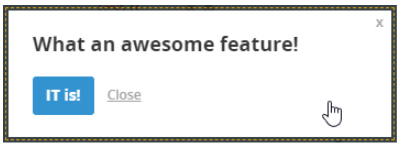
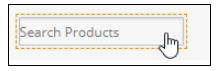
Supported WalkMe content will appear on screen with a dashed border around them to indicate they're editable and the mouse cursor will change to a hand pointer
ShoutOut example
WalkMe items, such as Invisible balloons or SmartTips, will appear with a dashed border around their captured element