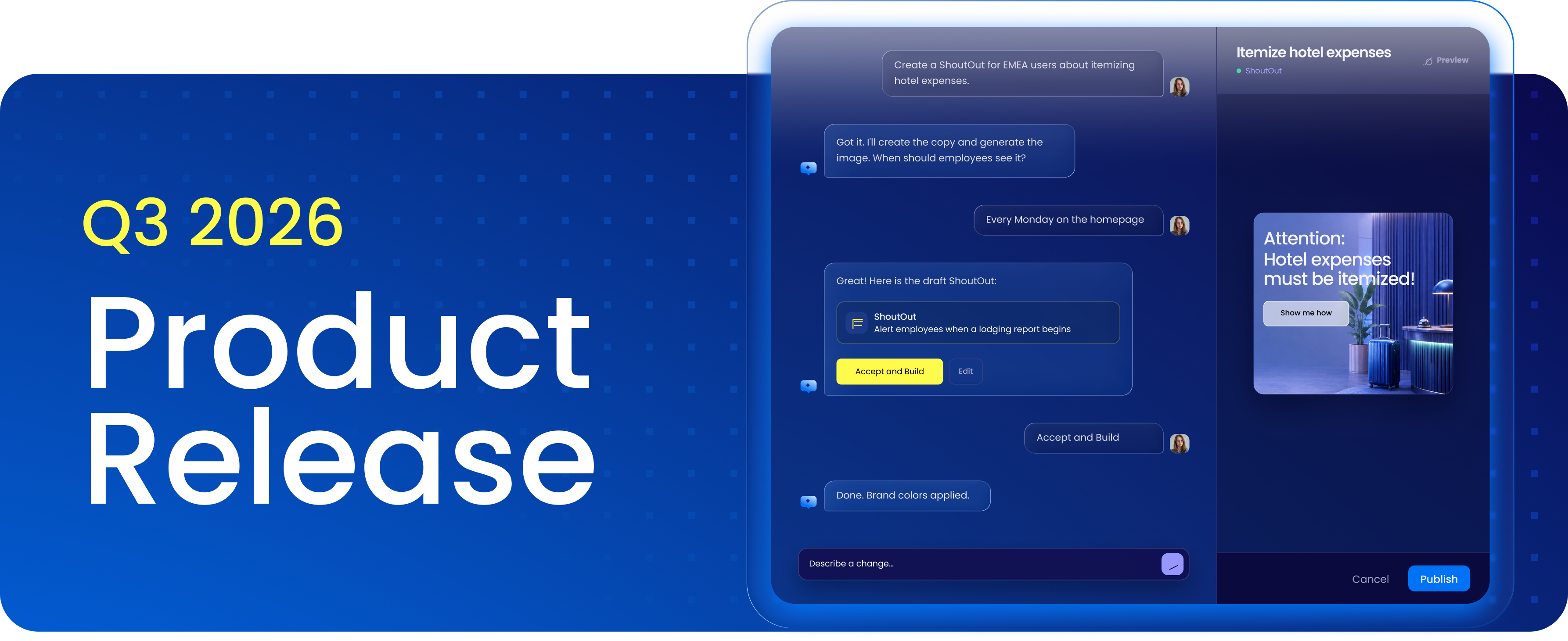
This page explains what changed in the Q3 '26 release, how each update works, and when to use it. It's written for admins, builders, and program owners who want clear, practical guidance.
All updates are available starting August 31, 2026 for US and EU data centers.
What's included in this release
This release includes updates across the full WalkMe platform. This page focuses on the following key updates:
- AI Experiences [New]: AI Authoring lets builders build and modify WalkMe content in natural language, and AI Insights brings that same natural language layer to analytics, so you can ask a question and get back a ready-to-use chart, or graph. No filtering or hunting required.
- Contextual AI Assistance: Smart Highlights becomes self-serve and reaches two new source systems, Action Bar gives builders more control over how launchers are ordered and grouped, and AI Chat can now read from SharePoint and the files people attach.
- Enterprise Digital Adoption: A redesigned Smart Walk-Thru map, version history for published content, permission-based Insights dashboards, and a new Segment Manager in console.
- WalkMe Learning Arc: AI-generated images and richer layouts for authors, a new analytics dashboard, and more interactive ways for learners to engage, including digital flashcards.
➡️ Register now for the Q3 '26 Release Webinar, September 9, 2026.
AI Experiences [New]
Q3 introduces new agentic AI Experiences across two domains: how builders create content, and how DAP managers understand their programs. Both are grounded in natural language, so using WalkMe becomes easier and more scalable.
AI Authoring
What it does
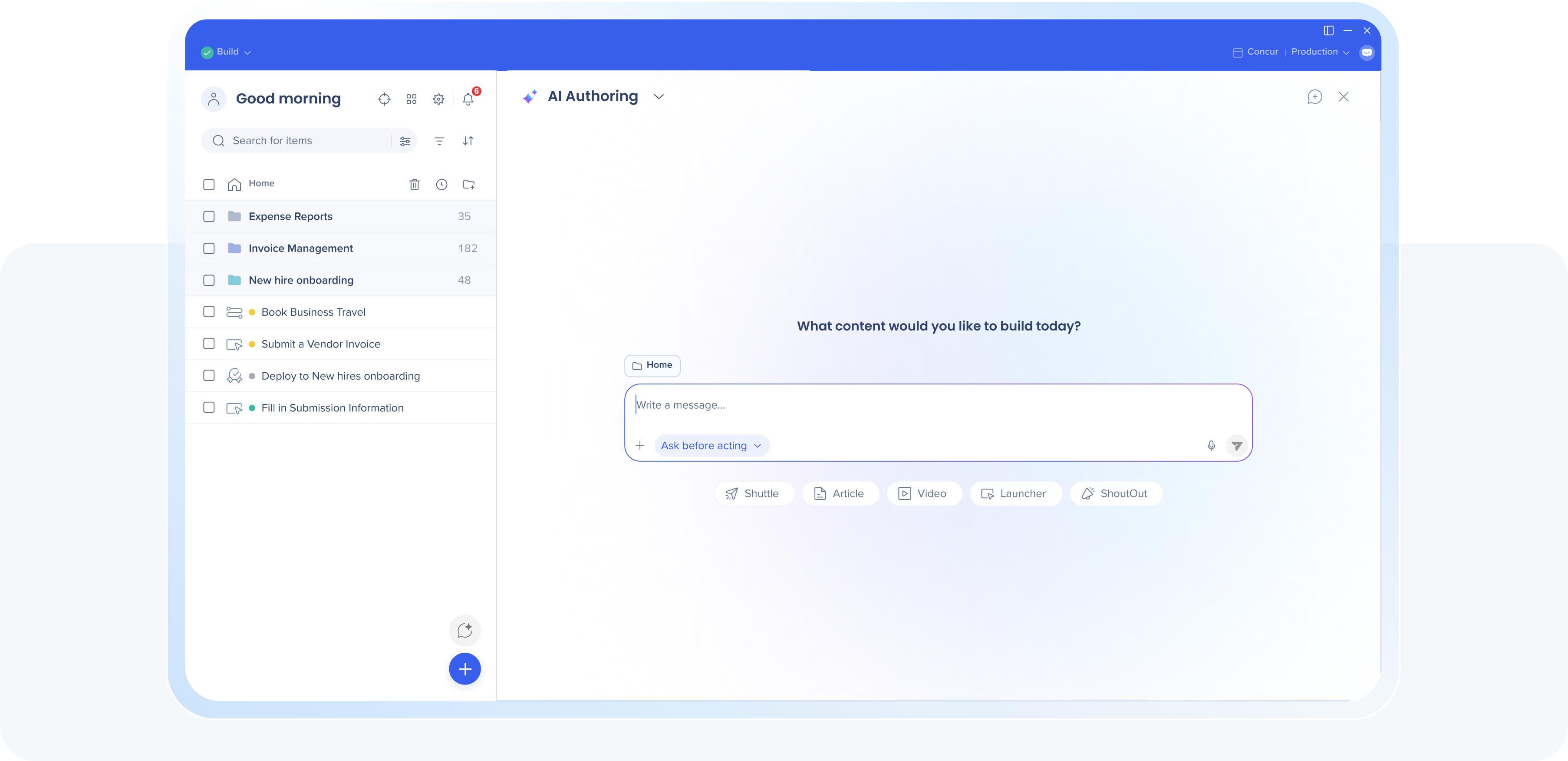
Builders can create, edit, extend, and query WalkMe content across all items using free-text prompts, including generating images, building conditions, editing CSS, and bulk edits. Project sessions let multiple people work on different parts of the same content at once, without stepping on each other, so a copywriter can edit tooltip text while a builder edits the flow logic, at the same time, without either one overwriting the other.
Notes:
- Smart Walk-Thrus, SmartTips, and element selection are not supported at this time and will be released at a future date.
- New AI experiences are available to all customers with AI Terms & Conditions in place. AI Authoring is subject to gradual rollout over the next month for eligible customers. Contact your account team with any questions.
Why it matters
Building and maintaining WalkMe content is now as simple as describing what you want. A quick fix or a full build, the AI handles it, in the same tool you already know, no new workflow to learn.
That ease flattens the learning curve, opening up building to more people across the org. And it frees existing builders to focus less on how to configure an experience and more on what it should do for the business.
Example use case
A builder needs the same launcher color updated across 12 Salesforce systems before a rebrand deadline. Instead of opening each system's editor one by one, they describe the change in a single AI Authoring prompt. The update applies everywhere it's scoped, and the builder reviews the result in minutes.
Data center availability: US | EU | SAP
➡️ Explore AI Authoring
AI Insights
What it does
AI Insights adds a natural language layer to WalkMe Insights. Ask a question about workflow performance, within or across applications, or about program ROI, and get back AI-generated graphs and filterable widgets you can save to a new or existing dashboard.
Why it matters
You get an answer on the spot, ready to share, instead of building a report from scratch. Analysis that used to take a dashboard now takes a question.
Example use case
A DAP manager needs to know why completion rates dropped on a new hire onboarding flow last month. Instead of building a report, they ask AI Insights directly: show completion rate for the onboarding flow by week for the last quarter. AI Insights returns a chart they save straight to their leadership dashboard.
Data center availability: US | EU | SAP
➡️ Explore AI Insights
Contextual AI Assistance
Q3 advances Contextual AI Assistance by reaching further into where people already work, and giving builders more control over how it shows up.
Smart Highlights: Self-configuration & customization
What it does
Admins enable and configure Smart Highlights themselves, right in the console, without waiting on WalkMe. It now pulls from two new source systems, SAP CX Sales Cloud and SAP Ariba, and admins can choose exactly which objects each source sends into a highlight.
Why it matters
Setup time drops from days to minutes, no tickets, no waiting.
Example use case
An admin wants Smart Highlights live on the sales team's Salesforce screens before a Monday QBR. Instead of filing a ticket, they configure it themselves in console that afternoon, and it's live before the meeting starts.
Data center availability: US | EU | SAP
Smart Highlights: New source and display systems
What it does
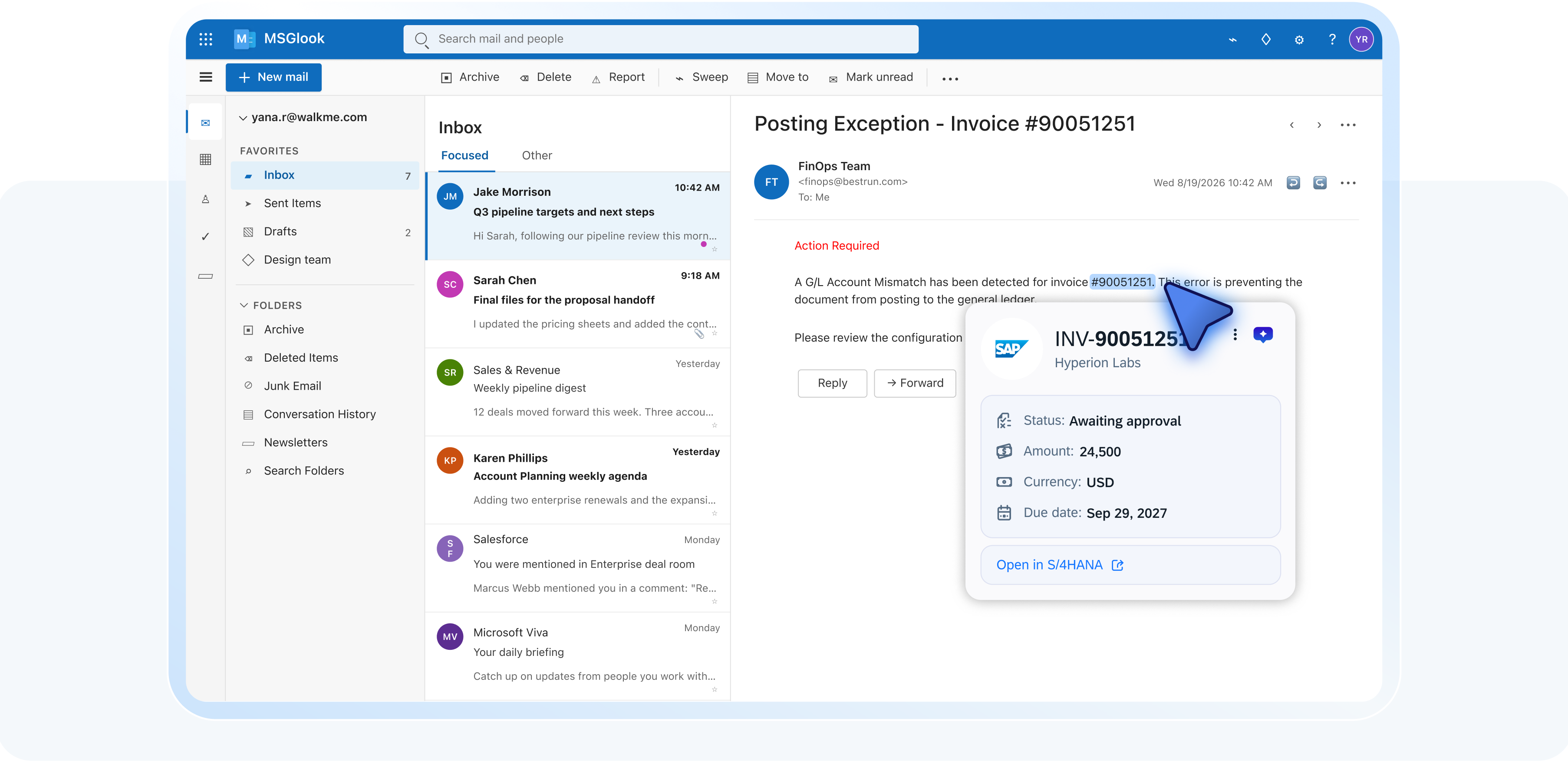
Smart Highlights can now pull record data from two additional source systems, SAP CX Sales Cloud and SAP Ariba, appearing directly on whatever screen or application the user is already working in. Smart Highlights are also now supported to display in the New Outlook for Desktop client, not just Classic Outlook.
Why it matters
Teams get the details they need from more of the systems they already use, without switching tabs or hunting through another tool, and that context shows up no matter which version of Outlook they've moved to.
Example use case
An accounts payable clerk gets an email asking about the status of a supplier invoice. Instead of logging into Ariba to look it up, a Smart Highlight surfaces the invoice status, amount, and approver right in their inbox, so they can reply with an answer in seconds.
Data center availability: US | EU | Canada | SAP
Action Bar: Launcher controls and customization
What it does
Builders can set launcher display order with drag and drop, and assign each one to a group, Suggestions or Tools. The Action Bar also inherits its icon from Pro Menu, so builders can set a custom icon once in console and it's applied everywhere.
Why it matters
Users see the right actions in the right place, in an Action Bar that feels native to your brand from day one.
Example use case
A builder's Action Bar has a dozen launchers added over several releases, and the ones people actually use are buried near the bottom. Instead of rebuilding the bar from scratch, they drag the top three to the front and move a few less-used ones from Suggestions into Tools, so end users see the right actions first.
Data center availability: US | EU | Canada | SAP
Action Bar: End-user file uploads
What it does
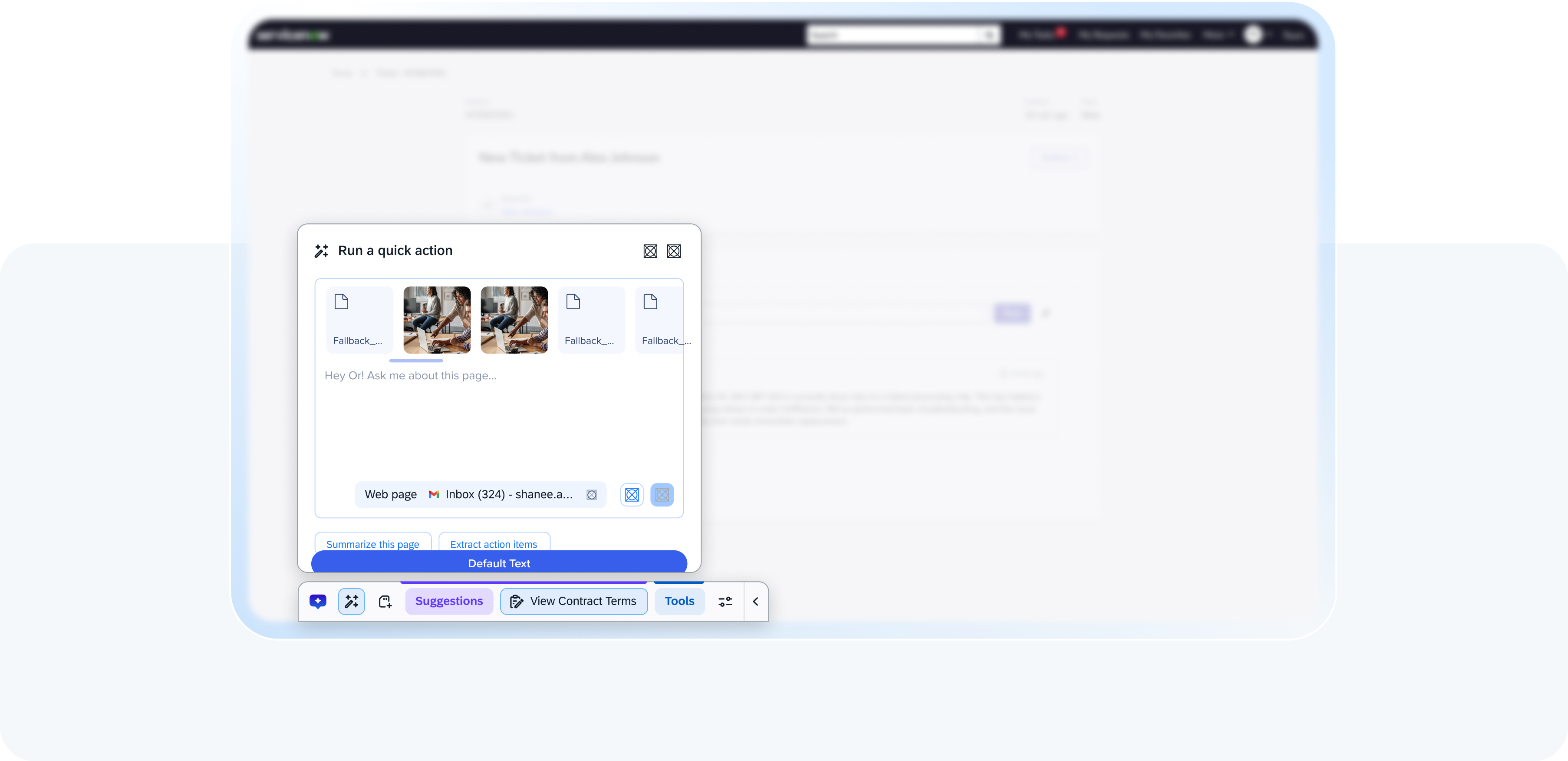
Users can upload files directly in the Action Bar and ask questions about them. Files stay available for the session, and the context carries over if the conversation continues in AI Chat.
Why it matters
People get answers about the document already in front of them, without leaving the flow of their work.
Example use case
An employee gets a contract PDF in a Slack thread and needs the termination clause explained. They upload it directly in the Action Bar and ask the question. It answers using the file, no separate app, no forwarding it to someone else to read first.
Data center availability: US | EU | SAP
Q3 also includes updates to the Action Bar (drag-and-drop launcher ordering and grouping, custom icon inheritance from Pro Menu) and AI Chat with a Sharepoint integration. See the Release Notes for full details.
➡️ Discover the latest Contextual AI Capabilities
Enterprise Digital Adoption
Q3 advances the core platform enterprise teams rely on daily, improving how DAP professionals build, publish, analyze, and manage WalkMe at scale.
Insights: Permission-based dashboards
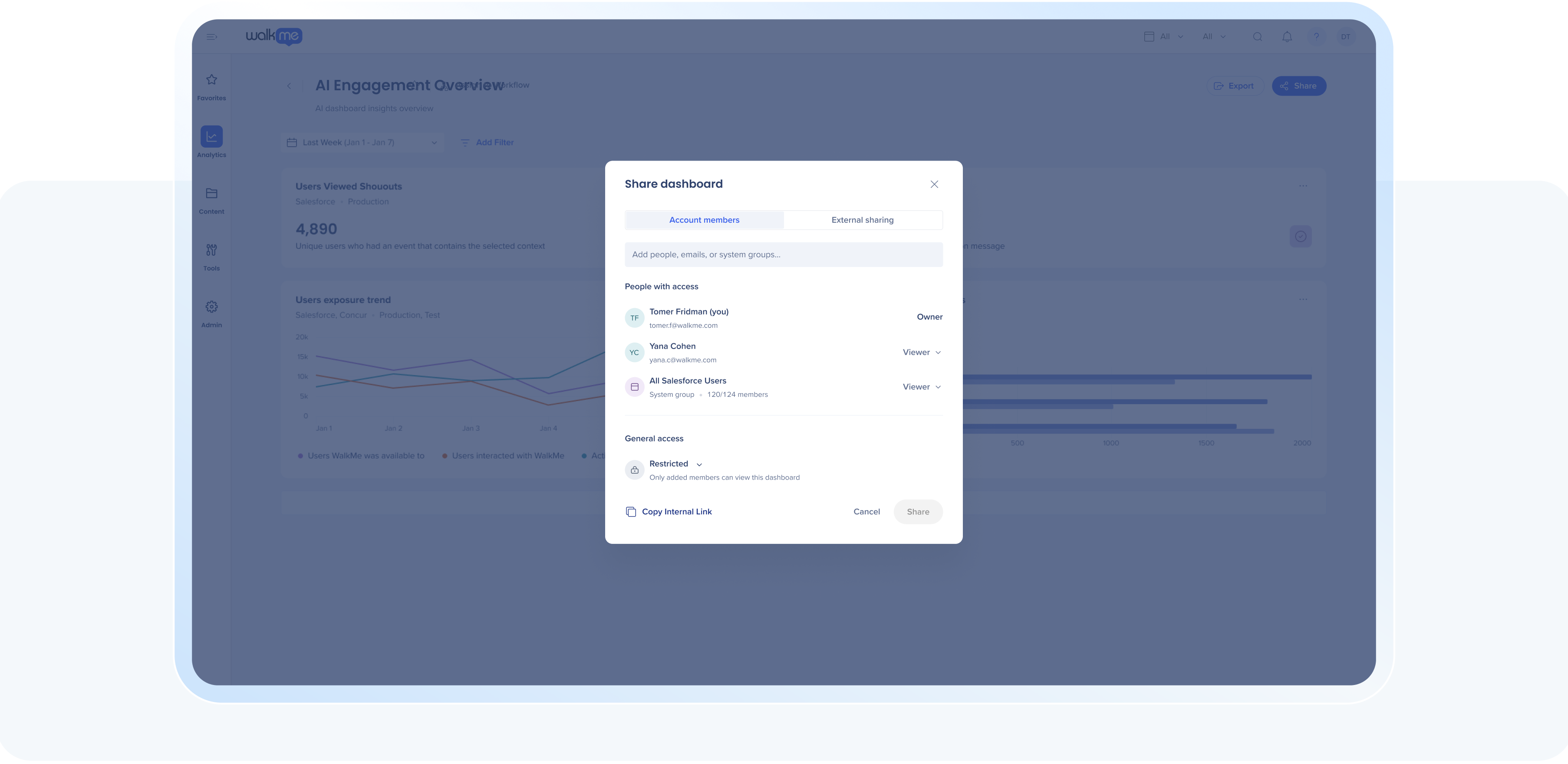
What it does
Insights dashboard access moves from account-wide to permission-based, so people only see dashboards relevant to them. Dashboards can also be shared via a secure, password-protected link with anyone without WalkMe Console access, internal or external, and admins can restrict sharing to specific domains.
Why it matters
Sensitive data stays inside the org while people who need one number, not the whole account, get exactly that. External stakeholders see results without a Console seat, and other admins stop wading through dashboards that aren't theirs.
Example use case
A Customer Success leader wants to share adoption results with an external stakeholder who doesn't have Console access. Instead of exporting screenshots or looping in IT, they generate a secure, password-protected link scoped to that one dashboard and send it directly. Meanwhile, a regional admin logging into Insights sees only the dashboards scoped to their region, not the entire account's worth of reporting.
Data center availability: US | EU | Canada | FedRAMP | SAP
Insights: Filter by editor folder and custom columns
What it does
Insights dashboards and reports can now be filtered by editor folder, and by custom columns built from Content Manager's metadata fields.
Why it matters
Sort and filter your analysis the way you already organize your content, so you can zero in on one project's performance without digging through everything else.
Example use case
A DAP program manager runs a quarterly Insights report and only needs results for the onboarding flows her team owns, not the whole account. Instead of scrolling past everything else, she filters the dashboard to her team's Editor folder and adds a custom column for content type, and gets a clean view of just her team's performance.
Data center availability: US | EU | Canada | FedRAMP | SAP
Editor: Redesigned Smart Walk-Thru map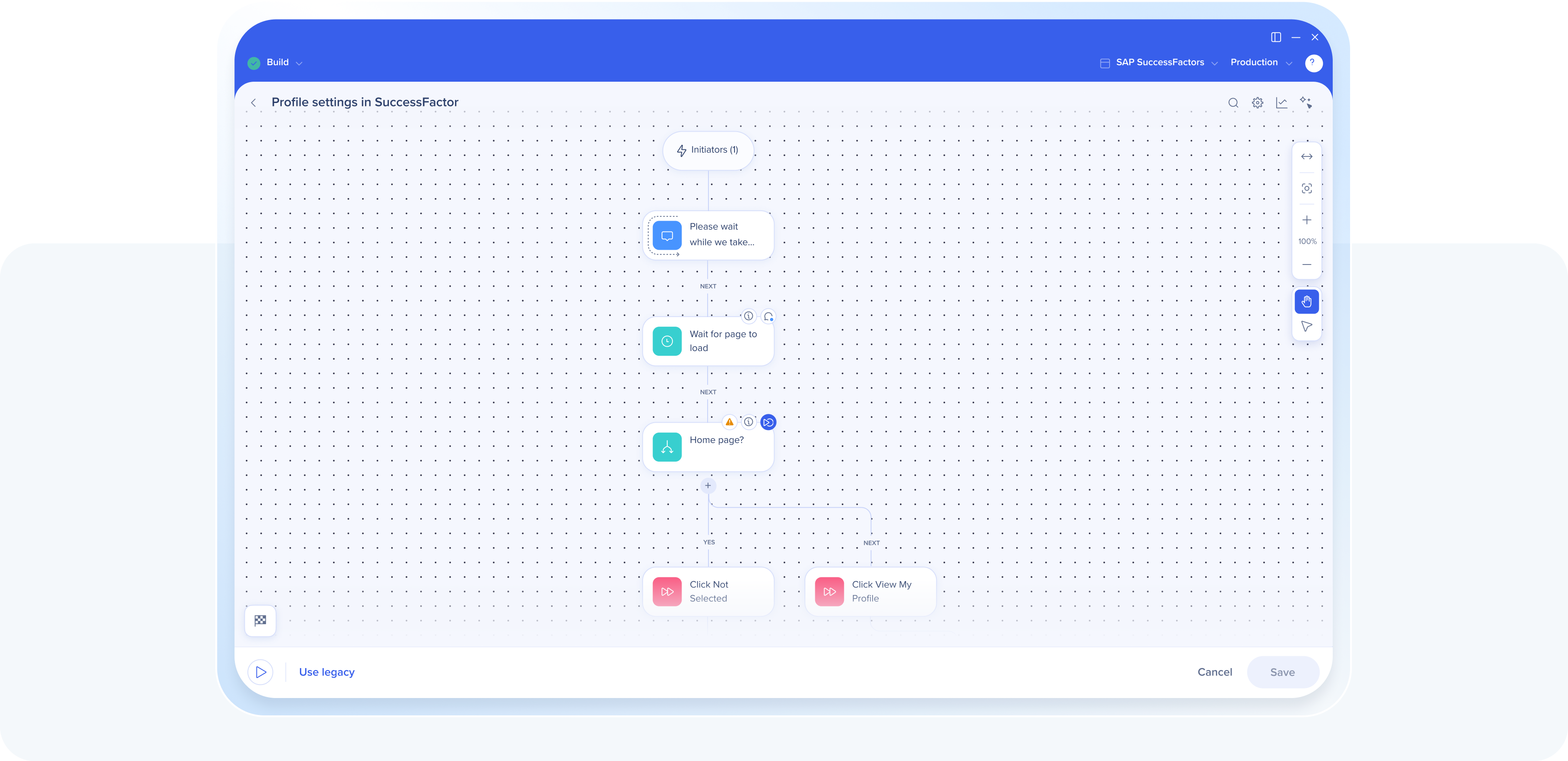
What it does
A reimagined Smart Walk-Thru map with a modern design, drag-and-drop interactions, multi-select, bulk actions, and contextual toolbars.
Why it matters
With this updated map design you have more natural control over your view of your Smart Walk-Thrus that saves you time. This way you can see the whole picture, better draft more logical steps and flows, and make edits without getting lost or missing context.
Example use case
A builder inherits a 40-step Smart Walk-Thru with no documentation. Instead of clicking through step by step, they open the new map, zoom out to see the whole structure at a glance, and multi-select a branch of steps to move into a new group in one action.
Data center availability: US | EU | Canada | FedRAMP | SAP
Editor: Publish version history and comparison
What it does
Compare WalkMe content versions side by side and restore an earlier one in a click, individually or in bulk.
Why it matters
Troubleshooting a bad publish takes minutes, not guesswork.
Example use case
A release breaks a live flow on a Friday afternoon. Instead of rebuilding it from memory, the builder opens version history, compares the last two published versions side by side, spots the change that caused it, and restores the previous version in a click.
Data center availability: US | EU | Canada | FedRAMP | SAP
➡️ Discover the latest editor capabilities
ActionBot: Redesigned UI with Theming support
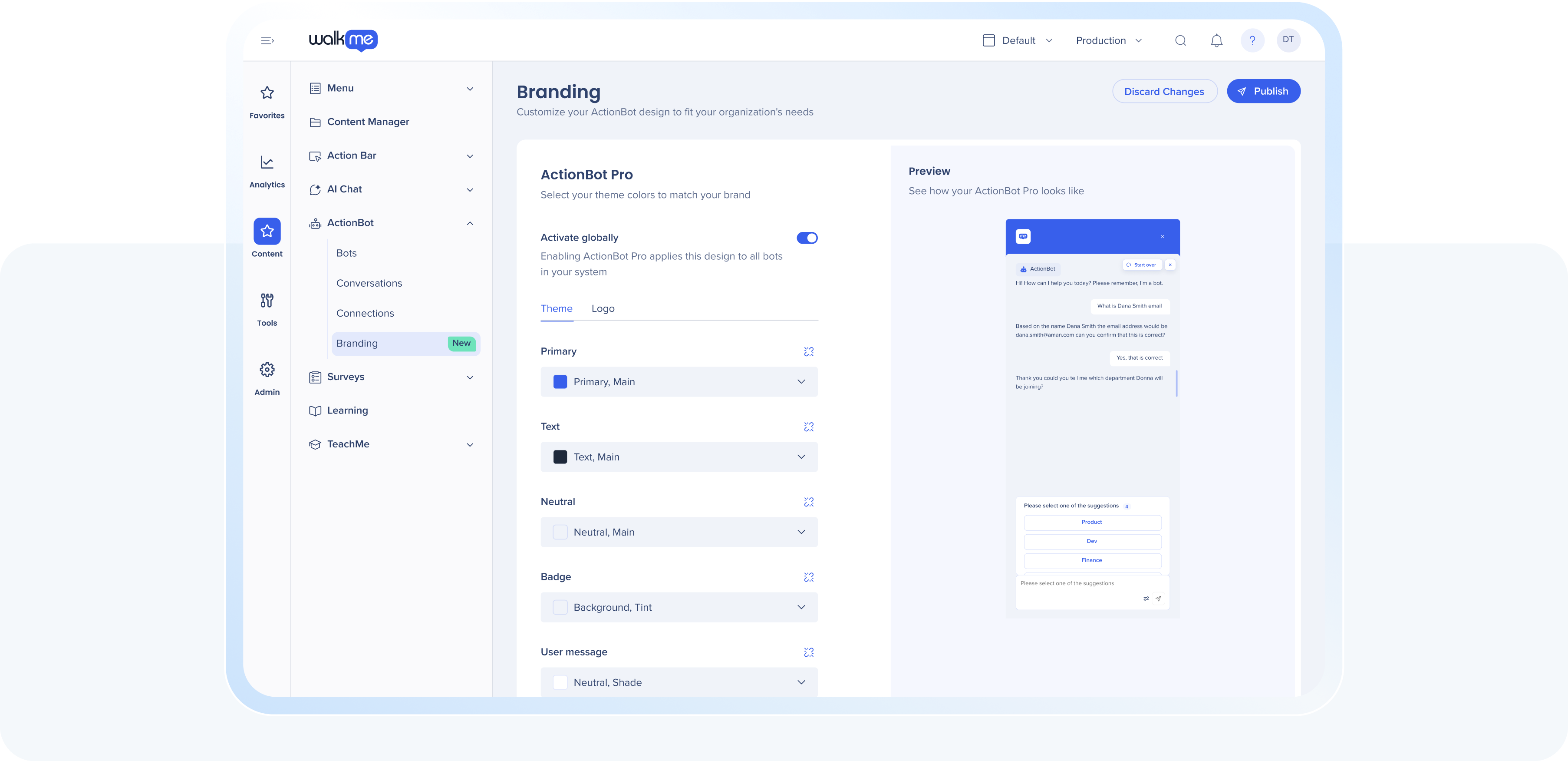
What it does
ActionBot moves from per-bot custom CSS to a single, system-level Branding page. Builders set colors once using WalkMe theme tokens, and the design applies consistently across every bot in the system.
Why it matters
Define your look once instead of rebuilding it bot by bot, and every conversation looks like you.
Example use case
An admin manages five ActionBots across different departments, each one hand-styled with its own CSS, and none of them match after a recent brand refresh. Instead of updating custom code five separate times, they set the new colors once in the Branding tab, and every bot updates to match.
Data center availability: US | EU | Canada | FedRAMP | SAP
Console: Segment Manager
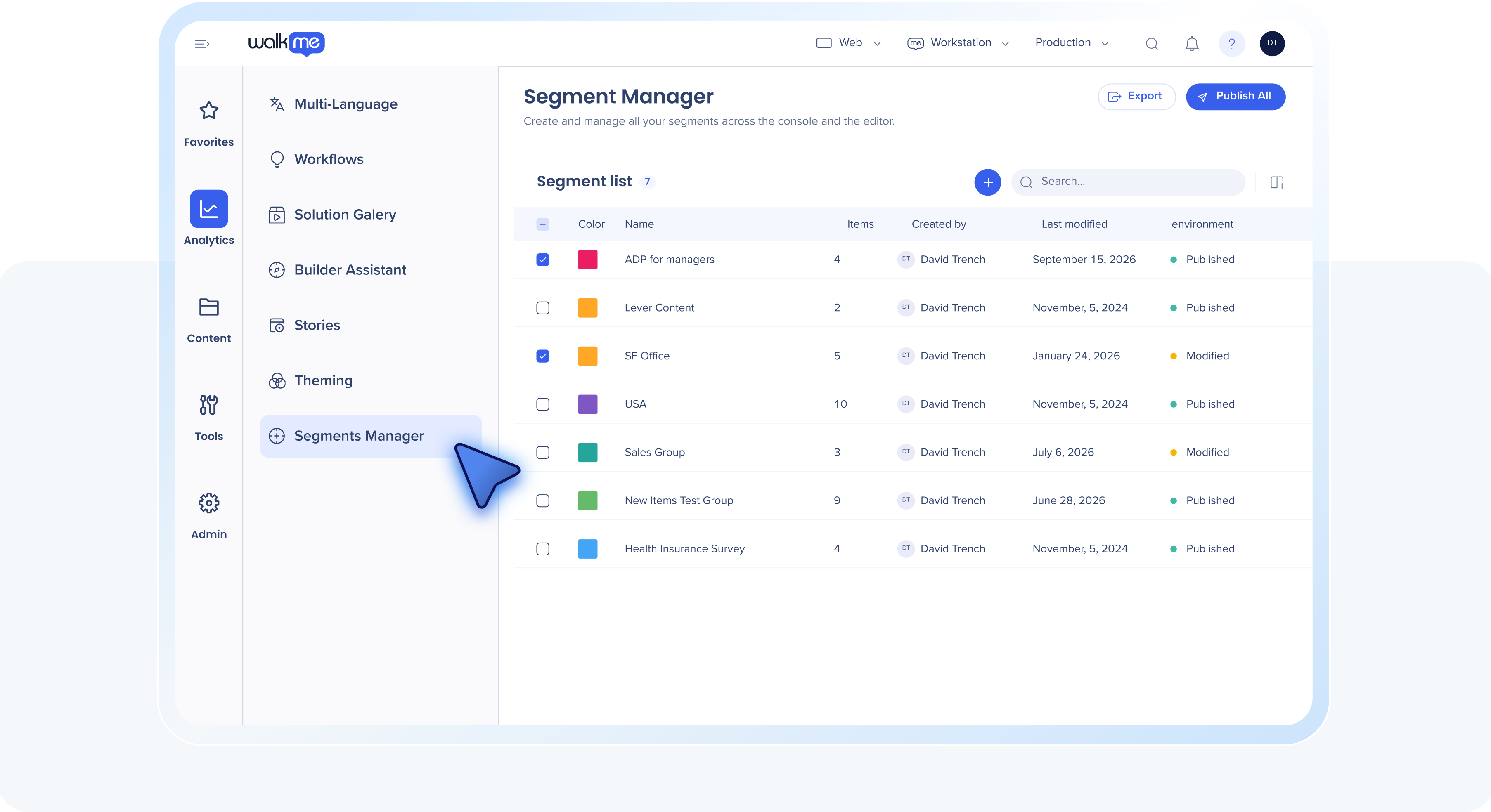
What it does
Create, edit, duplicate, and publish segments in bulk or individually, right from Console, and see each segment's status across every connected system at a glance. Export to CSV whenever you need it.
Why it matters
Segments drive who sees your guidance, so full visibility keeps adoption on target and reporting fast.
Example use case
A program owner needs to update which employees see a compliance walk-thru before a deadline. Instead of opening the Editor to track down the segment, they update and publish it directly in console, and export the list to CSV for the audit trail.
Data center availability: US | EU | Canada | FedRAMP | SAP
Q3 also includes smaller updates across Insights (folder and custom column filters, saved event visualizations, enhanced menu analytics), console (reorder Favorites, shared saved views, metadata fields as Insights filters), surveys (new question settings, player appearance controls, full-page redistribution and follow-ups), ActionBot (a system-level branding tab, V1 to V2 opt-in), WalkMe Menu (search parity with legacy web menus, Cornerstone connection for desktop), and Stories (desktop recording). See the Release Notes for full details.
➡️ See Enterprise Digital Adoption updates
WalkMe Learning Arc
WalkMe Learning Arc continues to mature this quarter. Authors get new ways to build visual content fast, learners get more interactive ways to work through it, and program owners get sharper analytics to track what's landing.
AI content creation: Images and infographics
What it does
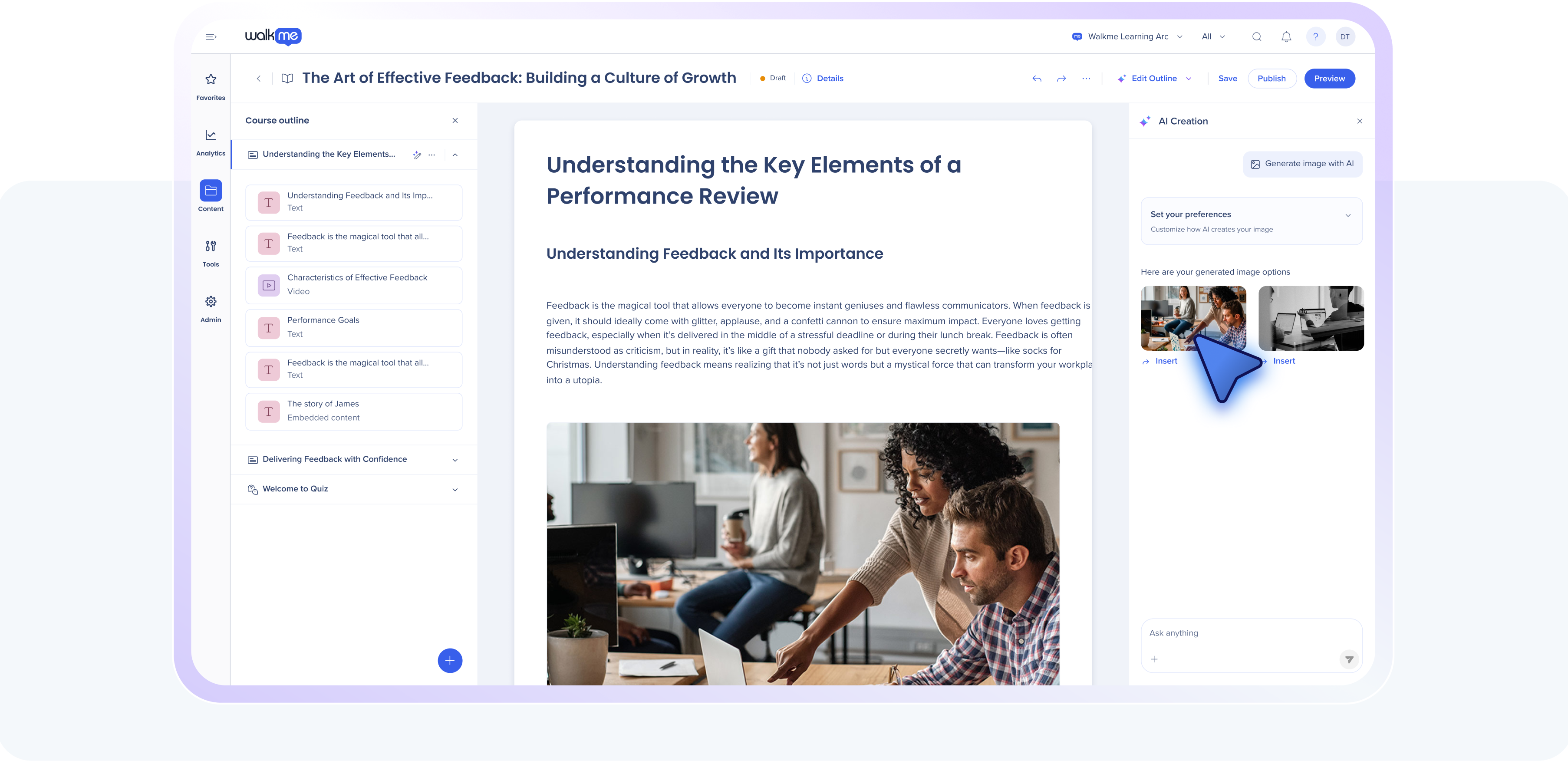
Authors can generate on-brand images directly within a lesson, choosing from style presets and refining results before inserting them. Accepted images save to a dedicated Asset Gallery folder for reuse. Authors can also turn lesson content, or a custom prompt, into a polished infographic using the same style presets.
Why it matters
You stop hunting for stock images or waiting on a design request to make a lesson look finished.
Example use case
You're building a course on the new expense approval workflow, and the only visual you have is a screenshot with 12 fields circled in red. You generate a clean infographic from that lesson's text instead, in the same style as the rest of the course, and drop it in before publishing.
Data center availability: US | EU | SAP
Learning analytics enhancements
What it does
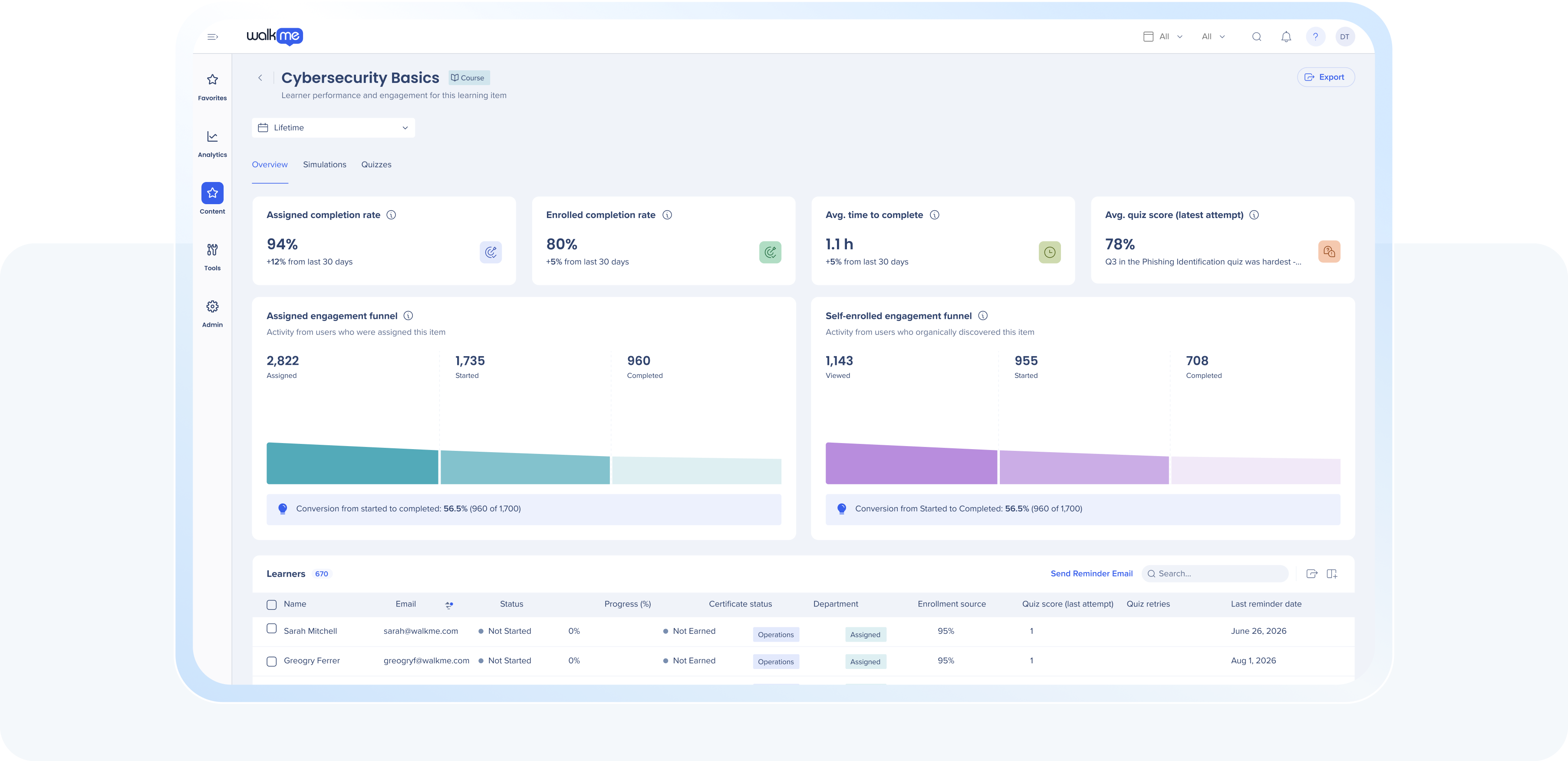
A new analytics dashboard surfaces engagement trends, compliance gaps, and content diagnostics in one place, with a global performance view and one-click reminders for learners who haven't completed assigned content.
Why it matters
You see where learning is landing across the org without piecing together multiple reports, and nudge stragglers directly from the dashboard.
Example use case
Your compliance training deadline is Friday and 200 people still haven't started. Instead of exporting a spreadsheet and emailing managers one by one, you filter the dashboard to the stragglers and send the reminder in one click.
Data center availability: US | EU | Canada | FedRAMP | SAP
Interactive elements: Flash cards, image hotspots, and accordions
What it does
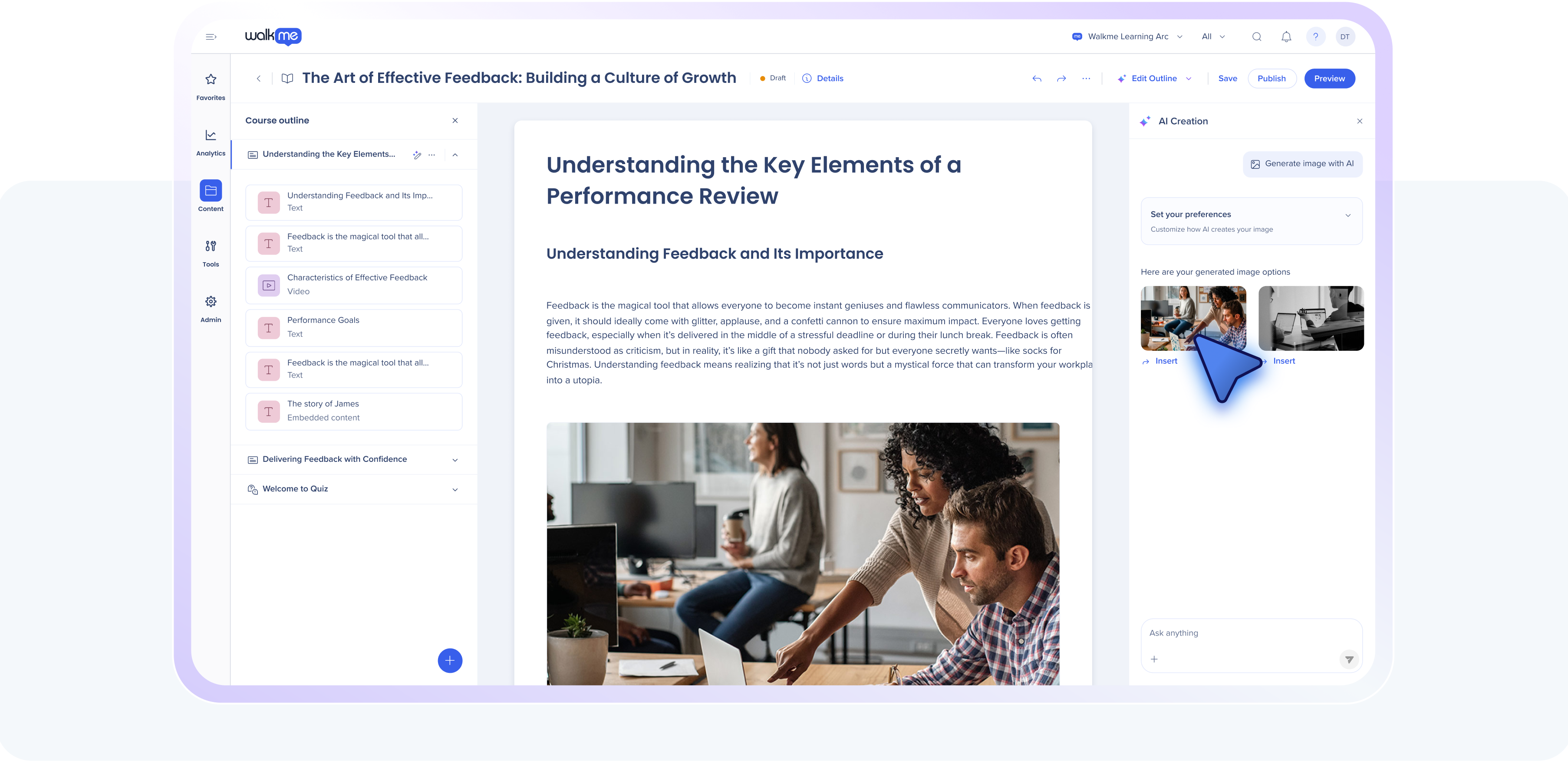
New ways to work through content: swipeable summary cards and flashcards, clickable hotspots on images that reveal extra detail, and collapsible accordion sections for pacing through longer content. All three can be authored manually or generated automatically by AI.
Why it matters
Learners work through bite-sized, flexible blocks instead of scrolling past a wall of text, built manually or drafted instantly with AI.
Example use case
You're building a product training course, and the middle section is a wall of text on edge cases. You break it into an accordion so people expand only the case that applies to them, and add a flash card set at the end so they test themselves before moving on.
Data center availability: US | EU | Canada* | FedRAMP* | SAP
*Excludes generative AI capabilities
Pre-assessments
What it does
Courses can open with a prior knowledge assessment to determine what a learner has already mastered, so they aren't required to review that content again.
Why it matters
Respect learners' time by focusing them on what they actually need to learn.
Example use case
A new hire is assigned an onboarding course covering a tool they used at their last job. Instead of clicking through modules they already know, they take the pre-assessment up front, tests out of the sections they've mastered, and lands directly on the parts of the course that are actually new to them.
Data center availability: US | EU | Canada | FedRAMP | SAP
Simulations: Mandatory completion and richer authoring
What it does
Simulations can now be set as mandatory for course completion, blocking progress until a learner finishes it. Builders also get more control over annotations (mode-specific balloons, a Next button, freestanding callouts), a blur tool with click, drag, or Smart Blur auto-detection for sensitive fields, and AI-powered step narration.
Why it matters
Learners prove they can do the task, not just read about it, and the simulation itself sounds and looks more like the real thing, sensitive data included.
Example use case
You're rolling out a new finance system and can't afford errors in production. You build the simulation with Smart Blur over account numbers, set it as mandatory before the course counts as complete, and nobody gets system access until they've actually run through the process correctly.
Data center availability: US | EU | Canada | FedRAMP | SAP
Q3 also includes content locking to prevent two authors editing the same course at once, enhanced segmentation based on file upload, and more control for folder permissions. See the Release Notes for full details.
➡️ Start creating learning content
Register for the Q3 '26 Release Webinar
September 9, 2026
Join WalkMe product leaders for a guided walkthrough of the Q3 '26 Release. You'll see live examples, real demos, and understand how these new capabilities support adoption and learning at scale.
➡️ Register now
Looking for more detail?
All product updates will be available starting August 31, 2026. Rest assured, your current implementation will remain unaffected by the updates until you publish again.
For a complete list of updates, including minor enhancements, fixes, and every item mentioned briefly above, visit our Release Notes and filter by your Data Center to view details specific to your environment.
 Data center rollout order
- US and EU: August 31, 2026
- FedRAMP: September 7, 2026
- SAP: September 28, 2026
- Canada: October 5, 2026
Let's stay connected
 Join the WalkMe Community: Learn from and collaborate with other DAP professionals
 Subscribe to Release Notes: Stay up to date on new features, improvements, and fixes
Issues with receiving new updates?
For customers that run WalkMe on their local servers, reach out to your Customer Success Manager or WalkMe contact to learn how you can gain access to these new features.


