WalkMe ended support for editor versions earlier than 5.0.0 on December 31, 2025. On version 5.0.0 or later, updates install automatically. Learn more
Brief Overview
The WalkMe Editor is an Electron-based desktop app for building, managing, and publishing WalkMe content, like Smart Walk-Thrus and ShoutOuts. It runs on Windows and macOS and updates automatically.
To build, you need the editor and the editor extension. The extension connects your browser to the editor so you can select elements on your site. This article explains how to choose an installer, install the editor, and add the extension.
Note
You may need administrator privileges on your computer to install the editor.
Access
Download the editor installer from the page for your data center:
Each installer is built for a different environment. Choose the one that fits how your organization deploys software:
Operating system
Installer
Best for
Notes
Installation path
Windows
User (EXE)
Individual users
The editor opens automatically.
%localappdata%
Windows
System (MSI)
Mass deployment
The editor opens after the computer restarts.
%localappdata%
Windows
Machine (MSI)
Citrix, Windows Server, and other virtual desktop infrastructure. Install server-side only
This MSI should be installed on server-side only.
Auto-update is off by default. The editor opens after the computer restarts.
<system drive>\Program Files\
macOS
Intel (PKG)
Macs with Intel processors
/Users/Shared/walkme
macOS
M series (PKG)
Macs with Apple M-series processors
/Users/Shared/walkme
Note
Installers don't replace each other. For example, installing the System MSI doesn't remove an existing User EXE installation. Uninstall any previous Editor version before you install a different installer.
Install the Editor
How you install the editor depends on your organization's IT setup.
Install on a single computer
Any user with administrator permissions can run the installer and follow the installation wizard.
Deploy across your organization
Your IT department can distribute the editor to builders' computers with mobile device management software. After deployment, the editor is available on each builder's desktop.
Turn on auto-update for the Machine installer
Auto-update is off by default for the Machine MSI. To turn it on, install with this command:
The editor extension connects your browser to the editor so you can select elements on your site as you build. Install it after you install the editor.
Install from the login popup
The first time you log into the editor, a popup helps you install the extension:
Open the WalkMe Editor
Log into the editor - A popup appears
Choose your browser
Select Add Extension - The extension download page opens in your browser
In your browser, select Add Extension
If your browser asks you to confirm, select Add Extension again
Install from settings
If the popup doesn't appear:
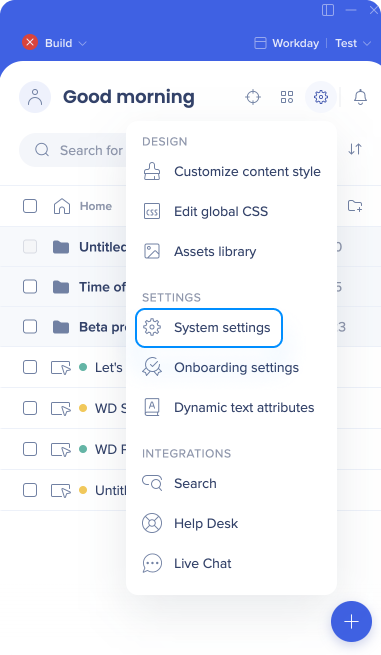
Select Settings, then System settings
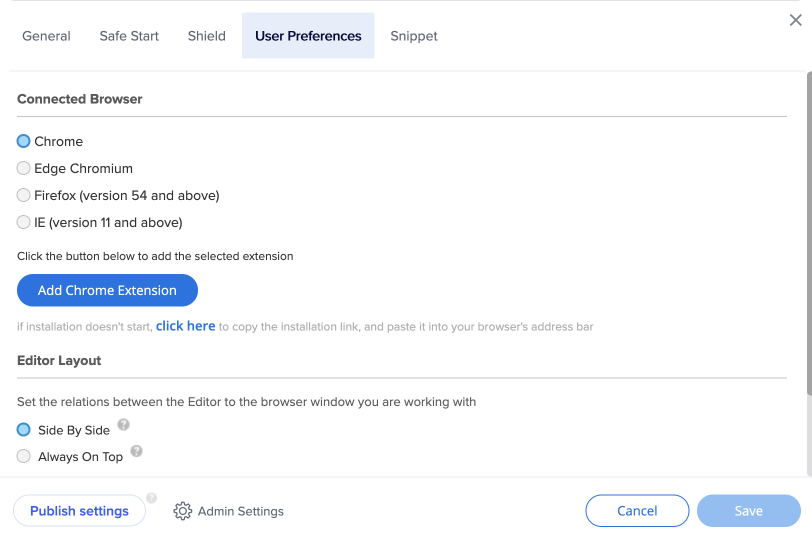
In the User Preferences tab, choose your browser and select Add Extension
In your browser, select Add Extension
If your browser asks you to confirm, select Add Extension again
Note
To see published WalkMe content on your site while you work, turn on Published mode in the editor.
The Editor is available in English, Japanese, French, Spanish, Brazilian Portuguese, and German
On version 5.0.0 or later, the editor checks for, downloads, and installs updates automatically. If you're on a version earlier than 5.0.0, uninstall it before you install the current version
If you have trouble with any of the steps in this article please refer to our troubleshooting article, or contact WalkMe Support