Your digital adoption content doesn't have to be conventional. In fact, some of the most effective ways to reinforce user behavior involve stepping away from traditional, rigid methods and leaning into a bit of playfulness. By building an in-product scavenger hunt, you can gamify the learning process and transform what might feel like a "mandatory task" into an engaging adventure. This approach helps you identify key friction points and streamline user workflows while keeping your employees or customers genuinely entertained. No matter who your audience is, a well-designed hunt proves that driving digital efficiency can actually be fun.
What is a digital scavenger hunt?
Think of a digital scavenger hunt just like the in-person version, but instead of hiding objects around a room, you're hiding clickable elements throughout your system for users to discover. By mixing digital adoption with gamification, a digital scavenger hunt can transform your digital initiatives into delightful user experiences.

A digital scavenger hunt built with WalkMe might include some or all of these elements:
- ShoutOuts announcing the scavenger hunt to users
- Themed Launchers that act as the hidden “objects”
- Smart Walk-Thrus and ShoutOuts that initiate upon Launcher click or after users have completed a specific action
- WalkMe Data to track users' progress in the hunt in real time
We asked DAP pros for their digital scavenger hunt best practices. Here are some real-world examples of WalkMe customers creating their own hunts:
Anushka Doshi, Digital Adoption Experience Associate at ServiceNow and DemoJam 2025 winner
ServiceNow had recently implemented a new internal network platform, as well as new integrated pages with their homegrown system. In order to drive adoption, Anushka created a golden ticket hunt spanning both systems, and participants who found every hidden golden ticket were entered into a prize drawing. Read more about the golden ticket hunt and see it in action here.
Laura Dean, Digital Adoption and Training Lead at TUI and WalkMe MVP
TUI was in the process of rolling out a new HR system to 15,000 employees. Due to resource constraints, Laura couldn't use her typical “train the trainer” onboarding method. Additionally, some HR data had not been migrated from the old system, so there was a great need for employees to update their profiles. Laura turned to digital adoption, using a treasure hunt to onboard employees and ensure their profiles were complete. Read more about the TUI People Quest and see it in action here.
Lizzie Willisson, WalkMe Implementation Manager at Flight Centre Travel Group and WalkMe MVP
Flight Centre's in-house booking engine allows travel consultants to easily build client-ready experiences. In order to reinforce key booking practices and promote new features, Lizzie created an Easter-egg-themed scavenger hunt to reward consultants for following best practices. As users found Easter eggs, they earned entries into a prize drawing. The hunt was so effective with almost 150,000 entries that Lizzie has built similar experiences for other initiatives and seasons, including both a candy cane and Valentine's Day hunt.
Define your goals
To create an effective scavenger hunt, start by defining the outcomes you want to drive. Delighting your users should absolutely be one of your goals, but don't forget to map your scavenger hunt to business objectives as well.
If your end users are employees:
- Change management: When you're rolling out new software or processes to employees, a scavenger hunt can help users get up to speed faster, as well as reduce the volume of tickets related to the change.
- Compliance: Identify error-prone processes that require frequent, time-intensive rework, and use your scavenger hunt to proactively address common mistakes.
- Employee onboarding: Introduce new hires to key systems and processes with a scavenger hunt, while also improving their time-to-proficiency.
If your end users are customers:
- Feature adoption: Use a scavenger hunt to introduce users to new functionalities, as well as to improve adoption of your stickiest features.
- Events: Promote an upcoming event to increase registration, or use a scavenger hunt in tandem with the event itself to create an interactive experience.
“Always tie this to a clear business outcome. Create an experience that is fun and interactive while delivering measurable value.” - Anushka Doshi, ServiceNow
Since the golden ticket hunt had to cover both the new internal network platform and the new integrated pages, Anushka teamed up with stakeholders from both systems. Together, they pinpointed exactly what they wanted to highlight and where to place the tickets. This helped make sure the hunt pointed everyone toward the most important information.
Map out the flow
Before you start building, map out exactly how your scavenger hunt will flow from start to finish. Taking a moment to plan helps you envision the full experience before you dive into the WalkMe Editor. Keep reading for a few helpful points to consider in order to make your hunt a success.
How will users first learn about the scavenger hunt?
Think about what your entry point(s) will be, and consider kicking off the hunt with a ShoutOut or clearly-visible Launcher that piques users' interest.
How will users track their progress?
Incorporate some kind of “home base” for users to refer back to while the hunt is live. This could be as simple as a forum post where users can swap notes on the scavenger hunt, or it could be as sophisticated as a piece of WalkMe content that dynamically displays the user's progress as they go.
At Flight Centre, scavenger hunts were announced in the company's internal social community, and Lizzie saw participants commenting on the announcement to share tips with one another. Users could also track their progress by viewing a persistent ShoutOut that updated every time they found a new item.
Does the order of the steps matter, or can users complete it in any order?
If the order matters, try mapping out a linear experience that guides users through each step. If the order doesn't matter, consider creating a more open-ended experience that encourages users to explore on their own. Here are some examples of what the experience might look like:
Guided hunt
Think of this as a hunt with a very clear path, where your WalkMe guidance uses clear clues and direct links to lead users from one spot to the next. If this were a physical hunt, you'd basically be saying, “Look in these bushes, this flowerpot, and under that tree.”
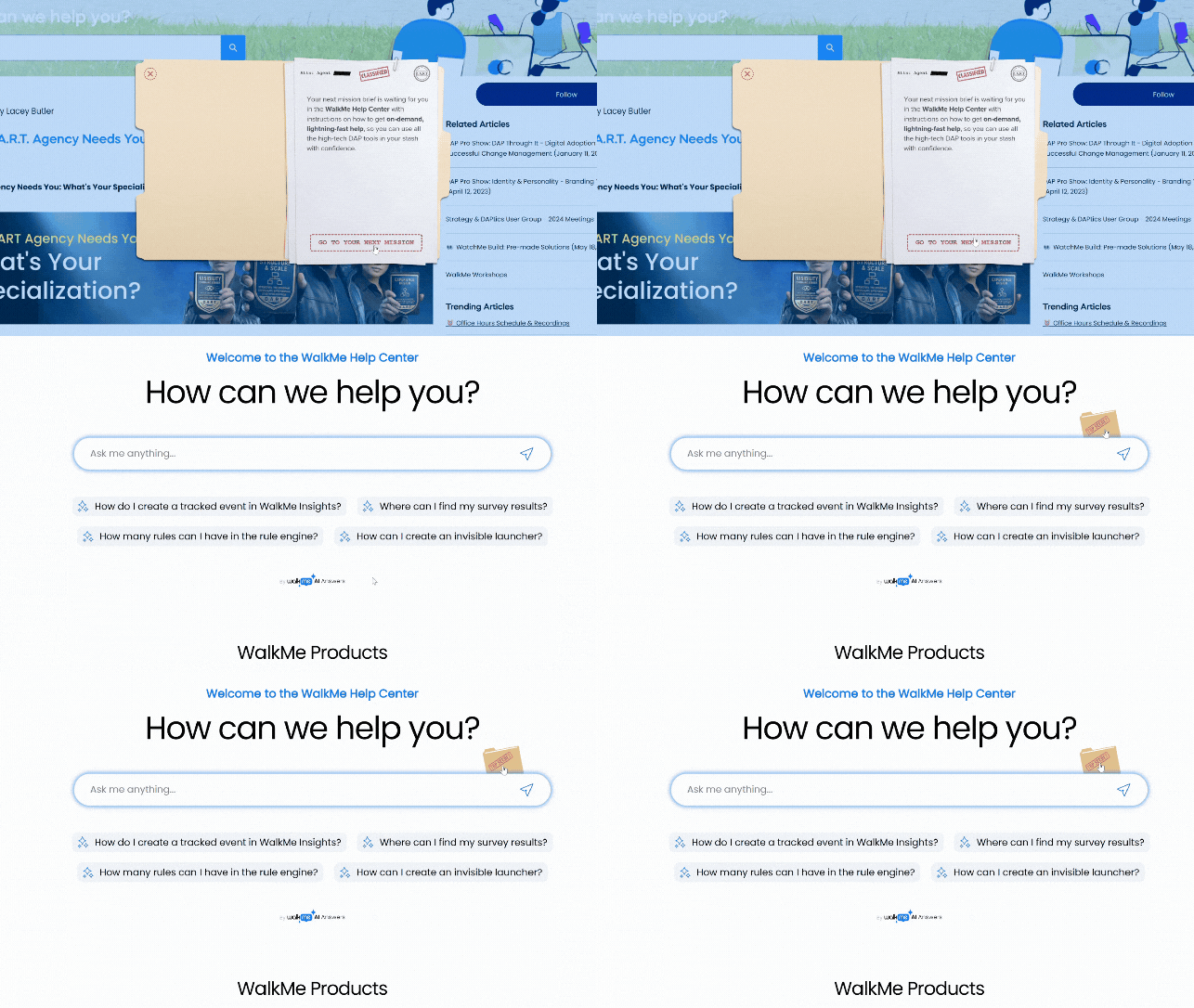
- Why we like it: It's the easiest and fastest version to build, because there's one happy path to the finish line. And since it follows a linear path, you're likely to see a higher percentage of users completing the full hunt.
- Things to consider: Because it's so guided, you're more or less "giving a man a fish" instead of "teaching him how to fish.” If you want users to learn how to navigate an app on their own, this style won't really help them build those habits.
“True” hunt
This is your classic treasure hunt where users browse around to find Launchers hidden across different pages. Instead of leading users around, you're effectively telling them, “There are five hidden items on this site – go find them!”
- Why we like it: This design gets people exploring and helps them become more self-sufficient.
- Things to consider: A "true" hunt takes a little more prep work. Since users can find items in any order, you'll need to use the condition builder and WalkMe data to track their progress in real time. That way, you can let them know whether they've finished the hunt or need to keep going.
Task-oriented hunt
In this version, users have to actually complete a specific action to "collect" an item, rather than just finding and clicking on a Launcher. It's like those in-person hunts where the instructions say, “Take a selfie with a dog, take a picture of a red car, and get a picture with a stranger in front of a local landmark.”
- Why we like it: This is the best way to reinforce great habits, like filling out a form field correctly. It's a huge help in cutting down on errors and rework.
- Things to consider: Since you aren't using visible Launchers here, you'll want to double-check that your appearance conditions work perfectly. Make sure your instructions are super clear, like "update your profile to unlock an item,” so users don't get frustrated clicking around aimlessly.
“Keep it smaller to keep it focused.” Lizzie Willisson, Flight Centre.
Lizzie kept things focused by building her seasonal scavenger hunts right into consultants' regular workflows. For example, when a consultant filled out the "Reason for travel" field during a booking, they'd unlock an entry for the prize drawing. This streamlined approach was a great way to reinforce best practices without slowing anyone down.
Make the experience fun!
The key to building a scavenger hunt that people actually enjoy is by focusing on the fun factor. You can really draw users in by gamifying the experience and giving the whole project its own unique look and feel. It's a simple way to drive your in-product outcomes in a fun, engaging way.
Gamify your hunt
There are plenty of ways to gamify your scavenger hunt and drum up excitement. If you have the budget, you could offer a real prize like company swag, a gift card, or some other tangible perk. To select your winner(s), use Insights Reports to see who finished the hunt, then choose someone at random or see who was the fastest. If you go this route, make sure your users know the deadline so they can complete the hunt in time.
Flight Centre and ServiceNow did a random drawing for prizes and saw considerable engagement. Flight Centre's first scavenger hunt saw nearly 150,000 entries, so Insights was essential for the prize drawing.
If you do not have a budget for big prizes, try offering an instant-delivery incentive on your final success message, like a discount code, early-bird event registration, or a digital badge for their user profile. Putting the reward right in the flow gives participants instant gratification, and it saves you the trouble of having to pick and contact winners later on.
Create a “brand” for the experience
Giving your scavenger hunt its own look and feel is a great way to make it stand out. It helps your users instantly recognize which content belongs to the game versus their regular daily workflows. Plus, creating a unique brand lets you use playful, whimsical elements that might otherwise not be part of your brand kit. Here are some ideas for making your scavenger hunt stand out:
Create a mascot to be the friendly face of your scavenger hunt and use a fun theme to match its personality. For example, if you pick a frog for your mascot, you could have users hunt for hidden lily pads while the frog cheers them on with puns like "leap to new heights" or "get a jump start.” This keeps the vibe light and helps your guidance feel way more approachable than typical guidance.
If your hunt coincides with a seasonal event, use related imagery like pumpkins in October, hearts for Valentine's day, or snowflakes in the winter. This not only helps to differentiate the scavenger hunt from your other content, but it also lets users know this is a special, limited-time event.
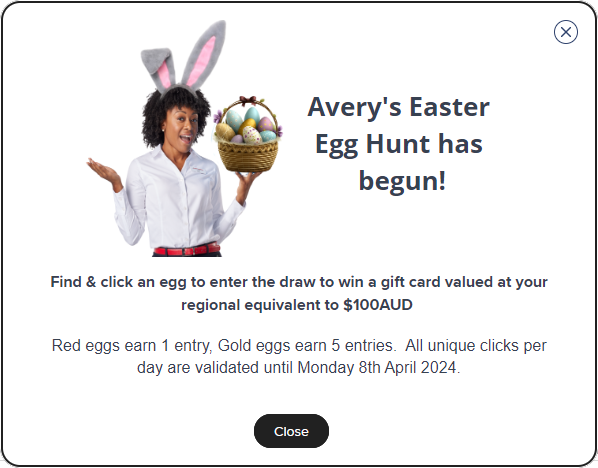
Meet Avery! Lizzie's team at Flight Centre created this friendly persona to be the face of all their digital adoption content. Avery makes things way more approachable and even kicks off Lizzie's seasonal scavenger hunts with fun, on-theme pictures. As you can see here, Avery's announcement also clearly shows the deadline so users know exactly how much time they have to earn entries for the prize drawing.
Using visual cues is a great way to show users their progress as they move through the hunt. Instead of a standard progress bar, you could use playful imagery that changes as users advance.
At ServiceNow, whenever a user found a golden ticket, the success message included an illustration of a hand collecting a new ticket. Anushka used WalkMe Data to check whether that was the final ticket, and if it was, users saw a final success message where the hand was holding all five tickets.
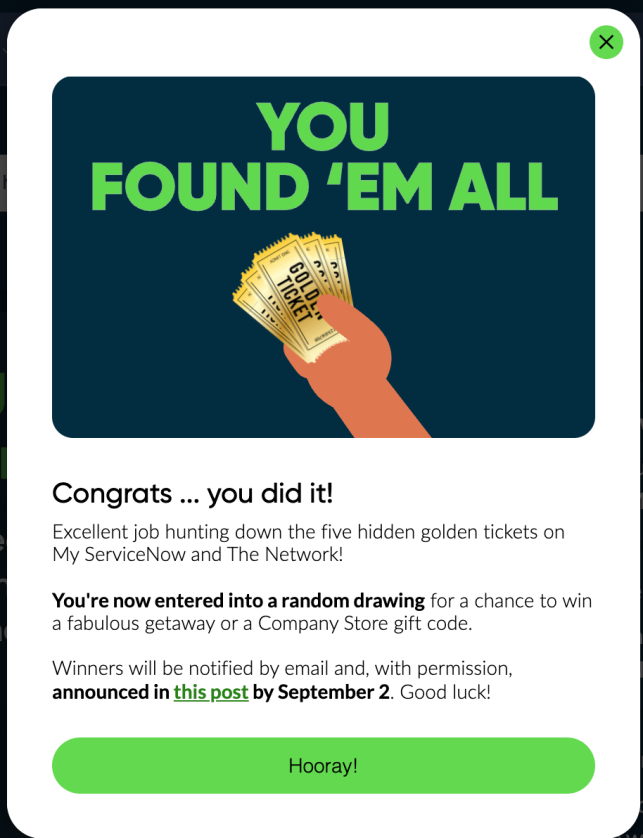
All that said, be sure your scavenger hunt doesn't look too disconnected from your regular branding, or else users might hesitate to engage with it.
“What I've learned is that people don't press things in WalkMe unless it looks like TUI. So I wanted to make sure the design looked like us, so users knew it was safe to press.” - Laura Dean, TUI
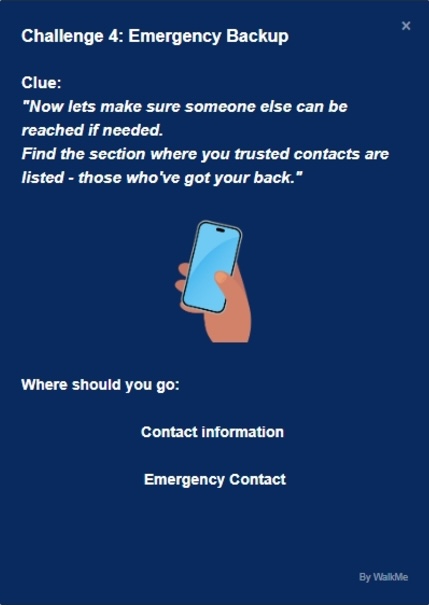
Laura kept her scavenger hunt visually aligned to TUI's brand, while also adding fun elements like riddles and quizzes to the steps themselves. And here's a time-saving tip: Laura used AI to edit her microcopy and help her write riddles.
Once you've developed a brand for your scavenger hunt, here's how to put it into practice:
- Use Theming and the Assets Library to streamline content creation. Theming helps you easily apply your fonts, color schemes, and button styling to each step of the scavenger hunt, no coding required. And the Assets Library helps you easily manage and reuse images throughout the hunt.
- Use CSS to replace your Launchers with images to represent the “objects” users will seek. This is where your scavenger hunt branding shines!
- Get even more creative with CSS! Create visual interest with simple animations, 3D effects, and more! See a roundup of our favorite CSS tips and tricks here.
“Make it visually interesting with an element of surprise that makes it more engaging!” - Anushka Doshi
Anushka's scavenger hunt used Launchers styled as golden tickets. When users hovered over each ticket, there was a simple animation showing the ticket “sliding out” from behind an on-screen element. Even small touches like that can make the experience feel more fun and dynamic.
Measure your outcomes and share your success
Once your scavenger hunt is out in the world, it's time to see all your hard work pay off! Visit WalkMe Insights to get a clear, real-time look at how users are engaging with every step of the fun. You can track exactly how many people are participating and where they might be getting stuck, which helps you fine-tune the experience while it's in-flight. This is also where you'll start to see how your scavenger hunt tracks against your business goals. Here's how:
- In Insights, look at Total Interactions, Unique Users, and Goals to measure the effectiveness of your scavenger hunt, and uncover whether users complete desired actions after interacting with it.
- Use WalkMe's pre-built Engagement by Item report to view engagement metrics.
- Use Flow Analytics and Flow Comparison to see how feature engagement and conversion rates have improved after your scavenger hunt.
- When applicable, leverage UI Intelligence to track improvements in form usage, such as reduced time spent and lower error rates.
“It's really important that their profiles are correct, their emergency contact details are filled in, and their bank details are right. And it's worked really, really well.” Laura Dean, TUI
Laura's scavenger hunt helped onboard 15,000 UK-based employees to the new HR system, and it's been so successful that Laura's rolling it out to additional regions (and using WalkMe's multi-language capabilities to translate the content).
Once your hunt is officially wrapped up, it is time to celebrate your results and take a well-deserved victory lap! Check out our practical guide to showcasing your DAP wins for tips on how to create and promote your WalkMe success story.


