Get started: Download templates now
Brief Overview
Content Optimization is the second level of a comprehensive Content Management strategy, building on a strong Content Maintenance strategy.
Content Optimization utilizes the flexible and dynamic capabilities of the WalkMe product to explore various solution strategies and evaluate their outcomes.
This process necessitates regular cooperation between the delivery team and business stakeholders to analyze engagement data (e.g. from A|B testing), revisit solution strategies, and expand value narratives.
Incorporating Into Capacity Planning
Your team should aim for an equilibrium where you are spending as much time on data-driven Content Optimization, as you are on new projects.
For more on resource modeling, see Capacity Planning.
Examples of Successful Optimization
Expand Your Value Opportunity
WalkMe customers often start with targeting use-cases around Training Reduction and improving End-User Efficiency. A mature DAP strategy has diversified use-cases and value opportunity.
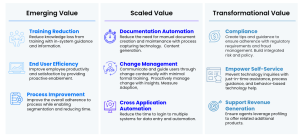
Use the 4 Pillars Framework in Download Templates & Tools below to expand your value mapping.
Pro Tip: Start with the workflows you already have live and analyze what downstream impacts you might not be considering.
For example, you built a Smart Walk-Thru and a Smart Tip set for your new Configure Price Quote (CPQ) flow. This reduces training time for your Sales users and development time of training materials. But what does it mean for your business if CPQ is not adopted?
- Elongated Cycle Time: Sales velocity slows, potential lost opportunities
- Revenue Loss: Due to incorrectly quoted prices and also could lead to loss opportunities
- Compliance Issues: If incorrect data entry leads to noncompliance with pricing regulations or internal pricing rules
Use this downstream impact lens to evaluate additional business problems and optimize your WalkMe solution.
Revisit Your Solution Strategy
The first solution you build may not always be the right one. This type of optimization uses WalkMe's agility and analytics to make data-driven decisions about different types of solutions that might have more precision in targeting your business problem.
Example Revisiting Solution Strategy Flow
Step 1: Data analysis. You build and publish Smart Walk-Thru to assist users with the Annual Benefits Enrollment workflow. Through regular Insights reviews, you understand only 40% of users are engaging with this Smart Walk-Thru, and 90% of them are dropping off at step 3 of 8.
Step 2: Stakeholder alignment. You set up a meeting with the Director of People Operations & Benefits (your original point of contact for this HRM project) to review your solution strategy.
Step 3: Adjust to new solution. You find out that steps 1 through 3 can actually be automated. You scope an adjustment of the first three Smart Walk-Thru steps from Manual Steps to Automated Steps and agree on this scope with your stakeholder.
Step 4: Ongoing stakeholder alignment. You make a plan with the Director of People Operations & Benefits to meet in 2 weeks to review the engagement data and adjust further if needed.
A|B Testing
A|B testing with WalkMe allows you to launch two solutions simultaneously and compare engagement levels. Any delay in providing a solution can affect your organization's costs or revenues - this lets you implement a solution promptly, and use data to adjust as needed. You can still use Funnels to compare with a “control group” - the group that chooses not to engage with the WalkMe content.
Example A|B Testing Flow
Step 1: Initial stakeholder alignment. Your Director of Asset Management is requesting a WalkMe solution for their Account Management workflow. During your discovery stage, they don't have a lot of information or analytics about current user behavior in the platform, but they want to get a WalkMe solution live ASAP.
Step 2: A|B Testing. You identify an IDP variable you can use to segment the user population into two groups. For Group A, you build and publish a Smart Walk-Thru with partial automation. For Group B, you build and publish a SmartTip set linking to different knowledge base resources.
Step 3: Ongoing stakeholder alignment. You make a plan with the Director of People Operations & Benefits to meet after 30 days to review the engagement data and decide which solution(s) you'll move forward with.
You set up Filters to review the engagement, as well as Funnels for each group to identify With/Without WalkMe completion rates with each solution.
Design Standardization
Creating a unified WalkMe brand improves trust and consistency of the user experience. See Content Branding & UI Design to learn more.
User Feedback
Creating a feedback loop is a great way to keep a pulse on sentiment and ensure you're addressing the right user problems.
Example User Feedback Flow
Add an In-App Solution: Add a Give Us Feedback WalkMe Launcher inside the application where your WalkMe implementation is live, linked to a WalkMe Survey. (See video below for how to do this).
Set up a Report: You set up a monthly subscription to the Survey Results report via Insights to review user responses. This is incorporated into your sprint planning meetings.
Close the Loop: When you incorporate the feedback user, you have a communication email template to acknowledge their suggestion and indicate it will be incorporated into the implementation in the next release. In the case of internally-facing applications, you may even consider publishing WalkMe release notes, in which you mention specific employees who inspired new solutions in your implementation.
Watch this Tip Tuesday video for an example of an in-product WalkMe Launcher that helps create a feedback loop.
Real-Time Recommendations
WalkMe Builder Assistant is an innovative tool that enables you to optimize your digital adoption assets and manage them at scale.
Example Builder Assistant Flow
- You are a WalkMe Builder, building a solution for the Configure Price Quote (CPQ) workflow
- As you are building, you visit the Builder Assistant Recommendations page of the WalkMe Console and are delivered 3 examples of where your build might be performance-heavy based on the types of elements you're attaching to
- You read and incorporate the recommendations.
Health Scans
A Health Scan is a point-in-time comprehensive review and assessment of your DAP solutions on a single system. This assessment includes a review and analysis of a few categories, including how impactful your solution currently is.
Tip
Never done a Health Scan before? WalkMe's Professional Services team can help by conducting your first one and educating your CoE on best practices. Reach out to your Customer Success contact for more information.
In-Product Tools for Content Optimization
The following tools in the WalkMe suite empower Builders and Project Leads to be data-driven and agile.
Builder Assistant
Using WalkMe's DeepUI technology, the Builder Assistant monitors your content and provides real-time recommendations to optimize your builds. Apply recommendations with one click - and get the most out of the DAP solutions.
UI Intelligence
UI Intelligence offers actionable user behavior analysis that drives digital transformation to meet business goals. Once data is collected, you can discover trends in form usage over time to understand the impact of changes.
UI Intelligence's Form Page is especially helpful for content optimization on any forms in your software.
AI Answers
AI Answers is a tool that facilitates easy and efficient information discovery within the flow of work. It minimizes the time and effort required to find critical information and improves the accuracy of the answers received.


